Showing posts with label pdf. Show all posts
Showing posts with label pdf. Show all posts
Sunday, April 16, 2017
Webpage ko pdf file me convert karne ke top 5 online tool
Webpage ko pdf file me convert karne ke top 5 online tool

Is post me ham janenge webpage ko pdf file me convert kaise karte hai aur webpage ko pdf file me convert ke best 5 online tools.
Yadi internet ki kisi website me hamari kaam ki koi jankari uplabdh hai aur wo hame baar-baar kaam padti hai. us jankari ko hame dobara pane ke liye baar-baar us website ko open karna padta hai. jis se hamara samay bhi barbad hota hai aur data bhi.
Lekin is post ki trick se na hi aapka samay barbaad hoga na hi data. jo webpage aapke kaam ka hai uski pdf file download karna hai aur jab bhi jaroorat ho pdf open karke aap jankari offline pa sakte hai.
Webpage ko pdf file me convert kaise karte hai
1. Jis webpage ko pdf file me convert karna hai uski link copy kare.
2. is link ko open kare- webpage2pdfconverter.com
3. box me apne webpage ki link paste kare jo hamne 1st step me copy kiya tha.

4. Convert to pdf button me click kare.

5. Convert to pdf button me click karne ke thodi der baad aapke webpage ki pdf file taiyar ho jayegi. ise download karne ke liye Download pdf button me click kare.
Finish
Top 5 webpage to pdf converter websites
1. www.webpage2pdfconverter.com
2. www.web2pdf.com
3. www.pdfonline.com
4. www.veevaweb2pdf.com
5. www.pdfcrawd.com
Webpage ko pdf me convert karne ke fayde
1. Time ki bachat hoti hai.
2. data ki bachat hoti hai.
3. file save rehti hai.
4. offline bhi use kar sakte hai.
Yadi is post se aapki thodi bhi madad hui ho to hamari madad karne ke liye hamara fb page like kare aur is post ko apne friends ke saath share kare.
Go to link download

Monday, April 10, 2017
Driver Gratis Untuk Mencetak Semua Jenis File ke PDF
Driver Gratis Untuk Mencetak Semua Jenis File ke PDF

Tapi bagaimana jika Anda ingin membuat file PDF, bukan hanya membacanya? Caranya mudah? Dan apakah perlu biaya? Jawaban berubah menjadi "sangat" dan "tidak ada".
Primo PDF, dari orang-orang di belakang pembaca Nitro PDF, adalah driver printer Windows. Menginstalnya pada PC Anda dan kemudian membuka program apapun. Buat beberapa data dan kemudian, dari menu File, pilih Print. Di samping printer normal Anda, Anda akan melihat opsi baru. Anda sekarang dapat "mencetak" ke file PDF. Yang berarti bahwa, bukannya output Anda muncul di atas kertas, Anda akan berakhir dengan file PDF yang terlihat seperti versi berbasis kertas akan memiliki.
Ini berarti bahwa Anda sekarang dapat menggunakan hampir setiap program pada PC Anda untuk membuat file PDF.
Primo PDF gratis, dan download 7 MB dari www.primopdf.com. Program ini bebas malware menurut VirusTotal dan Web of Trust.
Sumber: http://www.techsupportalert.com/
Go to link download
Wednesday, April 5, 2017
Lector Pdf Java Celulares Antiguos
Lector Pdf Java Celulares Antiguos

Google Play ID: de.offlinethesaurus
Version: 1.3
Size: 4.2Mb
Offline Thesaurus - Synonyme Screen Preview
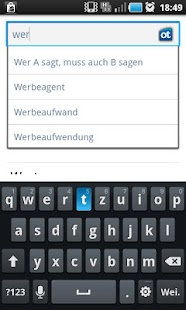
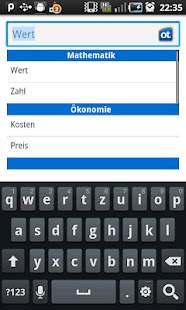
Offline Thesaurus - Synonyme Description
Offline Thesaurus bietet Ihnen eine Synonym Datenbank für Ihr Android. Es enthält die komplette Datenbank vom Projekt openthesaurus.de, somit ist keine Internetverbindung notwendig. Die Suche nach ähnlichen Begriffen erfolgt sehr schnell und wird durch eine Autocomplete Funktion unterstützt. Features: - keine Internetverbindung - sehr schnelle Suche - Autocomplete FunktionWhats new in Offline Thesaurus - Synonyme 1.3
-App lässt sich über Zurück-Button beenden, nach dem die History leer ist (v.1.3) -Querformat/Hochformat (v.1.2)Download Offline Thesaurus - Synonyme 1.3 APK
Go to link download
Sunday, March 26, 2017
OfficeSuite 8 PDF Editor Premium v9 0 6510 Mod APK
OfficeSuite 8 PDF Editor Premium v9 0 6510 Mod APK

OfficeSuite 8 + PDF Editor Premium
OfficeSuite lets you easily view, edit, and create Word, Excel, and PowerPoint documents, convert to/from PDF, and manage your files all with the most feature-rich mobile office solution available for Android smartphones and tablets.
Key Features
- View, create and edit complex office and attachments all from a familiar desktop-style interface.
- Full compatibility with Microsoft formats including DOC, DOCX, DOCM, XLS, XLSX, XLSM, PPT, PPTX, PPS, PPSX, PPTM, PPSM.
- Support for PDF files including PDF camera scanning and Export to PDF.
- Additional support for common formats like RTF, TXT, LOG, CSV, EML, ZIP; Open Office – ODT, ODS and ODP – support (available as in-app purchase).
- Preserve document formatting and layout and use advanced editing features like never before on a mobile platform.
- Integrated File Browser for quick and easy access to both local and remote files including Recent files, My Documents folders and document templates.
- Sharing via cloud services like Box, DropBox, Google Drive, OneDrive, Amazon Cloud Drive and SugarSync, as well as over email, Bluetooth, and Wi-Fi Direct.
- Available in 56 languages.
- Support for multiple keyboard shortcuts including moving of objects and selections.
Premium Features
- Format Painter in Word documents.
- Security features – work with password protected files.
- Insert pictures using your camera or from an external file.
- Additional options in Excel including Insert Filter, Conditional Formatting, Define Name, Import Image, Edit Chart, and Save as CSV.
- Edit transitions in PowerPoint slideshows.
- Compatible with Sony Ericsson LiveDock™ Multimedia station.
- com.sonyericsson.extras.ATTACHED
- Smart Connect extension for SmartBand
- YotaPhone-2 optimized
- Chromecast /dual screen support
Mod : No forced popup to install File Commander
How to Install ?
- Download the APK and install it
- You have done. Enjoy !

Screenshots

Downloads
No Force PopUp: OfficeSuite 8 + PDF Editor Premium v9.0.6510 APK (52 MB)/Link 2Lite Mod(Low Size and Faster Operation): [ARM : Link1/ Link2] [ARM64 : Link1/ Link2] [x86 : Link1/ Link2]
Go to link download
Sunday, March 19, 2017
The Web Application Hacker’s Handbook PDF 2nd Edition
The Web Application Hacker’s Handbook PDF 2nd Edition

Web applications are the front door to most organizations, exposing them to attacks that may disclose personal information, execute fraudulent transactions, or compromise ordinary users. This practical book has been completely updated and revised to discuss the latest step-by-step techniques for attacking and defending the range of ever-evolving web applications. You’ll explore the various new technologies employed in web applications that have appeared since the first edition and review the new attack techniques that have been developed, particularly in relation to the client side.
x
- Reveals how to overcome the new technologies and techniques aimed at defending web applications against attacks that have appeared since the previous edition
- Discusses new remoting frameworks, HTML5, cross-domain integration techniques, UI redress, framebusting, HTTP parameter pollution, hybrid file attacks, and more
- Features a companion web site hosted by the authors that allows readers to try out the attacks described, gives answers to the questions that are posed at the end of each chapter, and provides a summarized methodology and checklist of tasks
Focusing on the areas of web application security where things have changed in recent years, this book is the most current resource on the critical topic of discovering, exploiting, and preventing web application security flaws.
Download Now!
Go to link download
Sunday, March 5, 2017
ParanoiDF PDF Analysis Suite Password cracking redaction recovery DRM removal malicious JavaScript extraction and more
ParanoiDF PDF Analysis Suite Password cracking redaction recovery DRM removal malicious JavaScript extraction and more

The swiss army knife of PDF Analysis Tools. Based on peepdf - http://peepdf.eternal-todo.com.
Features
Interactive Console: Type "help" to get a list of commands. Type "help [command]" to get a description/usage on specific command.
- crackpw This executes Nacho Barrientos Ariass PDFCrack tool by performing an OS call. The command allows the user to input a custom dictionary, perform a benchmark or continue from a saved state file. If no custom dictionary is input, this command will attempt to brute force a password using a modifiable charset text file in directory "ParanoiDF/pdfcrack". (http://pdfcrack.sourceforge.net/)
- decrypt This uses an OS call to Jay Berkenbilts "QPDF" which decrypts the PDF document and outputs the decrypted file. This requires the user-password. (http://qpdf.sourceforge.net/)
- encrypt Encrypts an input PDF document with any password you specify. Uses 128-bit RC4 encryption.
- embedf Create a blank PDF document with an embedded file. This is for research purposes to show how files can be embedded in PDFs. This command imports Didier Stevens Make-pdf-embedded.py script as a module. (http://blog.didierstevens.com/programs/pdf-tools/)
- embedjs Similiar to "embedf", but embeds custom JavaScript file inside a new blank PDF document. If no custom JavaScript file is input, a default app.alert messagebox is embedded (http://blog.didierstevens.com/programs/pdf-tools/)
- extractJS This attempts to extract any embedded JavaScript in a PDF document. It does this by importing Blake Hartsteins Jsunpackns "pdf.py" JavaScript tool as a module, then executing it on the file. (https://code.google.com/p/jsunpack-n/)
- redact Generate a list of words that will fit inside a redaction box in a PDF document. The words (with a custom sentence) can then be parsed in a grammar parser and a custom amount can be displayed depending on their score. This command requires a tutorial to use. Please read "redactTutorial.pdf" in directory "ParanoiDF/docs".
- removeDRM Remove DRM (editing, copying etc.) restrictions from PDF document and output to a new file. This does not need the owner-password and there is a possibility the document will lose some formatting. This command works by calling Kovid Goyals Calibres "ebook-convert" tool. (http://calibre-ebook.com/)
Download ParanoiDF
Go to link download
Subscribe to:
Posts (Atom)