Showing posts with label ke. Show all posts
Showing posts with label ke. Show all posts
Sunday, April 30, 2017
Whatsapp Aapka Data Facebook Ke Sath Share Karega
Whatsapp Aapka Data Facebook Ke Sath Share Karega
Aapka log jaante honge ki whatsapp kitna popular social network hai. lagbhag sabhi android user whatsapp ka use karte hai. lekin aaj jo aap jaan ne waale hai use sunkar aap bhi jaroor pareshaan ho jayenge.
aapko bata den ki facebook ne whatsapp ko year - 2014 me khareed liya tha, lekin whatsapp ne users ki privacy ke liye kaha tha ki ham apne users ka data facebook ya other kisi site ke sath na hi share karega aur na hi bechega. lekin ab whatsapp apne waade se mukar raha hai aur whatsapp users ka data facebook ke sath share karne ki deal kar liya hai. whatsapp ke is decision se whatsapp users chinta me hai. wese whatsapp ne kaha hai ki isse users ko koi nuksaan nahi hoga balki isse user experience badhega kyoki iske dwara facebook aapke intrest ke hisaab se aapko ad dikhayega. ham is post me aapko detail se batayenge ki aapka kon kon sa data share kiya jayega, facebook aisa kyo kar raha hai aur ise kaise roka ja sakta hai. To chaliye dekhte hain -
Whatsapp Facebook Ke Sath Aapke Kis Data Ko Share Karega
Whatsapp aapka phone number aur personal data ko facebook ke sath share karega, users is se pareshaan hai lekin facebook ka kehna hai ki users ke personal data ke sath koi chhed chhaad nahi ki jayegi.
Whatsapp Users Ka Personal Data Facebook Ke Sath Share Kyo Kar Raha Hai
Aap log soch rahe honge ki aakhir whatsapp users ka personal data facebook ke saath share karne ka maksad kya hai ?
Aap log jaante hain ki whatsapp no ad policy par work karta hai, matlab aapko dusri kisi company ke ads whatsapp par show nahi hote aur whatsapp apni is policy ko barkaraar rakhna chahta hai.
Facebook ka kehna hai ki whatsapp users ke personal data ka use karke aapke intrest ka anadaza lagaya jayega aur us hisab se aapko ad dikhaye jayenge aur friend suggest kiye jayenge.
Shayad aap jante honge ki facebook ki kamai ka sabse bada hissa dusri company ke ad show karne se aata hai.
Whatsapp aur facebook ke is decision se whatsapp ki no ad policy bhi barkaraar rahegi aur facebook ki earning me bhi ijafa ho jayega.
Wese whatsapp ka kehna hai ki users ka personal data facebook ke alawa other kisi company ke sath share nahi kiya jayega aur naa hi users ke personal data ke sath koi chhed chhad ki jayegi balki is se user experience badhega.
Aapke Whatsapp Ka Personal Data Facebook Ke Sath Share Hone Se Kaise Roke
Yadi aap apne whatsapp ki privacy ko banaye rakhna chahte ho aur apna personal data facebook ke sath share nahi karne dena chahte ho to ise rok sakte ho.
Aapke paas whatsapp dwara ek message show hoga, screenshot me dekhen
Aapke paas whatsapp dwara ek message show hoga, screenshot me dekhen
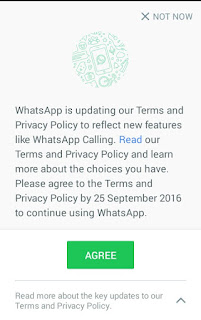
isme aapko Agree ki button show ho rahi hai lekin aap read option ko choose kare. iske baad aapko ek message show hoga share my whatsapp information with facebook , screenshot dekhen
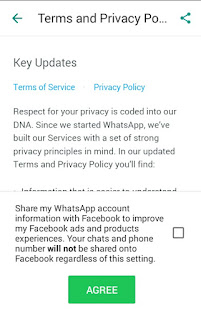
iske saamne jo box hai use uncheck karen aur agree button me click karen.
Yadi aapke saamne ye message pehle hi aa chuka hai aur aapne dhokhe se ya fir iski terms & policy bina read kiye Agree ki button daba diya hai to bhi aap ise band kar sakte hain.
whatsapp open kare aur option kholen > setting > account me jayen, ab aapko isme ek option show hoga share my account info use uncheck kar den.
Last Words
Whatsapp aur facebook dwara aisa isiliye kiya gaya hsi ki whatsapp ki no ad policy bhi barkaraar rahe aur facebook dwara aapke intrest ke hisab se aapko ad show kiye ja saken. is se aapko pareshaan hone ki jaroorat nahi hai kyoki whatsapp aur facebook aapki privacy ka poora dhyan rakhte hain aur fir whatsapp ne bhi kaha hai ki aapka data facebook ke alawa other kisi site ke sath na to share kiya jayega aur na hi becha jayega, fir bhi yadi aap apni privacy ko lekar pareshaan hain to hamare bataye hue tarike se ise band kar sakte hain.
Friends aapki is jaankari ko lekar kya raaye hai hame comment me batayen
Ye Bhi Padhen :
? Whatsapp me chats head kaise enable kare
? Whatsapp group ko bina leave kiye chat clear kaise kare
? whatsapp me color text kaise likhe
? Whatsapp ke fixedsys font ka use kare
? Whatsapp ke reply feature ka use kaise kare
? 1 phone me 2 whatsapp kaise chalaye
? 10 whatsapp tricks in hindi
? whatsapp me friend ki profile pic kaise change kare
Go to link download

Friday, April 28, 2017
Android phone ke liye top 5 internet browser
Android phone ke liye top 5 internet browser

Hindi helpz android phone ke liye top 5 best internet browsers ki list taiyar kiya hai, jinki madad se aap apne phone me fast internet browsing and downloading kar payenge.
internet slow chalne ki wajah sirf server low hona nahi hota balki browser se bhi internet ki speed me effect padta hai. inme se kuch ese browsers bhi hai jinko shayad na hi aapne kabhi khud use kiye hoge na hi kisi person ko use karte dekhe hoge, kyoki inki publicity jyada nahi hui hai.
internet slow chalne ki wajah sirf server low hona nahi hota balki browser se bhi internet ki speed me effect padta hai. inme se kuch ese browsers bhi hai jinko shayad na hi aapne kabhi khud use kiye hoge na hi kisi person ko use karte dekhe hoge, kyoki inki publicity jyada nahi hui hai.
Android Phone Ke Liye Top 5 Internet Browser
1. Puffin Browser

Puffin browser mera favourite browser hai, me apne phone me hamesha isi browser ko use karta hu ?. mere hisab se ye android ka sabse fast browser hai.
Features :
• Fast page loading hai
• Flash supported hai.
• Limited Add-ons hai.
• Virtual trackpad aur gamepad include hai.
• Desktop and mobile view dono uplabdh hai.
• bahut sari themes hai.
• Icognito mode available hai.
• bahut sare tabs open kar sakte hai.
• Flash supported hai.
• Limited Add-ons hai.
• Virtual trackpad aur gamepad include hai.
• Desktop and mobile view dono uplabdh hai.
• bahut sari themes hai.
• Icognito mode available hai.
• bahut sare tabs open kar sakte hai.
2. Dolphin Browser

Dolphin browser bhi puffin ke jaisa hi hai, bas in dono thoda sa fark hai ki dolphin ki speed thodi kam hai. dolphin 2g network me bhi accha work karta hai.
Features :
• Flash supported hai.
• Fast downloading and surfing.
• Bahut sare add-ons hai.
• Bahut se guestures hai.
• Bahut sari themes and wallpapers hai.
• Bahut sare tabs open kar sakte hai.
• Ad blocker bhi hai isme.
• Desktop and mobile view dono uplabdh hai.
• Icognito mode bhi hai.
• Fast downloading and surfing.
• Bahut sare add-ons hai.
• Bahut se guestures hai.
• Bahut sari themes and wallpapers hai.
• Bahut sare tabs open kar sakte hai.
• Ad blocker bhi hai isme.
• Desktop and mobile view dono uplabdh hai.
• Icognito mode bhi hai.
Also Read :
? Top 5 apps android smartphone ki screen record karne ke liye.
? Google ki top 20 magic tricks in hindi.
? Webpage ko pdf file me convert karne ke top 5 online tool.
? Android phone se photo background auto remove kaise kare.
3. Firefox Browser

Firebox bhi android users ke liye accha browser hai.
Features :
• Secure browsing kar sakte hai.
• Limited add-ons uplabdh hai.
• HTML 5 supported hai.
• Bahut sare tabs open kar sakte hai.
• Data syncronization feature bhi uplabdh hai.
• Bahut se shortcuts uplabdh hai (amazon, wikipedia, twitter etc.)
• Limited add-ons uplabdh hai.
• HTML 5 supported hai.
• Bahut sare tabs open kar sakte hai.
• Data syncronization feature bhi uplabdh hai.
• Bahut se shortcuts uplabdh hai (amazon, wikipedia, twitter etc.)
4. UC Browser

Uc browser ke bare me to aap acchi tarah se jante honge, adhiktar android users uc browser ka hi use karte hai.
Features :
• Fast page loading
• Fast downloading
• Bahut sare add-ons hai.
• Ad blocker hai.
• Music player include hai.
• bahut sari themes hai.
• Multiple tabs open kar sakte hai.
• Fast downloading
• Bahut sare add-ons hai.
• Ad blocker hai.
• Music player include hai.
• bahut sari themes hai.
• Multiple tabs open kar sakte hai.
5. Opera Mini

Opera mini bhi accha browser hai, ise bhi bahut se android users use karte hai.
Features :
• Simple and attractive layout.
• Isme low data use hota hai.
• Ad blocker hai.
• Data syncronization feature bhi hai.
• Ek baar me bahut sare tabs open kar sakte hai.
Ye sabhi browsers aapko google play store me aasani se mil jayenge.
Friends ye post apne friends ke saath bhi share kare aur hamari new posts fb me pane ke liye hamara FB PAGE like kare.
Go to link download
Thursday, April 27, 2017
International United States Ke Number Se Whatsapp Account Kaise Banaye
International United States Ke Number Se Whatsapp Account Kaise Banaye
Friends is post me ham aapko batayenge ki international phone number yaani united states ke number se whatsapp account kaise banaye.
Aapne united states ka naam ti suna hi hoga aur aap ye bhi jaante honge ki ye kaafi famous country hai. Aap chahe to is post ki madad se is country ka number pa sakte hai aur is number ki madad se whatsapp account bana sakte hai.
Iske liye aapko koi sim buy nahi karna padega. Ye sirf ek chhoti si trick se possible hai aur ye trick bilkul free hai. Bas iske liye aapko ek android app ki jaroorat padegi jiska naam primo hai.
Note - Ye trick only fun and knowladge purpose ke liye hai isliye iska use sirf fun ke liye hi kare. Is trick ka use kisi illigal work ke liye na kare. Yadi aap iska use kisi illigal work ke liye karte hai aur aapko kisi bhi prakar ka nuksaan hota hai to iska jimmedar mai aur hindihelpz.com nahi honge, iske jimmedar aap khud honge.
International [ United States ] Ke Number Se Whatsapp Account Kaise Banaye
[ Step - 1] Create Account On Primo App
1. Sabse pehle primo app install kare.
Download Primo App
2. Install hone ke baad open kare.
3. Create account option me click kare.
4. Ab aapko account create karne ke liye kuch details fill karna hai.
1) First name - Isme apna name fill kare.
2) Last name - Isme apna last name yaani surname fill kare.
3) Username - Isme aapko login ke liye username fill karna hai. Aap apni pasand ka koi bhi username fill kar dijiye. Example - Abc123 . Username yaad rakhe kyoki dubara login karte samay aapko iski jaroorat padegi.
4) Password - Apni pasand ka password fill kare jo yaad rahe. Iski bhi jaroorat dubara login karte samay padegi.
5) Confirm password - Jo password iske pehle wale box me fill kiya tha use hi dubara is box me fill kare.
Sabhi fields fill karne ke baad last me sign up button me click kare.
5. Isme apna mobile number fill kare aur submit button me click kare. Iske baad aapke fill kiye hue mobile number me otp code aayega use fill karke confirm kare.
( Note - Mobile number jaroor fill kare aur verify kare. Yadi aap is step ko skip karte hai to aapko international number nahi milega. )
6. Iske baad aapka account successfully create ho jayega aur primo app ki home screen open ho jayegi.
7. Ooper ki taraf left corner me di hui 3 verticle lines me click karke menu open kare.
8. Menu open hone ke baad sabse neeche jakar dekhe, waha aapko ek united states ka mobile number dikhega. Isi number se whatsapp account banana hai isiliye use kahi par likh ke rakh le.
[ Step - 2 ] Create Whatsapp Account With United States Number
1. Whatsapp install kare and open kare.
2. Agree & continue button me click kare.
3. Country me untited states select kare.
4. Mobile number fill kare jo primo app se mila tha aur next button me click kare.
5. Iske baad otp ke liye call me option choose kare kyoki aapko iska message nahi milega.
6. Call me option choose karne ke baad turant primo app open kare. Open karne par whatsapp ka call aayega use attend kare. Isme 6 digit ka ek otp code bataya jayega jise kahi note kar le.
7. Iske baad whatsapp open kare aur jo 6 digit ka otp code call me bataya gaya tha use fill kare.
8. Iske baad whatsapp account create karne ke aage ke steps compelete kare.
9. Ab aap whatsapp se kisi ko bhi message ya call karenge to wo isi united states ke number se send hoga.
Note - Ye trick only fun and knowladge purpose ke liye hai isliye iska use sirf fun ke liye hi kare. Is trick ka use kisi illigal work ke liye na kare. Yadi aap iska use kisi illigal work ke liye karte hai aur aapko kisi bhi prakar ka nuksaan hota hai to iska jimmedar mai aur hindihelpz.com nahi honge, iske jimmedar aap khud honge.
Friends aapko ye post kaisi lagi hame comment me bataye. Ye post apne friends ke sath share kare. Hamare blog ki new updates facebook me pane ke liye hamara facebook page like kare aur email me pane ke liye hamara blog subscribe kare.
Go to link download
Sunday, April 23, 2017
18 Year Se Kam Age Ke Hai To Kaise Le Jio Ki Sim Khud Ke Document Se
18 Year Se Kam Age Ke Hai To Kaise Le Jio Ki Sim Khud Ke Document Se

Hi friends, Is post me ham aapko batayenge ki yadi aap 18 year se kam age ke hai to jio ki sim kaise le sakte hai wo bhi khud ke document se.
Aap log ye baat acche se jaante honge ki india me baalig hone ki age 18 saal hai aur india me kisi bhi network ki sim lene ke liye aapki age 18 year ka hona jaroori hai.
Jio 4g ki free services ke bare me to aapko pata hoga. Itni acchi services free me kon chhodna chahega but 18 year se kam age ke boys and girls dukhi hain ki unhe sim nahi mil pa rahi hai.
> 2G / 3G Phone Me Jio Barcode Kaise Nikale
Ham aapko yaha koi trick ya koi illigal process nahi bayayenge. Sabhi sim card ke lie aapka 18 saal age ka hona jaroori hai but jio ke saath aisa bilkul bhi nahi hai. Jab jio launch hui thi to ambani ji ne announce kiya tha ki students ko data packs me 25% ki chhoot di jayegi.
18 Saal Se Kam Age Ke Hai To Kaise Le Jio 4G
Aapko iske liye sirf kuch extra documents ki jaroorat padegi.
1. Barcode ( MyJio app se nikaal sakte hai. )
2. School / college se provide ki gayi student id card ki xerox copy.
3. Personal identity jisme father / mother ka naam saamil ho. ( aadhar card ka use kar sakte hai. )
4. Address proof. ( isme bhi aadhar card ka use kar sakte hai. )
2. School / college se provide ki gayi student id card ki xerox copy.
3. Personal identity jisme father / mother ka naam saamil ho. ( aadhar card ka use kar sakte hai. )
4. Address proof. ( isme bhi aadhar card ka use kar sakte hai. )
Ye sab documents lekar aap najdiki jio center lekar jama kare aapko jio ki sim mil jayegi. Iske baad jio ki free services ka laabh uthao.
Aapko ye post kaisi lagi hame comment me batayen, is post se related koi question ya pareshani ho to aap hamse comment me pooch sakte hai. Ye post apne friends ke sarh bhi share kare. Hamare blog ki new post email dwara pane ke lie hamara blog subscribe kare aur fb par pane ke liye hamara facebook page like kare.
Go to link download
Sunday, April 16, 2017
Whatsapp Chat Me Hike Ke Stickers Kaise Send Kare
Whatsapp Chat Me Hike Ke Stickers Kaise Send Kare

Hello Friends, in this post mai aapko bataunga ki whatsapp chat me hike ke stickers kaise send kare.
Aap sabhi ye baat acche se jaante honge ki indian users ke liye stickers ke maamle me sabhi social media apps me se hike messenger sabse top position me hai.
Hike messenger me stickers ka bohot bada collection hai. Ye ek indian app hai isliye sabse jyada stickers hindi me hai. Aap chahe to kisi se bhi aadhi se jyada chat in stickers ki madad se kar sakte hai.
Aap bhi sochte honge ki kaash ye possible hota ki hike ke stickers whatsapp chat me use kiye ja sakte. To friends aapko pareshan hone ki jaroorat nahi hai kyoki ye possible hai , kaise kar sakte hai jaanne ke liye is post ko follow kijiye.
Whatsapp Chat Me Hike Ke Stickers Kaise Use Kare ?
1. Hike messenger open kare.
2. Setting me jaye.
3. Sticky option open kare.
4. Isme aapko bahut se options milenge jisme whatsapp ke saamne ke checkbox me tap karke right check kare.
5. Ab hike ko exit kare aur whatsapp open kare.
6. Koi bhi conversation open kare.
7. Ab aapko hike ka small icon show hoga usme tap kare.
8. Iske baad aapko hike ke sabhi stickers show honge. Jis sticker ko send karna hai use select karke send kare.
Done
Friends aapko ye chhoti si trick kaisi lagi hame comment me bataye. Ye post apne friends ke sath share kare. Hamare blog ki new updates facebook me pane ke liye hamara facebook page like kare aur email me pane ke liye hamara blog subscribe kare.
Go to link download
Facebook messenger me chess kaise khelte hai bina kisi third party app ke
Facebook messenger me chess kaise khelte hai bina kisi third party app ke

Friends aap log to jante hi hai ki Facebook messenger media and text message send karne ka kitna accha way hai. lekin kya aapko pata hai Facebook messenger me chess kaise khelte hai? nahi na. kyoki ye facebook messenger ka hidden game hai, jiska na to facebook ne koi promotion kiya hai na hi hame koi hint di hai. Ham is hidden game ko kuch commands ke dwara aasani se apne fb friends ke saath khel sakte hai. is game ke liye hame kisi third party app ki jaroorat nahi hai.
Facebook ki is secret trick ke bare me jyada kisi ko jankari nahi hai. lekin is post me aapko detail se is baare me bataya jayega. jis se aap aasani se apne fb friends ke saath online chess ka lutf uthayenge wo bhi sirf simple si commands ke dwara. aaiye dekhte hai.
* Facebook me sabhi friend requests ek click me accept kaise kare
Facebook messenger me chess kaise khelte hai
jaisa mene aapko bataya iske liye kisi third party app ki jaroorat nahi hai. sirf kuch simple si commands ke dwara aap chess khel sakte hai.
1. Messenger open kare aur jis friend ke saath chess khelna hai uske sath conversation open kare.
2. Conversation panel open hone ke baad aap messege box me @fbchess play type kare aur send kar de.
3. Jaise hi aap command send karenge conversation me chess board open ho jayega.

Chess board ke just upar aapko ek messege show hoga jisme aapko bataya jayega ki kisko konsa color diya gaya hai aur kiski move hai. aapko moves simple si commands ke dwara chalna hai.
jaise aapko pawn (pyada) chalna hai.
To mene image me jaise "b4" tile (khand)" ka example diya hai wese hi aap aasani se har tile ka name nikal sakte hai. Aur pawn(pyada) ka pehla word hai "p" to hame pawn ko b4 tile me chalne ke liye command send karna hai. @fbchess Pb4 .
ese hi yadi aapko "Queen" e7 tile me chalna hai to command send karenge @fbchess Qe7 .
Yadi aapko facebook chess se related help chahiye to aapko command send karna hai @fbchess help . jaise hi aap send karenge aapko conversation me ek messege show hoga jisme sabhi commands di hui hai.
* Facebook autoliker se hone wale nuksan
Facebook messenger me chess khelne ke fayde
1. Aapko kisi third party application ki jaroorat nahi hai. aap sirf messenger ki madad se hi chess khel sakte hai.
2. Online kisi bhi friend ke saath khel sakte hai.
3. Game khelte hue aap chating bhi kar sakte hai aur jaise hi move chalenge game wahi se start ho jayega jaha aapne chhoda tha.
4. Chess khelne ke liye har cheej ke liye sirf simple si commands ki jaroorat hai.
Friends aapko ye fb trick acchi lagi ho to apne friends ko bhi share kare aur hamara fb page like kare.
R
Go to link download
Webpage ko pdf file me convert karne ke top 5 online tool
Webpage ko pdf file me convert karne ke top 5 online tool

Is post me ham janenge webpage ko pdf file me convert kaise karte hai aur webpage ko pdf file me convert ke best 5 online tools.
Yadi internet ki kisi website me hamari kaam ki koi jankari uplabdh hai aur wo hame baar-baar kaam padti hai. us jankari ko hame dobara pane ke liye baar-baar us website ko open karna padta hai. jis se hamara samay bhi barbad hota hai aur data bhi.
Lekin is post ki trick se na hi aapka samay barbaad hoga na hi data. jo webpage aapke kaam ka hai uski pdf file download karna hai aur jab bhi jaroorat ho pdf open karke aap jankari offline pa sakte hai.
Webpage ko pdf file me convert kaise karte hai
1. Jis webpage ko pdf file me convert karna hai uski link copy kare.
2. is link ko open kare- webpage2pdfconverter.com
3. box me apne webpage ki link paste kare jo hamne 1st step me copy kiya tha.

4. Convert to pdf button me click kare.

5. Convert to pdf button me click karne ke thodi der baad aapke webpage ki pdf file taiyar ho jayegi. ise download karne ke liye Download pdf button me click kare.
Finish
Top 5 webpage to pdf converter websites
1. www.webpage2pdfconverter.com
2. www.web2pdf.com
3. www.pdfonline.com
4. www.veevaweb2pdf.com
5. www.pdfcrawd.com
Webpage ko pdf me convert karne ke fayde
1. Time ki bachat hoti hai.
2. data ki bachat hoti hai.
3. file save rehti hai.
4. offline bhi use kar sakte hai.
Yadi is post se aapki thodi bhi madad hui ho to hamari madad karne ke liye hamara fb page like kare aur is post ko apne friends ke saath share kare.
Go to link download
Android Phone Ke Camera Se Photography Ke Alawa Ye Kaam Bhi Kar Sakte Hai
Android Phone Ke Camera Se Photography Ke Alawa Ye Kaam Bhi Kar Sakte Hai

Aajkal camera se jyada phone se photography ki jati hai. aajkal android phone ke camera me bhi shaandar quality di ja rahi hai jis se aap apni photo ko badhiya look de sakte hai.
Aap log smartphone ke camera se photography to karte hai lekin kya aapko pata hai ki ham android phone se photography ke alawa bhi aise bahut se jaroori work hai jo kar sakte hai.
Ham is post me aapko batayenge ki smartphone se photography ke alawa bhi aise kon kon se jaroori kaam hai jo kiye ja sakte hai.
Smart Phone Ke Camera Se Photography Ke Alawa Aur Kon Se Kaam Kiye Ja Sakte Hai
1. Smartphone Ke Camera Se QR Code Scan Kar Sakte Hai
QR Code small squares se bana hua ek code hota hai jisme koi bhi data store kar diya jata hai jise scan karne par wo data show hone lagta hai.
Pichli post me hamne QR code ki full detail diya hai jise padhkar aap jaan sakte hai ki QR code kya hota hai, ise kaise scan karte hai, kaise banate hai etc.
Pichli post me hamne QR code ki full detail diya hai jise padhkar aap jaan sakte hai ki QR code kya hota hai, ise kaise scan karte hai, kaise banate hai etc.
2. Document Scan Kar Sakte Hai
Android phone ke camera se documents bhi scan kiye ja sakte hai. documents jaise ki koi paper jisme koi jaroori jankari likhi ho. scan karke aap usko pdf file ya text document me convert kar sakte hai. kisi image me koi text likha ho to use bhi pdf ya text file me convert kiya ja sakta hai.
Document scan google drive ki madad se kar sakte hai jo ki har phone me hota hai.
google drive open kare aur bottom me camera ka icon diya hoga usme click kare. camera open hone ke baad jis document ko scan karna hai uske upar camera rakhe aur capture kare. thodi der ki processing ke baad wo pdf me convert ho jayega.
Aap kisi doosre app ki bhi madad le sakte hai. play store me iske liye bohot se apps uplabdh hai. mai Genius Scan app ka use karta hu.
Genius Scan play store se install kare aur open kare. isme 2 option show honge. ek gallery aur doosra camera. aapke paas koi image hai jisme text ho to aap gallery option se use pdf me convert kar sakte hai ya kisi document ko scan karna hai to camera option choose kare.
Read Also :
? 5 Best Photo Editor Apps For Android
? Android phone se photo background auto remove kaise kare
3. Language Translate Ke Liye
Yadi aapko kisi paper, banner ya board me kisi doosri language ki koi jankari dikh rahi hai aur aap use apni language me convert karna chahte hai to kar sakte hai.
Language translate karne ke liye aap Google Translate app ka use kar sakte hai jo ki aapko play store me mil jayega.
Google translate ko open karne ke baad camera option choose kare aur kis language me translate karna hai choose kare aur jis cheez me likhi hue ko translate karna hai uske saamne camera rakhe. usme likhi hui language automatic detect ho jayegi aur aapki choose ki hui language me translate ho jayegi.
4. Security ( CCTV ) Camera Ke Liye
Yadi aapke paas koi old smart phone rakha hua hai jiska use aap nahi karte to aap uska security camera ke liye kar sakte hai. iske liye aapko bas ek third party app ki jaroorat padegi jiske madad se aap apne 2 phone ko connect kar sakte hai, 1 phone ko ka use webcam ke roop me karna hoga aur 1 ka use viewer ke roop me.
Security camera banane ke liye play store se Home Security Camera - Alfred apne dono phone me play store se install kare aur open kare. dono phone me ek hi gmail id se login kare uske baad ek me webcam choose kare aur ek me viewer. iske baad dono phone wi-fi se connect ho jayenge. ab aapne jis phone me webcam choose kiya tha use waha par set kar de jis jagah ki aapko security rakhna hai. aur jis phone me aapne viewer choose kiya tha use apne paas rakh le.
Security camera banane ke liye play store se Home Security Camera - Alfred apne dono phone me play store se install kare aur open kare. dono phone me ek hi gmail id se login kare uske baad ek me webcam choose kare aur ek me viewer. iske baad dono phone wi-fi se connect ho jayenge. ab aapne jis phone me webcam choose kiya tha use waha par set kar de jis jagah ki aapko security rakhna hai. aur jis phone me aapne viewer choose kiya tha use apne paas rakh le.
Friends aapko ye post kaisi lagi. Ye post apne friends ke sath social media me share kare.
Go to link download
Friday, April 14, 2017
Android Phone Ke Youtube App Me Ads Block Kaise Kare
Android Phone Ke Youtube App Me Ads Block Kaise Kare

Hello friends, is article me ham aapko batayenge ki android phone ke youtube app ke ads block kaise kare ?
Yadi aap android user hai to aapke phone me youtube ka official apk jaroor hoga. Aap jab us app se koi bhi video dekhte hai to usme advertisements bhi show hote honge. Ye advertise video dekhte se pehle ya beech me bhi show hote hai.
Ye advertisements bade hi irriating hote hai aur ye hamare time ke sath sath data ko bhi barbaad karte hai. Isi problem ko dekhte hue ham aisi trick lekar aaye hai jisse aap iske ads block kar sakte hai.
Android Phone Ke Youtube App Me Ads Block Kaise Kare
Is trick ke liye aapka phone rooted hona chahiye aur saath hi aapke phone me xposed framework install hona chahiye.
Requirements :
1. Phone ka version 2.0.3 ya isse jyada hona chahiye.
2. Phone rooted hona chahiye.
> Android phone root kaise kare without pc ?
> Android phone root kaise kare without pc ?
3. Xposed framework installed hona chahiye.
> Xposed framework kya hai aur android phone me ise kaise install kare ?
> Xposed framework kya hai aur android phone me ise kaise install kare ?
4. Youtube adaway app download karna padega.
Download Youtube Adaway
5. Youtube ka official app hona chahiye.
Method :
Yadi aape phone me oopar di hui requirements compelete ho gayi ho to aage ke steps follow kijiye.
1. Oopar di hui link se post read karke apne phone ko root kare.
2. Oopar di hui link se post read karke xposed framework install kare.
3. Youtube adaway app install kare.
Download
4. Xposed framework app open kare.
5. Modules option open kare.
6. Youtube adaway application ke saamne diye hue checkbox me right check kare.
7. Iske baad apna phone reboot / restart kare.
8. Phone ki setting > application manager > youtube me jaaye aur clear data option choose karke youtube app ka data clear kare.
Iske baad aapko youtube adaway app ya youtube app me koi setting wagerah nahi karna hai. Itna karne ke baad youtube adaway app active ho jayega. Ab aap bina kisi problem ke youtube me adfree videos dekh sakte hai.
Friends aapko ye post kaisi lagi hame comment me bataye aur aapko is post se related koi problem ho to bhi comment me pooch sakte hai. Ye post apne friends ke sath share kare. Hamare blog ki new updates facebook me pane ke liye hamara facebook page like kare aur email me pane ke liye hamara blog subscribe kare.
Go to link download
Tuesday, April 11, 2017
Program Gratis Back Up Gmail Ke PC
Program Gratis Back Up Gmail Ke PC
Sementara sistem email berbasis cloud seperti Gmail sangat berguna, sangat masuk akal untuk menyimpan salinan dari kotak surat Anda pada PC lokal Anda untuk keselamatan dan keamanannya. Bahkan, itu ide yang baik untuk memastikan bahwa semua layanan berbasis cloud telah dicadangkan ke komputer Anda sendiri, untuk menghindari lupa di mana setiap jenis informasi yang disimpan.

Dalam kasus Gmail, inilah program yang benar-benar berguna untuk Windows yang akan membuat cadangan seluruh kotak surat Anda ke PC Anda. Setiap pesan disimpan sebagai file teks yang terpisah, sehingga Anda dapat mengambil atau mencari mereka jika Anda kehilangan akses ke akun Gmail Anda.
Program ini dari UpSafe dan itu disebut Gratis Gmail Backup. Ini adalah 6 MB download dari http://www.upsafe.com/free-gmail-backup/ yang harus bekerja pada semua versi terbaru dari Windows.
Program ini bebas malware menurut VirusTotal dan Web of Trust.
Secara default, program mengubur backup Anda di folder AppData Anda. Jika Anda lebih memilih mereka untuk berada di tempat lain, seperti desktop Anda, pastikan Anda mengubah tujuan data sebelum Anda menjalankan cadangan. Ini semua pada menu pilihan.
sumber techsupportalert.com
Go to link download
Monday, April 10, 2017
Youtube se video aur song download kaise kare bina kisi software ke
Youtube se video aur song download kaise kare bina kisi software ke

Hindi Helpz me aapka swagat hai. Hindi Helpz aapke liye new youtube trick lekar aaya hai- Youtube se videos aur song download kaise kare (without any app). Aap log to jante hi hai ki Youtube kitna popular hai. iski Global (world) rank- 2nd hai, youtube me kai millions peoples daily videos dekhte hai aur laakho videos daily upload hoti hai.
ye Google ka hi ek famous product hai but iski sabse badi samsya hai ki youtube hame downloading ka permission nahi deta aur na hi koi option available hai. Youtube me daily kai million log videos dekhte hai aur laakho videos upload ki jaati hai. aapko youtube me world ki lagbhag sabhi videos mil jayengi but samsya ye hai aap inhe download nahi kar sakte. but me aapko aaj aisi trick bata raha hu jis se aap video aur audio aasani se download kar sakenge. To friends me aapka jyada samay na lete hue point me aata hu.
Youtube se video download kaise karte hai
1. Apne browser me Youtube.com open kare.2. Aapko jo video download karna hai search box me search kare.
3. Ab video ko open kare.
 |
5. Ab browser me New tab open kare aur url box me link copy kar de. link kuch is tarah se hogi.
https://m.youtube.com/watch?v=Tt_aqmgGu58

6. Ab aapko link me Youtube ke aage jo https://m. likha hai use cut karke SS jodna hai . is tarah se.
SSyoutube.com/watch?v=Tt_aqmgGu58

7. iske baad jo page kuch khulega usme aapko us video ki sabhi qualities mil jayengi. 3gp, mp4, avi, hd etc. (image me dekhe)
8. Aapko jis quality ki video download karna ho usme click kare aur download kar le.
Friends hamne video download karna to seekh liye ab seekhte hai youtube se audio download karna.
Youtube se Mp3 download kaise kare.
1. upar bataye hue tarike se jis video ko download karna hai uski link copy kare.2. www.youtube-mp3.org is site ko open kare.

3. Ab jo page khulega usme ek box diya hua hai usme copy ki hui link ko paste kare aur convert video me click kare. ( image me dekhe )
4. convert video me click karne ke baad video 2-5 second me convert ho jayegi uske baad download option me click karke download kar le.
Aapne Youtube video se mp3 download karna bhi seekh liya.
Is trick se Youtube se video aur audio download karne ke faayde.
1. Ye dono sites bilkul free hai. iske liye aapko kisi prakar se paise paid nahi karne honge.
2. Iske liye kisi bhi App ki jaroorat nahi hai.
3. Is trick ka use aap Mobile aur desktop dono me kar sakte hai.
4. Method bilkul simple hai koi bhi aasani se kar sakta hai.
5. Ye tarika bilkul legal hai kisi bhi prakar se farji nahi hai.
Friends aap logo ko ye trick kesi lagi hame comment me bataye. aur kuch samajh na aa raha ho to aap comment me pooch sakte hai.
Aage bhi esi tricks paane ke liye hamara blog subscibe kare aur hamara Fb page like kare.
Thanx....
Go to link download
Driver Gratis Untuk Mencetak Semua Jenis File ke PDF
Driver Gratis Untuk Mencetak Semua Jenis File ke PDF

Tapi bagaimana jika Anda ingin membuat file PDF, bukan hanya membacanya? Caranya mudah? Dan apakah perlu biaya? Jawaban berubah menjadi "sangat" dan "tidak ada".
Primo PDF, dari orang-orang di belakang pembaca Nitro PDF, adalah driver printer Windows. Menginstalnya pada PC Anda dan kemudian membuka program apapun. Buat beberapa data dan kemudian, dari menu File, pilih Print. Di samping printer normal Anda, Anda akan melihat opsi baru. Anda sekarang dapat "mencetak" ke file PDF. Yang berarti bahwa, bukannya output Anda muncul di atas kertas, Anda akan berakhir dengan file PDF yang terlihat seperti versi berbasis kertas akan memiliki.
Ini berarti bahwa Anda sekarang dapat menggunakan hampir setiap program pada PC Anda untuk membuat file PDF.
Primo PDF gratis, dan download 7 MB dari www.primopdf.com. Program ini bebas malware menurut VirusTotal dan Web of Trust.
Sumber: http://www.techsupportalert.com/
Go to link download
Saturday, April 8, 2017
Debit card kya hai debit card ka use online transaction ke liye kaise karte hai Full guide
Debit card kya hai debit card ka use online transaction ke liye kaise karte hai Full guide
Bohot se log isi confusion me rehte hai ki debit card kya hai? Atm card ko hi debit card kaha jata hai. aap ye to jante hi hai Atm/debit card ka use Atm machine se paise nikalne ke liye kaise kiya jata hai. Lekin ham is post me janenge ki Debit card ka use online transaction karne ke liye kaise karte hai. debit card kaise banwate hai, iska use kaha-kaha karte hai, aur is ke kya-kya fayde hai.
Iske pehle ham jaan lete hai ki debit card ka use ham kaha-kaha kar sakte hai.

Debit card ka use kisliye kiya jata hai
Jaisa ki mene aapko bataya Debit card ka use online transaction ke liye kiya jata hai.
1. Online shoping ke liye kare Debit card ka use
Aap sabhi khud jante hai aur dekh rahe honge ki online shoping ka craze kitna badh gaya hai. Online shoping ke liye adhiktar Amazon, flipkart, snapdeal, Homeshop18 jesi site ka use kiya jata hai.In site se yadi ham koi samaan buy karte hai to kuch samaan me hame Cash on delivery ka option milta hai. Kuch samaan buy karne ke liye Cash on delivery ka option nahi milta to ese me hame online banking ka use karna padta hai jiske liye aap debit card ka use kar sakte hai.
2. Online recharge aur bill payment ke liye
Yadi aapko apne mobile, Dth me recharge karana ho ya postpaid sim ka bill paid karna ho to aap debit card ke use se ye kaam ghar bethe kar sakte hai.online recharge ke liye aap Paytm, mobikwik aur freecharge jaisi website aur application ka use kar sakte hai.3. Apni website/blog ke liye kare debit card ka use
Yadi aapki website/blog hai to aapko apni website ke liye Domain, hosting aur other cheez buy karne ke liye debit card ka use kar sakte hai.4. Other work ke liye
Aap yadi apni study ke liye ya job ke liye kisi bhi prakar ka form submit karte hai to aapko uske liye ek nischit payment karna hota hai jiske liye aap debit card ka use kar sakte hai.Aap sabhi itna to jaan gaye honge ki debit card ka use aap kaha aur kis work ke liye kar sakte hai.
Ab ham janenge debit card ka upyog kaise kiya jata hai.
Debit card ka use kaise karte hai online transaction ke liye
Aap jab bhi kisi bhi cheez ke liye payment karte hai to usme payment karne ke liye kuch option diye hote hai.
Example- credit card, debit card, net banking, mobile banking, paypal etc.
In options me se aapko debit card select karna hai uske baad ki process me aapko detail se samjhane ke liye point to point bata raha hu.
Me yaha par paytm ka example de raha hu jisme mene recharge ke liye debit card ka use kiya hai.


1. Card no. me aapko apne debit card ka 16 digit ka number dalna hai jo ki aapke debit card ke front me hi likha hoga. (Image me dekhe)
2. month and year me aapko apne debit card ka expiry month and year likhna hai jo aapke debit card ke front me card no. ke neeche likha hoga. (Image me dekhe)
3. Yaha par CVV code likhna hai. CVV ka matlab hota card verification value hota hai jo ki debit card ke back me likha hota hai. (image me dekhe)
Pay now me click kare
4. Ab ek new page khulega jo ki aapke bank ka page hoga. Isme aapko OTP (one time password) dalna hai. OTP aapke mobile number me aayega jo aapke bankaccount me registered hai.
Debit card kaise banwate hai
Debit card banwana bohot hi aasan hai. Iske liye aap apne najdeeki kisi bhi bank me account banwaye. account 2-3 din me ban jata hai uske baad aap bank jakar atm ka form fill kar ke submit kare.
NOTE- Form me apna mobile number jaroor likhe aur bank account khulwate samay bhi mobile number submit karna na bhoole, kyoki OTP aapke registered mobile number me hi aayega aur bina OTP ke aap transaction nahi kar sakte hai.
atm card ka form submit karne ke 5-10 din ke andar aapko Debit card bank ya postman ke madhyam se mil jayega.
Debit card ke fayde
1. online transaction ke liye sabse accha madhyam hai.
2. aap yadi 18 saal se kam ke bhi hai to bhi Debit card banwa sakte hai. Jabki net banking, mobile banking ya paypal ke liye 18 ka hona jaroori hai.
3. isme id, password bagerah yaad rakhne ki jhanjhat nahi rehti hai. Debit card ke use ke liye card no., card ki expiry date, cvv lagta hai aur ye sab card me hi likha hota hai aur OTP hamare mo. nu. me message ke dwara aa jata hai. jabki net banking, mobile banking ke liye id password yaad rakhna hota hai.
4. Debit card ka use kahi bhi kabhi bhi kiya ja sakta hai.
Friends ummid hai ye jankari aapke liye helpfull sabit hogi. aisi hi jankari email dwara ya fb me pane ke liye hamara fb page like kare aur subscribe kare.
Go to link download
Ab Facebook Ke Jariye Milega 100000 Rs Tak Ka Loan
Ab Facebook Ke Jariye Milega 100000 Rs Tak Ka Loan

Dosto, kya aapko pata hai ki ab facebook me aapka account hai to aapko 1,00,000 rs. tak ka loan mil sakta hai. aap soch rahe honge ki ye majak hai, lekin ye bilkul sach hai ki yadi aapka facebook me account hai to aap iske jariye 1 lakh rupay tak ka loan le sakte hai.
iski sabse acchi baat ye hai iske liye aapko kisi bhi prakar ka paperwork nahi karna padega aur loan aapko sirf 24 hours ke andar mil jayega.
iski sabse acchi baat ye hai iske liye aapko kisi bhi prakar ka paperwork nahi karna padega aur loan aapko sirf 24 hours ke andar mil jayega.
Pune ki ek company ne early salary name ka ek android app banaya hai jiske ceo akshay mehrotra hai. ham is post me janenge ki iska lakshya kya hai, loan kaise milega, kitne samay me milega, kon kon le sakta hai, loan lene ke liye kya kya lagega aur ye suvidha kaha kaha par uplabdh hai.
Early Salary App Ka Kya Maksad Hai Aur Ye Kyo Banaya Gaya
Akshay mehrotra ji batate hai aaj kal adhiktar youngsters ki salary kam hoti hai aur jaroorte tarah tarah ki hoti hai to salary month ke end tak bhi nahi chal paati. lekin is app ki madad se aap chahe jaha par bhi ho is app se aapko loan ke liye apply karna hai aur 24 hours tak aapko loan mil jayega.
Read Also :
? Facebook messenger ki top 10 tricks.
? Facebook me color text kaise likhte hai.
? Facebook autoliker se hone wale nuksan.
? 1 Android phone me 2 facebook app chalaye.
Loan Ke Liye Kya Kya Lagega
Sabse pehli baat to ye loan facebook id ke throw milega to iske aapka facebook account hona chahiye, monthly income 20,000 rs. hona chahiye, PAN card, 3 month ka bank statement, linkedin account aur aapke paas android phone bhi hona chahiye kyoke early salary ek android application hai.
Early Salary App Se Loan Kaise Milega
Sabse pehle aapko play store se early salary app download karna hai uske baad aapko usme apni sabhi jankari sahi sahi fill karna hai jaise- PAN nu., bank acc. ka 3 month ka statement, bank account number, facebook login, linkedin id etc.
Is app se 10,000 rs. se 1,00,000 rs. tak ka loan le sakte hai jo ki aapko 2.5 % interest rate per month ke hisab se 7 days se 30 days ke andar chukana padega.
Aap jaise hi is app se loan ke liye apply karenge aapke phone me 10 minute ke andar loan approval alert aayegi aur 24 hours ke andar jitne rs. loan ke liye aapne apply kiya tha wo aapke bank account me aa jayega.
Ye aapke facebook account aur linkedin account ki activity check karti hai ki aapka friend circle kaisa hai aur aap kitne time tak active rehte hai etc. aapki activity jitni acchi hogi, loan utni hi jaldi aur kam interest rate par milega.
Early Salary App Ki Suvidha Kaha Kaha Par Uplabdh Hai
Ye suvidha sabse pehle pune me start ki gayi thi lekin present me mumbai, gurugram, delhi, noida, bangalore aur chennai me uplabdh hai. Jald hi yah suvidha desh ki labhag sabhi city me uplabdh hogi.
Early salary ke ceo akshay malhotra ka kehna hai ki is company ka target next year tak 300 crore rs. loan dene ka target hai.
Jin cities me ye suvidha uplabdh hai yadi aap bhi waha se talluk rakhte hai to jaroorat padne par iska fayda jaroor le.
Friends aapko ye jankari lagi hame comment me bataye. hamari website aur bhi articles hai unhe bhi read kare. esi hi aur bhi jankari facebook par pane ke liye hamara facebook page like kare.
Go to link download
Sunday, April 2, 2017
Whatsapp Ke New Font Fixedsys Ka Use Kaise Kare
Whatsapp Ke New Font Fixedsys Ka Use Kaise Kare

Is post me ham janenge ki whatsapp ke new font fixedsys ka use kaise kare. Whatsapp dino din naye naye features add karte ja raha hai apne users ke liye. whatsapp ke voice calling feature launch kiye jyada samay nahi hua aur abhi kuch hi dino pehle whatsapp ne Bold, italic aur strikethrough font ka feature add kiya tha.
aur abhi haal hi me whatsapp me fixedsys font ka feature add kiya hai. ye whatsapp ka hidden feature hai jiske bare me whatsapp ne koi jikra nahi kiya hai. fixedsys font ke text normal text se thodi chhote dikhte hai. to chaliye jante hai whatsapp ke new feature fixedsys ka use kaise kare.
aur abhi haal hi me whatsapp me fixedsys font ka feature add kiya hai. ye whatsapp ka hidden feature hai jiske bare me whatsapp ne koi jikra nahi kiya hai. fixedsys font ke text normal text se thodi chhote dikhte hai. to chaliye jante hai whatsapp ke new feature fixedsys ka use kaise kare.
Whatsapp Ke Hidden Feature Fixedsys Font Ka Use kaise Kare
Is font ka use karne ke liye aapko message ke aage 3 baar (`) sign ka use karna hai aur 3 baar message ke peeche. Example dekhiye screenshot ke sath.
Normal font - Hindi Helpz
Fixedsys font - ```Hindi Helpz```
Fixedsys font - ```Hindi Helpz```

is tarike se aap whatsapp me fixedsys font ka use kar sakte hai.
Friends aapko ye whatsapp trick kaisi lagi hame comment me bataye aur ye whatsapp trick apne friends ke sath bhi share kare. Aapko is post se related koi problem ho to hame comment me bataye. esi hi new new tricks fb par pane ke liye hamara fb page like kare aur email me pane ke liye hamari website subscribe kare.
Also Read :
? 1 Android phone me 2-2 whatsapp kaise chalate hai.
? 10 whatsapp tricks hindi me, jo shayad aap nahi jante.
? Whatsapp me friend ki profile picture kaise change kare, whatsapp trick (prank).
Also Read :
? 1 Android phone me 2-2 whatsapp kaise chalate hai.
? 10 whatsapp tricks hindi me, jo shayad aap nahi jante.
? Whatsapp me friend ki profile picture kaise change kare, whatsapp trick (prank).
Go to link download
Friday, March 31, 2017
Aplikasi Penghemat Batterai Dengan Mengatur Aplikasi yang tidak dipakai ke Hibernasi
Aplikasi Penghemat Batterai Dengan Mengatur Aplikasi yang tidak dipakai ke Hibernasi
Meskipun Android 6.0 Marshmallow memperkenalkan fitur Doze untuk menjaga menguras baterai rendah bila Anda tidak menggunakan ponsel, masih ada beberapa cara lain untuk meminimalkan penggunaan baterai.
Setelah memeriksa penggunaan baterai karena perangkat didakwa terakhir penuh, Anda mungkin melihat bahwa layar adalah salah satu faktor utama yang menguras baterai Anda. Dengan demikian, menyesuaikan kecerahan layar yang lebih rendah merupakan sarana yang baik untuk menjaga daya baterai lebih lama.

Menggunakan alat otomatisasi, seperti Llama, untuk mematikan WiFi dan layanan data setiap kali tidak tersedia di lokasi atau setiap kali layar dimatikan, juga merupakan solusi yang masuk akal untuk mengurangi konsumsi baterai.
Jika Anda ingin meningkatkan hemat baterai lebih jauh setelah Anda menginstal banyak aplikasi pada ponsel atau tablet, itu bermanfaat untuk memeriksa aplikasi yang mampu ini Greenify, yang membantu Anda mengidentifikasi aplikasi yang telah hibernated dan apa latar belakang menjalankan aplikasi lain Anda bisa greenify pada perangkat Android Anda.
Get It: Android
License: Free (Limited features)
Categories: System Tools & Info, Memory Optimizer
Tags: hibernation, task-killer, battery-saver, app-of-the-week
Go to link download
Monday, March 27, 2017
Play Store Ke Paid Apps Free Me Kaise Download Kare
Play Store Ke Paid Apps Free Me Kaise Download Kare
Friends aap log to jante hi honge ki mobile phones ke maamle me android phones ka sabse bada market hai aur internet par bhi abdroid apps bohot jyada quantity me moujood hai. Android apps ka sabse bada market google play store hai. Hame koi bhi apps ki jaroorat padti hai to sabse pehle playstore me hi search karte hai. Lekin kabhi kabhi kai apps paid hote hai jinke liye hame money pay karna hota hai.
Kai logo ke paas debit / credit card nahi hota to kuch log money problem ki wajah se paid applications buy nahi kar paate. Isi problem ko dekhte hue ham aapke liye ye trick lekar aaye hai jiski madad se aap playstore ke koi bhi paid apps ko free me download kar sakte hai.
Play Store Ke Paid Apps Free Me Download Kaise Kare
Iske liye aapko ek application ki jaroorat padegi jiska naam hai blackmart. Ye bhi playstore ki tarah app store hi hai. Jo bhi app developers playstore me apps upload karte hai wo isme bhi karte hai. Ye bhi kaafi famous hai. Iski khaasiyat ye hai ki isme sabhi apps aapko free me milenge jabki play store me kuch apps paid hote hai.
Download Blackmart
Ooper di hui link se blackmart download kijiye aur jo bhi app ya game download karna ho use search karke aasani se download kar sakte hai bina koi payment kiye.
Friends aapko ye post kaisi lagi hame comment me bataye. Ye post apne friends ke sath share kare. Hamare blog ki new updates facebook me pane ke liye hamara facebook page like kare aur email me pane ke liye hamara blog subscribe kare.
Go to link download
Sunday, March 26, 2017
Play Store Apps Games Ke Credits Money License Etc Free Me Buy Kaise Kare
Play Store Apps Games Ke Credits Money License Etc Free Me Buy Kaise Kare

Hello friends maine pichli post me aapko bataya tha ki play store ke koi bhi apps and games free me download kaise kare. But isme bhi ek aur problem hai ki kuch apps & games ko powerful banane ke liye credits, money, license etc. ki requirement hoti hai jiske liye hame google play payment method ke throw money pay karna hota hai. Lekin is post me ham aapko ek aisi trick bata rahe hai jiski madad se aap inhe free me buy kar sakenge.
Example ke liye ham subway surfers game aur picsart game le lete hai. Subway surfers me yadi hame jyada coins chahiye to paise pay karna padega. Aise hi yadi picsart me stickers, fonts, themes etc. extra chahiye to bhi money pay karna hota hai.
Play Store Ke Apps & Games Ke Credits, Money, License Etc. Free Me Kaise Buy Kare
Requirement :
1. Rooted android phone
2. Internet connection
> Android Phone Ko Without PC Root Kaise Kare.
Method :
1. Sabse pehle neeche di hui link se freedom app download kare.
Download Freedom
2. Download hone ke baad install kare and open kare.
3. Ab aapse root permission poochi jayegi use grant kare.
4. Iske baad aap dekhenge ki aapke phone ke play store se install kiye hue jitne bhi apps hai sabhi show honge.
5. Ab jis app ke liye kuch buy karna hai use open kare.
6. Iske baad jo bhi cheez buy karna hai kare.
7. Aap dekhenge ki buy karne par bina payment kiye payment successful show hoga aur jo aapne buy kiya hai wo successfully buy ho jayega.
Note - :
1. Jis app ke liye koi cheez buy karna hai to use freedom app ke andar se hi open kare. Direct open karke buy karenge to nahi hoga.
2. Ye trick sabhi apps me work nahi karti but kaafi saari applications me work karti hai.
Friends aapko ye post kaisi lagi hame comment me bataye. Ye post apne friends ke sath share kare. Hamare blog ki new updates facebook me pane ke liye hamara facebook page like kare aur email me pane ke liye hamara blog subscribe kare. ork karti hai.
Go to link download
Thursday, March 23, 2017
Jio Prime Membership Kaise Activate Kare March 2018 Tak Free Jio 4G Use Karne Ke Liye
Jio Prime Membership Kaise Activate Kare March 2018 Tak Free Jio 4G Use Karne Ke Liye

Reliance company ke chairman mukesh ambani ji ne jio ke liye ek naya membership plan launch kiya hai jise jio prime naam diya hai. Yadi ap jio user hain to shayad aapne bhi is plan ke baare me suna hoga aur yadi nahi suna hai to is post ko dhyan se padhe, ye post aapke liye bohot kaam ki hai.
Aap log ye baat acche se jaante honge ki reliance jio dino din aage hi badhta ja raha hai. Reliance jio apni launching ke 170 days me hi 100 million subscribers collect kar liya tha. Har ek second me jio se 7 new customer judte hai.
> Aapke Phone Me Nahi Chal Rahi Jio Sim To Kya Kare.
> 2G/3G Phone Se Jio Sim Ka Barcode Kaise Nikale.
Ambani ji ke mutabik jio users 1 month me 100 crore gb se bhi jyada data use kar lete hain aur per day 3.3 crore gb se bhi jyada data use kar lete hain.
Ambani ji me announce kiya hai ki jio ki free service 31 march ke baad khatm hone wali hai. 31 march ke baad koi bhi jio user without prime membership ke jio ki free service ka lutf nahi utha payega.
Jio prime membership plan ke liye aapko 99 rupay ka subscription karna hoga jiske baad aap har month 303 rupay kharch karke jio ke happy new year plan ka maja le sakte hai jisme aapko free 1 gb data, phone call, sms etc. milenge.
Jio Prime Membership Kaise Activate Kare
Jio prime membership aap sirf 99 rs kharch karke 1 march se 31 march tak kabhi bhi neeche diye hue steps ki madad se suvscribe kar sakte hai.
1. Jio Site
1) www.jio.com open kare.
2) Quick pay option me se recharge option select kare.
3) Apne jio account se login kare.
4) Buy membership me click kare.
5) Jio prime membership select kare.
6) Jio prime membership ke liye 99 rs pay kare.
2) Quick pay option me se recharge option select kare.
3) Apne jio account se login kare.
4) Buy membership me click kare.
5) Jio prime membership select kare.
6) Jio prime membership ke liye 99 rs pay kare.
1 april 2017 se aapke number me jio prime membership activate ho jayegi.
2. MyJio App
1) MyJio app open kare aur login kare.
2) Left menu open kare buy membership option choose kare.
3) Jio prime membership me click kare.
4) 99 rs pay kare.
2) Left menu open kare buy membership option choose kare.
3) Jio prime membership me click kare.
4) 99 rs pay kare.
Done....
3. Offline
Aap apne najdiki kisi bhi jio store par jaye aur waha par upasthit staff se jio prime membership ke liye bolen. Unhe 99 rs cash ya card se payment kare. Thodi der ki process ke baad wo aapke number pe jio prime membership ke liye apply kar denge.
> Reliance Jio Ke Najdeeki Store Ka Pata Kaise Kare
Jio Prime Membership Me Kya Kya Free Milega 31 March 2017 Tak
Jio prime membership me happy new year offer ki tarah same plan milega jisme unlimited call, sms and internet data ke saath saath JioTV, JioMusic, JioMags, Jio Cinema and JioXpressNews bhi free rahega.
1) Daily 1 GB high Speed data + unlimited data with 125Kbps.
2) Unlimited jio premium apps -JioTV, JioMusic, JioMags, Jio Cinema and JioXpressNews.
3) Unlimited free calling with free roaming.
4) Unlimited high speed 4g data in night (2 am to 5 am).
2) Unlimited jio premium apps -JioTV, JioMusic, JioMags, Jio Cinema and JioXpressNews.
3) Unlimited free calling with free roaming.
4) Unlimited high speed 4g data in night (2 am to 5 am).
Kya Hoga Yadi Aapne Jio Prime Membership Plan Subscribe Nahi Kiya
Jaisa ki hamne aapko bataya ki jio prime membership plan me aapko happy new year offer ki tarah sab kuch free milega sirf ek baar ke 99 rs aur monthly 303 rs pay karne par but yadi aap ise subscribe nahi karte to aapko high priced jio plans use karna padega. Aap www.myjio.com me recharge ki list dekh sakte hai ki aapko kitna amount pay karne par kitna benifit milega. Haalanki jio ke regular plans bhi baaki sim ke mukaable saste hai but jio prime membership isse bhi sasta hai.
Final Words :
Friends poori post padhne ke baad shayad aapko khud hi pata chal gaya hoga ki aapke liye kya sahi hai but fir bhi ek baar mai aapse kehna chahunga ki yadi aapko jyada benifit chahiye to is plan ko jald se jald subscribe kar le. Yaad rakhe ki ise aap 1 march se 31 march tak hi subscribe kar sakte hai isiliye der na kare aur is shaandaar offer ko haath se na jaane de.
Friends aapko ye post kaisi lagi hame comment me bataye aur aapko is post se related koi problem ho to bhi comment me pooch sakte hai. Ye post apne friends ke sath share kare. Hamare blog ki new updates facebook me pane ke liye hamara facebook page like kare aur email me pane ke liye hamara blog subscribe kare.
Go to link download
Subscribe to:
Posts (Atom)