Showing posts with label whatsapp. Show all posts
Showing posts with label whatsapp. Show all posts
Sunday, April 30, 2017
Whatsapp Aapka Data Facebook Ke Sath Share Karega
Whatsapp Aapka Data Facebook Ke Sath Share Karega

Aapka log jaante honge ki whatsapp kitna popular social network hai. lagbhag sabhi android user whatsapp ka use karte hai. lekin aaj jo aap jaan ne waale hai use sunkar aap bhi jaroor pareshaan ho jayenge.
aapko bata den ki facebook ne whatsapp ko year - 2014 me khareed liya tha, lekin whatsapp ne users ki privacy ke liye kaha tha ki ham apne users ka data facebook ya other kisi site ke sath na hi share karega aur na hi bechega. lekin ab whatsapp apne waade se mukar raha hai aur whatsapp users ka data facebook ke sath share karne ki deal kar liya hai. whatsapp ke is decision se whatsapp users chinta me hai. wese whatsapp ne kaha hai ki isse users ko koi nuksaan nahi hoga balki isse user experience badhega kyoki iske dwara facebook aapke intrest ke hisaab se aapko ad dikhayega. ham is post me aapko detail se batayenge ki aapka kon kon sa data share kiya jayega, facebook aisa kyo kar raha hai aur ise kaise roka ja sakta hai. To chaliye dekhte hain -
Whatsapp Facebook Ke Sath Aapke Kis Data Ko Share Karega
Whatsapp aapka phone number aur personal data ko facebook ke sath share karega, users is se pareshaan hai lekin facebook ka kehna hai ki users ke personal data ke sath koi chhed chhaad nahi ki jayegi.
Whatsapp Users Ka Personal Data Facebook Ke Sath Share Kyo Kar Raha Hai
Aap log soch rahe honge ki aakhir whatsapp users ka personal data facebook ke saath share karne ka maksad kya hai ?
Aap log jaante hain ki whatsapp no ad policy par work karta hai, matlab aapko dusri kisi company ke ads whatsapp par show nahi hote aur whatsapp apni is policy ko barkaraar rakhna chahta hai.
Facebook ka kehna hai ki whatsapp users ke personal data ka use karke aapke intrest ka anadaza lagaya jayega aur us hisab se aapko ad dikhaye jayenge aur friend suggest kiye jayenge.
Shayad aap jante honge ki facebook ki kamai ka sabse bada hissa dusri company ke ad show karne se aata hai.
Whatsapp aur facebook ke is decision se whatsapp ki no ad policy bhi barkaraar rahegi aur facebook ki earning me bhi ijafa ho jayega.
Wese whatsapp ka kehna hai ki users ka personal data facebook ke alawa other kisi company ke sath share nahi kiya jayega aur naa hi users ke personal data ke sath koi chhed chhad ki jayegi balki is se user experience badhega.
Aapke Whatsapp Ka Personal Data Facebook Ke Sath Share Hone Se Kaise Roke
Yadi aap apne whatsapp ki privacy ko banaye rakhna chahte ho aur apna personal data facebook ke sath share nahi karne dena chahte ho to ise rok sakte ho.
Aapke paas whatsapp dwara ek message show hoga, screenshot me dekhen
Aapke paas whatsapp dwara ek message show hoga, screenshot me dekhen
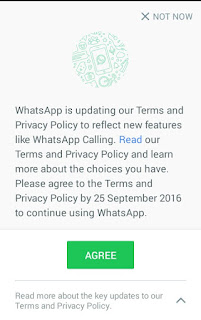
isme aapko Agree ki button show ho rahi hai lekin aap read option ko choose kare. iske baad aapko ek message show hoga share my whatsapp information with facebook , screenshot dekhen
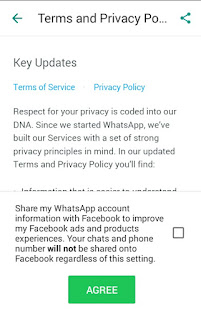
iske saamne jo box hai use uncheck karen aur agree button me click karen.
Yadi aapke saamne ye message pehle hi aa chuka hai aur aapne dhokhe se ya fir iski terms & policy bina read kiye Agree ki button daba diya hai to bhi aap ise band kar sakte hain.
whatsapp open kare aur option kholen > setting > account me jayen, ab aapko isme ek option show hoga share my account info use uncheck kar den.
Last Words
Whatsapp aur facebook dwara aisa isiliye kiya gaya hsi ki whatsapp ki no ad policy bhi barkaraar rahe aur facebook dwara aapke intrest ke hisab se aapko ad show kiye ja saken. is se aapko pareshaan hone ki jaroorat nahi hai kyoki whatsapp aur facebook aapki privacy ka poora dhyan rakhte hain aur fir whatsapp ne bhi kaha hai ki aapka data facebook ke alawa other kisi site ke sath na to share kiya jayega aur na hi becha jayega, fir bhi yadi aap apni privacy ko lekar pareshaan hain to hamare bataye hue tarike se ise band kar sakte hain.
Friends aapki is jaankari ko lekar kya raaye hai hame comment me batayen
Ye Bhi Padhen :
? Whatsapp me chats head kaise enable kare
? Whatsapp group ko bina leave kiye chat clear kaise kare
? whatsapp me color text kaise likhe
? Whatsapp ke fixedsys font ka use kare
? Whatsapp ke reply feature ka use kaise kare
? 1 phone me 2 whatsapp kaise chalaye
? 10 whatsapp tricks in hindi
? whatsapp me friend ki profile pic kaise change kare
Go to link download

Saturday, April 29, 2017
Thursday, April 27, 2017
1 Android phone me 2 2 whatsapp messenger fb etc kaise chalate hai
1 Android phone me 2 2 whatsapp messenger fb etc kaise chalate hai
How to run 2 whatsapp, 2 facebook app, 2 messenger etc. in 1 mobile ?
Ek mobile me 2 whatsapp, 2 fb, 2 messenger etc. kaise chalate hai ?
Ye sawal mujhse bohot se peoples ne poocha. aaj ham isi trick ke bare me janenge. wese to aap is question ko Google me search karenge to aapko bohot se results milenge but unme se aapko 20% post hi esi milengi jisme is bare me true jankari ho, baaki ki sab f5ake rehti hai. lekin me aaj aapko jo trick batane ja raha hu wo 100% work karegi.
aaj ki generation ke lagbhag 80% whatsapp ka use karte hai, lekin ham ise ek phone me ek hi number se chala sakte hai, jabki android phone dual sim ke rehte hai. theek isi prakar fb me bhi sabhi ke 2-3 account rehte hai. is wajah se ham sochte hai ki kaas ye apps do - do rehte to kitna accha hota. is trick se aap chahe to aapke phone ke jitne bhi apps hai sabki 2 - 2 copy kar sakte hai.
1 Phone me 2 - 2 whatsapp, messenger, instagram kaise chalate hai
1. Sabse pehle parallel space app download kare niche di hui Download button me click karke.

3. jis app ka clone banana ( double karna ) hai usme click kare.
4. Click karte hi us app ka clone ban jayega.
Also read:
? Facebook messenger me basketball kaise khelte hai.
? Facebook me color text kaise likhte hai.
? Whatsapp me friend ki profile pic change kaise karte hai.
Ab aapko us app ka home screen me shortcut banana hai to us app me long press kar ke rakhe, aapko neeche ki taraf do option show honge. 1) Create shortcut 2) Delete . aap create shortcut me us app ko swipe kar de. yadi aapko shortcut nahi banana hai to aap Parallel space app open karke bhi us app ko chala sakte hai. isi tarah aapko jis - jis app ka aapko clone banana hai aap bana sakte hai.
Parallel space app ke features
1. Isme pattern protection diya hua hai.
2. Bina rooted phone me bhi work karta hai.
3. Task manager bhi diya hua hai is app me.
4. legal app hai, Google play store me bhi uplabdh hai.
5. kisi bhi app ka clone without loading ke banta hai.
6. jis app ka bhi clone banana ho bana sakte hai. same process hai.
Friends is post se related koi bhi pareshani ho to aap hamse comment me pooch sakte hai. Ye post apne friends ke sath bi share kare aur hamara Fb page like kare.
Go to link download
International United States Ke Number Se Whatsapp Account Kaise Banaye
International United States Ke Number Se Whatsapp Account Kaise Banaye
Friends is post me ham aapko batayenge ki international phone number yaani united states ke number se whatsapp account kaise banaye.
Aapne united states ka naam ti suna hi hoga aur aap ye bhi jaante honge ki ye kaafi famous country hai. Aap chahe to is post ki madad se is country ka number pa sakte hai aur is number ki madad se whatsapp account bana sakte hai.
Iske liye aapko koi sim buy nahi karna padega. Ye sirf ek chhoti si trick se possible hai aur ye trick bilkul free hai. Bas iske liye aapko ek android app ki jaroorat padegi jiska naam primo hai.
Note - Ye trick only fun and knowladge purpose ke liye hai isliye iska use sirf fun ke liye hi kare. Is trick ka use kisi illigal work ke liye na kare. Yadi aap iska use kisi illigal work ke liye karte hai aur aapko kisi bhi prakar ka nuksaan hota hai to iska jimmedar mai aur hindihelpz.com nahi honge, iske jimmedar aap khud honge.
International [ United States ] Ke Number Se Whatsapp Account Kaise Banaye
[ Step - 1] Create Account On Primo App
1. Sabse pehle primo app install kare.
Download Primo App
2. Install hone ke baad open kare.
3. Create account option me click kare.
4. Ab aapko account create karne ke liye kuch details fill karna hai.
1) First name - Isme apna name fill kare.
2) Last name - Isme apna last name yaani surname fill kare.
3) Username - Isme aapko login ke liye username fill karna hai. Aap apni pasand ka koi bhi username fill kar dijiye. Example - Abc123 . Username yaad rakhe kyoki dubara login karte samay aapko iski jaroorat padegi.
4) Password - Apni pasand ka password fill kare jo yaad rahe. Iski bhi jaroorat dubara login karte samay padegi.
5) Confirm password - Jo password iske pehle wale box me fill kiya tha use hi dubara is box me fill kare.
Sabhi fields fill karne ke baad last me sign up button me click kare.
5. Isme apna mobile number fill kare aur submit button me click kare. Iske baad aapke fill kiye hue mobile number me otp code aayega use fill karke confirm kare.
( Note - Mobile number jaroor fill kare aur verify kare. Yadi aap is step ko skip karte hai to aapko international number nahi milega. )
6. Iske baad aapka account successfully create ho jayega aur primo app ki home screen open ho jayegi.
7. Ooper ki taraf left corner me di hui 3 verticle lines me click karke menu open kare.
8. Menu open hone ke baad sabse neeche jakar dekhe, waha aapko ek united states ka mobile number dikhega. Isi number se whatsapp account banana hai isiliye use kahi par likh ke rakh le.
[ Step - 2 ] Create Whatsapp Account With United States Number
1. Whatsapp install kare and open kare.
2. Agree & continue button me click kare.
3. Country me untited states select kare.
4. Mobile number fill kare jo primo app se mila tha aur next button me click kare.
5. Iske baad otp ke liye call me option choose kare kyoki aapko iska message nahi milega.
6. Call me option choose karne ke baad turant primo app open kare. Open karne par whatsapp ka call aayega use attend kare. Isme 6 digit ka ek otp code bataya jayega jise kahi note kar le.
7. Iske baad whatsapp open kare aur jo 6 digit ka otp code call me bataya gaya tha use fill kare.
8. Iske baad whatsapp account create karne ke aage ke steps compelete kare.
9. Ab aap whatsapp se kisi ko bhi message ya call karenge to wo isi united states ke number se send hoga.
Note - Ye trick only fun and knowladge purpose ke liye hai isliye iska use sirf fun ke liye hi kare. Is trick ka use kisi illigal work ke liye na kare. Yadi aap iska use kisi illigal work ke liye karte hai aur aapko kisi bhi prakar ka nuksaan hota hai to iska jimmedar mai aur hindihelpz.com nahi honge, iske jimmedar aap khud honge.
Friends aapko ye post kaisi lagi hame comment me bataye. Ye post apne friends ke sath share kare. Hamare blog ki new updates facebook me pane ke liye hamara facebook page like kare aur email me pane ke liye hamara blog subscribe kare.
Go to link download
Sunday, April 23, 2017
Whatsapp Me Chat Heads Kaise Enable Kare
Whatsapp Me Chat Heads Kaise Enable Kare

Kya aap jante hai ki whatsapp me bhi messenger ki tarah chats head enable kar sakte hai. ham aapko is post me batayenge ki whatsapp me chats head kaise activate kiya ja sakta hai.
Yadi aapne facebook messenger ka use kiya hoga to aap jante honge ki messenger hame chats head ki suvidha deta hai jis se ki ham mobile par koi bhi work kar rahe ho but chats head ke dwara us message ko read kar sakte hai aur reply bhi kar sakte hai. bilkul ese hi aap chahe to whatsapp me kar sakte hai ki koi bhi work karte hue aap iski madad se message read kar sakte hai.
Yadi aapne facebook messenger ka use kiya hoga to aap jante honge ki messenger hame chats head ki suvidha deta hai jis se ki ham mobile par koi bhi work kar rahe ho but chats head ke dwara us message ko read kar sakte hai aur reply bhi kar sakte hai. bilkul ese hi aap chahe to whatsapp me kar sakte hai ki koi bhi work karte hue aap iski madad se message read kar sakte hai.
? Whatsapp Me Color Text Kaise Likhe.
Whatsapp Me Chats Head Kaise Chaalu Kare
1. Dashdow app download kare aur open kare.
3. fir new window open hogi usme kuch options diye hue, unhe ese hi rehne de ya apne hisab se customize kar ke save kar de.
Download Dashdow
2. Iske baad notification access ka option aayega to usme dashdow option ke saamne click kare.3. fir new window open hogi usme kuch options diye hue, unhe ese hi rehne de ya apne hisab se customize kar ke save kar de.
? 1 Android Phone Me 2 Whatsapp Kaise Chalate Hai.
Finish
Ab aapke whatsapp me jab bhi koi message aayega to aapko chat head show hoga jis se aap koi bhi work karte hue message read kar sakte hai.
? 10 Whatsapp Tricks In Hindi.
Dashdow Ke Advantages
1. Is se aap facebook messenger ki tarah chats head whatsapp me enable kar sakte hai.
2. Chats head hone ki wajah se aap koi bhi work kar rahe ho apne phone par fir bhi message read kar sakte hai.
3. Chat head ke message me click karne par whatsapp par pahuch jayenge.
4. Mobile phone rooted hona jaroori nahi hai.
2. Chats head hone ki wajah se aap koi bhi work kar rahe ho apne phone par fir bhi message read kar sakte hai.
3. Chat head ke message me click karne par whatsapp par pahuch jayenge.
4. Mobile phone rooted hona jaroori nahi hai.
? Whatsapp Me Friend Ki Profile Picture Kaise Change Kare.
Dashdow Ke Disadvantages
1. Ye sirf android phones ke liye hai. ise aap baaki phones me run nahi kar sakte.
2. Android version 4.0 ya is se jyada hona chahiye.
3. Yah GB whatsapp and whatsapp plus etc. me work nahi karta. ye sirf whatsapp ke official app me work karta hai.
4. Aur iska sabse bada disavantage ye hai ki is se aap message ko read bas kar sakte hai uska direct chat head se reply nahi kar sakte.
Lekin next post me aapko iska bhi solution bataya jayega.
Friends yadi aap bhi android user hai to whatsapp chat head ka use kare.
Hamari is post ko apne friends ke sath bhi share kare aur esi hi tricks ki new update fb par pane ke liye hamara facebook page like kare.
Go to link download
Thursday, April 20, 2017
Efectos de sonido con Whats Sound para WhatsApp
Efectos de sonido con Whats Sound para WhatsApp

Google Play ID: antonio.cs2.swat
Version:
Size: 0Mb
SWAT Counter Terrorist Army 3D Screen Preview


SWAT Counter Terrorist Army 3D Description
Are you going to become the sniper master? One of the most addictive shooting games on android! You will love it! This shooting game is 100% free! Addictive Gameplay! You will love extremely challenging shooting game! SWAT Counter Terrorist Army 3D the best game in category action sniper 3d shooting games 2015! Now is future in fight the sniper shooting, simulator 3d sniper shooting and kill. Fight to survive in War battlefield and execute a duty to the country! Commando, the survive army sniper us 3D killer take out a dead of target by a sniper kill shooter. Hes killer sniper 3d shooting sharpened the most at that all time. Contra straik 3d is American us sniper simulator in future city crime you are a 3d sniper the assassin which must complete the mission impossible in the crime of city! Sawing criminal case and find a killer! Army commando sniper, is 3d sniper shooter is best frontline survival commando in us army sniper which have super heroes skills to kill one shot. You are private Ryan Jhonse which is sent on many different missions to prevent world destruction. Features: - A huge array of weapons and equipment to use on the battlefield. - Many different levels - Upgrade your skills in the Lab to increase your combat effectiveness. - Awesome and stunning graphics Do not enter into of sniper with the enemy, simple destroy them us army powerful counter strike by elite dangerous army. Destroy your target military soldiers and contract with assassin sniper 3d. You, as an elite assassin sniper and revenge of us army american soldier, a real the steel sniper killer are the last line of defense of tower city of crime against the terrorists. When the whole world war consumed crime in captain, 3d sniper shooting, frontline real enemy tanks and steel guns. Mission to destroy crime in the future, and kill crime mafia, and investigates criminal case! The future in crime of simulator, deadly sniper shot, use assassin sniper 3d rifle, real target. The us army sniper 3d is now in the armed with real sniper guns steel gun and shoot in to kill, protect justice. Duty Army Sniper 3d shooting is assassination sneak , contract of sniper a grand thief or ninja give a fatal blow from behind the sniper 3d shooting target! Become a us army sniper 3d in the battlefield. Now is future crime fight the sniper shooting, simulator 3d sniper shoot in to kill, escape games to survive army commando, us sniper 3d on this crime Duty Army Sniper 3d shooting is very bloody and merciless but you duty strike to the end this epic war. Grab your sniper rifle and head back out for another round of missions. As a professional sniper you need to complete more missions to the best of your ability!Whats new in SWAT Counter Terrorist Army 3D
Bugs fixDownload SWAT Counter Terrorist Army 3D APK
Go to link download
Wednesday, April 19, 2017
Whatsapp Message Me Read More Link Kaise Add Kare
Whatsapp Message Me Read More Link Kaise Add Kare

Hello friends, is post me ham aapko batayenge ki whatsapp me read more link / button kaise add karte hai. Aap log ye baat acche se jante hai ki ye kitna popular messaging app hai. Lagbhag sabhi android and i phone users iska use karte hai.
Shayad aapne whatsapp me aise messages dekhe honge jinme ek chhote se message ke baad read more link add rehti hai jise click karne ke baad ham aage ka message padh paate hai.
Waise to yadi aap whatsapp me koi long message karte hai to kuch lines ke baad ye link automatic add ho jati hai, kyoki ye feature isme already diya hua hai but aapko yadi khud se ye link 1 line ke message ya koi chhote se message ke baad add karna hai to ye feature nahi diya.
Ham aapko is post me ek choti si whatsapp trick batayenge jiski madad se aap kisi bhi message me ye link add kar sakenge. Hamne iske pehle bhi whatsapp ki bohot si tricks post ki hai jinhe aap yaha click karke padh sakte hai. To chaliye jante hai.
Whatsapp Me Read More Link / Button Kaise Add Kare
1. Sabse pehle is 17 kb ki text file ko neeche di hui download link se download kare.
Download
2. Ab ise kisi text editor me open kare.( Note - Yadi aapke phone me pehle se koi text editor app nahi hai to aap play store se bhi koi text editor app install kar sakte hai. )
3. Aap is file ko open karenge to ye blank show hogi. Ise edit karke isme apna message type kare jo aapko link me hide karna hai.
4. Message type karne ke baad select all kare aur copy kare.
5. Whatsapp open kare aur jise message karna hai uske saath conversation launch kare.
6. Message box me jo 2-3 line ka message aapko show karna hai wo type kare uske baad space dekar copy kiya hua text waha paste kar de aur message send kare.
7. Send karne ke baad aap dekhenge ki aapko message me type kiya hua text bas show hoga aur uske neeche link show hogi. Isme click karne par aapko wo copy karke paste kiya hua text show hoga.
Friends aap log seekh chuke hai ki whatsapp me read more link kaise add karte hai. Aapko ye post kaisi lagi hame comment me bataye aur ye whatsapp trick apne friends ke sath bhi share kare. Yadi aapko is trick se related koi problem ho rahi ho to aap hamse commenrmt me pooch sakte hai.
Go to link download
Monday, April 17, 2017
Hide Read for WhatsApp 1 015 Apk
Hide Read for WhatsApp 1 015 Apk

Hide Read for WhatsApp
Hide read for Whatsapp will allow your contacts to see wether you received the message or not, but they will never know that you read it.
Features
- Read all your messages with incognito mode.
- Download and display pictures, images and audio files that you receive through WhatsApp.
- Your contacts will receive the double check only when you’ll want to answer.
How to Install?
- Download Apk (link below).
- On your Android device, go to settings > security > allow unknown sources.
- Find downloaded APK on your phone and install it.
- All Done. Enjoy!
Screenshots

Hide Read for WhatsApp 1.015 Apk
Go to link download
Sunday, April 16, 2017
Whatsapp Chat Me Hike Ke Stickers Kaise Send Kare
Whatsapp Chat Me Hike Ke Stickers Kaise Send Kare

Hello Friends, in this post mai aapko bataunga ki whatsapp chat me hike ke stickers kaise send kare.
Aap sabhi ye baat acche se jaante honge ki indian users ke liye stickers ke maamle me sabhi social media apps me se hike messenger sabse top position me hai.
Hike messenger me stickers ka bohot bada collection hai. Ye ek indian app hai isliye sabse jyada stickers hindi me hai. Aap chahe to kisi se bhi aadhi se jyada chat in stickers ki madad se kar sakte hai.
Aap bhi sochte honge ki kaash ye possible hota ki hike ke stickers whatsapp chat me use kiye ja sakte. To friends aapko pareshan hone ki jaroorat nahi hai kyoki ye possible hai , kaise kar sakte hai jaanne ke liye is post ko follow kijiye.
Whatsapp Chat Me Hike Ke Stickers Kaise Use Kare ?
1. Hike messenger open kare.
2. Setting me jaye.
3. Sticky option open kare.
4. Isme aapko bahut se options milenge jisme whatsapp ke saamne ke checkbox me tap karke right check kare.
5. Ab hike ko exit kare aur whatsapp open kare.
6. Koi bhi conversation open kare.
7. Ab aapko hike ka small icon show hoga usme tap kare.
8. Iske baad aapko hike ke sabhi stickers show honge. Jis sticker ko send karna hai use select karke send kare.
Done
Friends aapko ye chhoti si trick kaisi lagi hame comment me bataye. Ye post apne friends ke sath share kare. Hamare blog ki new updates facebook me pane ke liye hamara facebook page like kare aur email me pane ke liye hamara blog subscribe kare.
Go to link download
Whatsapp me friend ki profile picture kaise change kare whatsapp trick prank
Whatsapp me friend ki profile picture kaise change kare whatsapp trick prank

Friends aap log to jaante hi hoge ki whatsapp kitna famous hai.lagbhag sabhi android users whatsapp ka use karte hai.
is post me aap janenge ki whatsapp me aap apne kisi bhi freind ki profile picture apne hi phone se kaise change kar sakte hai.
chaliye step by step jaante hai.
Whatsapp me friend ki profile picture kaise change karte hai
1.File manager open kare.
mcent se free talktime kaise kamaye
2.internal sd card (internal storage) open kare.
3.whatsapp folder open kare.
4.profile pictures folder open kare.
profile pictures folder open karne ke baad aap dekhenge ki aapke whatsapp ke jitne bhi contacts hai sabki profile pictures di hui hai.
5.jis freind ki profile pic change karna hai us image ka name copy kar le aur delete kar de.
(image ka name wahi hoga jo aapke friend ka phone number hai.example-maan lo aapke friend ka mobile number 1234567890 hai to image ka name 1234567890.jpg hoga)
way2sms se free sms kaise kare
4.ab jo image aapko aapke friend ki profile rakhni hai use rename karna hai. rename aapko wahi name daalna hai jo orignal pic ka tha.
5.rename karne ke baad us image ko select kar copy kare aur whatsapp folder me paste kar de.
bas aapka kaam ho gaya hai. ab aap whatsapp open kare aur dekhe, aap dekhenge ki profile pic change ho chuki hai.
[Note- is trick se aapke friend ki profile pic sirf aap ke phone me hi change hogi, baaki ke phone me orignal pic hi dikhegi. kyoki yah sirf prank trick hai.]
To friends aapko ye trick acchi lagi ho to aage bhi isi prakar ki jankari jaan ne ke liye mera blog subscribe kare aur is trick ka maja le.
Thanx...
Go to link download
Whatsapp más de 27 mil millones de mensajes al día
Whatsapp más de 27 mil millones de mensajes al día

Google Play ID: com.glu.android.ck
Version: 1.6.0
Size: 3.7Mb
CONTRACT KILLER Screen Preview

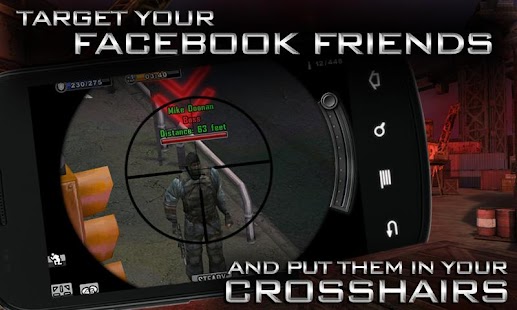

CONTRACT KILLER Description
They might call you an enforcer, or an assassin. Call it what you like - youre a CONTRACT KILLER. Pulled into a world of bounty hunters, mobsters and criminals, you must check in with your contacts and accept SECRET MISSIONS that only you can handle. Select your WEAPON OF CHOICE from an inventory of sniper rifles, assault rifles and machine guns. Locate your target, zoom in, take aim and GO FOR THE HEADSHOT to earn cold hard cash. You might eliminate a crime boss and escape without being spotted, or you might walk straight into an AMBUSH... WELCOME TO CENTRAL CITY Prepare for your mission and then jump into one of many vantage points within 5 gritty 3D locations UNLIMITED MISSIONS 17 Story Missions and unlimited Random Missions provide cash, XP and lots of action DEADLY WEAPONS 20 distinct weapons including handguns, sniper rifles, machine guns and assault rifles ALIVE OR DEAD Use the Tranquilizer Gun to capture your target or put them down... permanently FOLLOW US at Twitter @glumobile facebook.com/ContractKillerGlu Use of this application is governed by Glu Mobile’s Terms of Use. Collection and use of personal data are subject to Glu Mobile’s Privacy Policy. Both policies are available at www.glu.com. Additional terms may also apply. CONTRACT KILLER is free to play, but you can choose to pay real money for some extra items.Whats new in CONTRACT KILLER 1.6.0
MORE VALUE! New Glu VIP packages are now available for the best value Glu Credit packs! MORE GAMES! You can now spend Glu Credits in other Glu VIP Club games such as Contract Killer: Zombies and Blood & Glory! MORE REWARDS! Join the Glu Games Network to earn FREE Glu Credits!Download CONTRACT KILLER 1.6.0 APK
Go to link download
Monday, April 10, 2017
Whatsapp se kai guna jyada features wala india ka motu messenger
Whatsapp se kai guna jyada features wala india ka motu messenger

India me develop hue Motu messenger me whatsapp se 10 guna jyada features hai iska dawa uddeshya agrawal ji karte hai jinhone is app ko banaya hai. uddeshya ji ke saath 1 july 2016 ko mera interview hua jo mai aapke saath agli post me share karunga, is post me mai sirf aapko motu messenge ke baare me aur iske features bataye jayenge.
Motu messenger ko roosh me develop kiye gaye telegram messenger ki tarj par banaya gaya hai. yah 25 oct. 2015 se google play store me bhi uplabdh hai. Is app ke kuch khaas features hai jo ise aur bhi behtar banate hai. aur sabse badi khaas baat ye hai ki yah india ka hai.
Motu Messenger kya hai aur iske features
Motu messenger whatsapp ki tarah hi messeging app hai. iske dwara ham ek dusre ko messege and files send kar sakte hai.
Features :
1. Iske dwara ham messeging kar sakte hai.
2. Is app se 100 pictures ek sath send kar sakte hai. jabki whatsapp me sirf 10 pics hi ek sath send ki ja sakti hai.
3. Is app se 1.5 gb tak videos send ki ja sakti hai.
4. Is app se zip, doc, pdf aur excel file bhi send ki ja sakti hai.
5. Aap kisi bhi friend ko uske username se bhi search kar ke add kar sakte ho.
6. ise 2.3 version ya is se jyada version ke phone me chalaya ja sakta hai.
Also Read:
? Facebook messenger ki top 10 hidden tricks.
? Facebook messenger me basketball kaise khelte hai.
? Facebook messenger me soccer kaise khelte hai.
Security features:
7. Aap kisi friend se chatting kar rahe hai aur usne snapshot liya to iska pata aapko aasani se lag jayega.
8. Yadi aapne apne friend ke sath ki conversation apne phone kiya to aapke friend ke phone se bhi conversation delete ho jayegi.
khaas feature:
9. Motu messenger ka khaas feature "motu bots" hai. isme aap images and texts search kar sakte hai. ye google se connected hai.
Download Motu Messenger
Final words
Aap motu messenger ke features padh kar hi samajh gaye honge ki kitna accha app hai. ye app girls and females ki security ko dhyan me rakhte hue create kiya gaya hai. is app ko din ba din update kiya ja raha hai jis se iske users is app ko aur bhi aur bhi aasani se chala sake. is app ko abhi 1000+ log chala rahe hai. is app ka promotion na hone ki wajah se ise abhi jyada log use nahi kar rahe.
Friends aap is swadesi app ko use kar ke jaroor dekhe.
Ham apni agli post me motu messenger ke founder uddeshya agrawal ke sath Hindi Helpz ke interview ko share karenge jise aap jaroor padhe aapko kuch naya seekhne ko milega.
Friends aap is swadesi app ko use kar ke jaroor dekhe.
Ham apni agli post me motu messenger ke founder uddeshya agrawal ke sath Hindi Helpz ke interview ko share karenge jise aap jaroor padhe aapko kuch naya seekhne ko milega.
Aapko ye post acchi lagi ho to apne friends ke sath share karna na bhoole aur new posts fb par pane ke liye hamara facebook page like kare.
Go to link download
Wednesday, April 5, 2017
Whatsapp Me Khud Ko All Time Online Show Kaise Kare
Whatsapp Me Khud Ko All Time Online Show Kaise Kare

Hi friends, Is post me ham janenge ki yadi aapke phone ki screen off ho, aap offline hai aur aapke mobile me internet connection nahi hai to aap apna status whatsapp me online show kar sakte hai. Matlab ki aap apne aap ko all time whatsapp me online show kar sakte hai apne friends ke samne.
Aapko ye baat majak lag rahi hogi but ye baat sach hai. Ham aapko is post me aisi trick batayenge ki aap aisa aasani se kar sakenge.
Waise official whatsapp me nahi hota hai. Iske liye aapko GB Whatsapp download karna hoga. Ham apni pichli post me GB Whatsapp ki download link aur iske features bataye the.
Waise official whatsapp me nahi hota hai. Iske liye aapko GB Whatsapp download karna hoga. Ham apni pichli post me GB Whatsapp ki download link aur iske features bataye the.
GB whatsapp me is feature ke alawa aur bhi aise bohot se features hai jo official me nahi hai. Me bhi ise hi use karta hu aur aapko bhi ise hi use karna chahiye. Isme ham full customization kar sakte hai.
Whatsapp Me Khud Ko All Time Online Kaise Show Kare
1. Iske liye sabse pehle aapko GB Whatsapp download karna hoga. Ise download karne ke liye hamari GB Whatsapp wali post padhe usi me iski download link bhi di hui hai.
2. Download karne ke baad ise open kare aur account banane ke steps compelete kare. ( same wese hi account banana hai, jaise official app me banate hai )
3. Account ban jane ke baad option button ( three verticle dots ) me click kare.
4. Option button me click karne par bohot se options show honge, unme aapko ek new option show hoga GB Settings ise open kare.
5. GB Settings open karne ke baad Other MODS option choose kare.
6. Iske baad Always Online option ke saamne bane check box me tap kare.
DONE
Iske baad aap hamesha online show honge.
Friends aapko ye trick kaisi lagi hame comment me bataye. Hamari website me aur bhi tricks hai unhe bhi read kare. Is post se related koi question ho to aap hamse comment me pooch sakte hai. Hamari ye post apne friends ke sath bhi share kare aur hamari sabhi latest post ki jankari mail se pane ke liye hamara blog subscribe kare.
Go to link download
Monday, April 3, 2017
Cuidado Priyanka! el virus que ataca el WhatsApp
Cuidado Priyanka! el virus que ataca el WhatsApp

Google Play ID: ro.wip.redescoperaromania
Version: 1.6
Size: 4.9Mb
Redescopera Romania Screen Preview


Redescopera Romania Description
With Redescopera Romania App one can find the most beautiful destinations and tourist attractions of the country. Wherever you are you can access our database of places worth seeing, a database that rises continuously with the help of our users. One can definitely find a place to see after using the app to its full potential. Nearby places Helps you find the most interesting places nearby. From one tap the app shows you places around, that you can sort based on 11 types of tourist attractions. Create route Using this function you can find places worth seeing on your way to other cities. Never have a dull ride again! Search Find a certain place or search after a key-word in the app. You can filter depending on the type of destination and how close it is to you. Notifications The @ladruminromania Twitter account keeps you up to date with road information and recommended places. La Drum Mark the places where you were, where you want to go and keep them in one place. If there is a place you have discovered and you cannot find it in the app add it so other users can enjoy it as well. Info The app is available in Romanian and English. One can connect with its Facebook account for an easy access.Whats new in Redescopera Romania 1.6
The new app version brings a complete re-design in app! •Improved and simplified user experience •Easier navigation in-app, easier to use •New maps included •The possibility to organize destinations in Romania in personal list of where one wants to go or where he has beenDownload Redescopera Romania 1.6 APK
Go to link download
Sunday, April 2, 2017
Whatsapp Ke New Font Fixedsys Ka Use Kaise Kare
Whatsapp Ke New Font Fixedsys Ka Use Kaise Kare

Is post me ham janenge ki whatsapp ke new font fixedsys ka use kaise kare. Whatsapp dino din naye naye features add karte ja raha hai apne users ke liye. whatsapp ke voice calling feature launch kiye jyada samay nahi hua aur abhi kuch hi dino pehle whatsapp ne Bold, italic aur strikethrough font ka feature add kiya tha.
aur abhi haal hi me whatsapp me fixedsys font ka feature add kiya hai. ye whatsapp ka hidden feature hai jiske bare me whatsapp ne koi jikra nahi kiya hai. fixedsys font ke text normal text se thodi chhote dikhte hai. to chaliye jante hai whatsapp ke new feature fixedsys ka use kaise kare.
aur abhi haal hi me whatsapp me fixedsys font ka feature add kiya hai. ye whatsapp ka hidden feature hai jiske bare me whatsapp ne koi jikra nahi kiya hai. fixedsys font ke text normal text se thodi chhote dikhte hai. to chaliye jante hai whatsapp ke new feature fixedsys ka use kaise kare.
Whatsapp Ke Hidden Feature Fixedsys Font Ka Use kaise Kare
Is font ka use karne ke liye aapko message ke aage 3 baar (`) sign ka use karna hai aur 3 baar message ke peeche. Example dekhiye screenshot ke sath.
Normal font - Hindi Helpz
Fixedsys font - ```Hindi Helpz```
Fixedsys font - ```Hindi Helpz```

is tarike se aap whatsapp me fixedsys font ka use kar sakte hai.
Friends aapko ye whatsapp trick kaisi lagi hame comment me bataye aur ye whatsapp trick apne friends ke sath bhi share kare. Aapko is post se related koi problem ho to hame comment me bataye. esi hi new new tricks fb par pane ke liye hamara fb page like kare aur email me pane ke liye hamari website subscribe kare.
Also Read :
? 1 Android phone me 2-2 whatsapp kaise chalate hai.
? 10 whatsapp tricks hindi me, jo shayad aap nahi jante.
? Whatsapp me friend ki profile picture kaise change kare, whatsapp trick (prank).
Also Read :
? 1 Android phone me 2-2 whatsapp kaise chalate hai.
? 10 whatsapp tricks hindi me, jo shayad aap nahi jante.
? Whatsapp me friend ki profile picture kaise change kare, whatsapp trick (prank).
Go to link download
Friday, March 31, 2017
Download GB Whatsapp 4 81 With Lots Of Features For Android Phone
Download GB Whatsapp 4 81 With Lots Of Features For Android Phone

Aap log is post ko read kar rahe hai to aap whatsapp ka use jaroor karte honge but kya aapne GB Whatsapp ka use kiya hai. Ab aap soch rahe honge ki ye kya hai.
Ye bhi whatsapp hi hai but ye aapko aise bohot se features deta hai jo ki aapko whatsapp ke official version me nahi milenge. Aap isme full customization kar sakte hai aur ye user friendly hai. Ham aapko is post me iske features batayenge to isko download karne ki ikcha aapki khud hi hone lagegi.
? Whatsapp Group Ki Join Link Kaise Banaye
? Whatsapp Grouo Me Read More Link Kaise Add Kare
? Whatsapp Grouo Me Read More Link Kaise Add Kare
Download GB Whatsapp Latest Version
Jaisa ki mene aapko bataya ki is me aapko wo features milenge jo aapko official me nahi milenge. Wese to ye ek third party app hai but ye bhi aapki privacy ka dhyan rakhta hai. Isme bohot si themes hai jiski madad se aap main screen and chat screen ka look, color and options ko apne hisab se customize kar sakte hai.
? Jane Aapki Whatsapp Profile Kisne Visit Kiya Hai
? Whatsapp Me Chat Heads Kaise Enable Kare
? Whatsapp Me Chat Heads Kaise Enable Kare
GB Whatsapp 4.81 Ke Features
? Isme aap specific contacts ke liye call disable kar sakte hai.
? Specific contacts ke liye last seen hide kar sakte hai.
? Isme 600 contacts ka broadcast bana sakte hai, jabki official me sirf 250 contacts ka.
? group ki link banakar send karke group join kara sakte hai.
? Calling feature support karta hai.
? Last seen hide kar sakte hai.
? Second tick & blue tick hide kar sake hai.
? Kisi ka bhi online $ last seen status main screen me hi dikhta hai.
? Bohot si themes di hui hai jinhe apply kar ke whatsapp ko accha look de sakte hai.
? Themes ko apne according customize karne ka feature hai.
? Internet se iski themes download kar ke bhi isme apply kar sakte hai.
? Ticks & chat bubbles ka style change kar sakte hai.
? App icon aur home screen ka color change kar sakte hai.
? Isme 30 mb size tak ki videos send ki ja sakti hai, jabki official me sirf 16 mb size tak ki.
? Isme 90 images ek baar me send kar sakte hai jabki official me sirf 10 images.
? Isme status 250 characters ka add kar sakte hai jabki official me sirf 139 characters ka.
? Official app me bohot sare messages copy karne par har message ke upar sender ka name and date bhi copy ho jati hai but isme hide kar sakte hai.
? Friend ka status copy kar sakte hai.
? Specific chats me pin lock laga sakte hai.
? pin lock laga sakte hai.
Isme inke alawa aur bhi bohot se features hai but hamne yaha sirf important features ke baare me bataya hai.
GB Whatsapp Kaise Download Aur Install Kare
1. GB Whatsapp download karne ke liye neeche di hui download link me click kare.
3. Mobile number enter kare.
4. OTP enter kare jo ki aapke mobile number se aayega.
Download
2. Download hone ke baad install kare aur open kare.3. Mobile number enter kare.
4. OTP enter kare jo ki aapke mobile number se aayega.
Friends aapko ye post kaisi lagi hame comment me bataye. Aisi hi aur bhi post email par pane ke liye hamara blog subscribe kare aur ye post apne friends ke sath bhi share kare.
Go to link download
Tuesday, March 28, 2017
WhatsApp 2 12 APK Download Free For Android Latest Version
WhatsApp 2 12 APK Download Free For Android Latest Version
WhatsApp 2.12 APK Download Free For Android Latest Version
Go to link download
Thursday, March 23, 2017
Kaise Jane Whatsapp Me Aapki Profile Kisne Visit Kiya Hai
Kaise Jane Whatsapp Me Aapki Profile Kisne Visit Kiya Hai

Hi friends, hamari profile kai log check karte hai but ham jaan nahi pate ki hamari profile kis kisne visit kiya hai. aap log bhi jaanna chahte honge ki aapki profile kis kis ne visit kiya hai.
wese to whatsapp ne iska na hi koi option diya hai na hi whatsapp me aisa koi feature hai jis se ki ham jaan sake ki kis kis person ne hamari whatsapp profile visit kiya hai but is post me ham jo trick bata rahe hain us se aap aasani se jaan sakte hain ki aapki profile kisne check kiya hai. hame iske liye bas ek third party app ki jaroorat padegi. To chaliye ham jaante hain ki hamari whatsapp profile kisne visit kiya hai.
wese to whatsapp ne iska na hi koi option diya hai na hi whatsapp me aisa koi feature hai jis se ki ham jaan sake ki kis kis person ne hamari whatsapp profile visit kiya hai but is post me ham jo trick bata rahe hain us se aap aasani se jaan sakte hain ki aapki profile kisne check kiya hai. hame iske liye bas ek third party app ki jaroorat padegi. To chaliye ham jaante hain ki hamari whatsapp profile kisne visit kiya hai.
Aapki Whatsapp Profile Kisne Visit Kiya Hai Kaise Jane
1. Sabse pehle whatsapp viewer download karen.
3. Scan button me click karen.
Download Whatsapp Viewer
2. Whatsapp viewer open karen.3. Scan button me click karen.
Scan button me click karne ke thodi der ki loading ke baad aapko list show hone lagegi jisme un sabhi ke contact number aur name diye honge jis jis ne aapka whatsapp profile visit kiya hai.
Read Also :
? Whatsapp Aapka Data Facebook Ke Sath Share Karega
? Whatsapp Me Chat Heads Kaise Enable Kare
? Whatsapp Group Ko Bina Leave Kare Group Chat Clear Kaise Kare
? Whatsapp Me Color, Stylish Aur Magic Text Kaise Likhte Hai
? Whatsapp Ke "Reply" Feature Ka Use Kaise Kare
? Whatsapp Ke New Font Fixedsys Ka Use Kaise Kare
? 1 Android phone me 2-2 whatsapp kaise chalate hai
? 10 whatsapp tricks hindi me
? Whatsapp me friend ki profile picture kaise change kare
Friends aapko ye post kaisi lagi hame comment me batayen aur ye post apne friends ke sath bhi share karen.
Go to link download
Saturday, March 18, 2017
Enable WhatsApp Two step verification
Enable WhatsApp Two step verification

WhatsApp is the most popular messaging app used by 5 billion peoples over the world. Now a days Whatsapp brings many new features in every new update release. Our social accounts security is really sensitive issue and which are on mobile devices makes it easier even someone to access them. But, even without our smartphone there are methods that allow take control profiling apps and services.enable two factor authentication.2 factor authentication
WhatsApp Two-step Verification 2017
WhatsApp Two-step verification is live since November 2016 but, until now it was only in the beta version of the application. As per the new update of WhatsApp now the feature is available for all users. So any one can activate Two-step Verification and put protect your whatsapp profile with security code.multi factor authentication
How to Enable Two-step Verification in WhatsApp
1 At first step update whatsapp. If you are Android user download latest version by playstore / For iOS users update from App store or from the below link. New version have a new option in the account settings in which can activate two step verification.
2 Open Whatsapp and navigate to Settings -> Account -> Two-step Verification -> Enable.
3 At the next step it will ask us to set Six-digit PIN figures. Now enter the setup the pin then confirm it. That PIN will asked every time when we trying login your account with phone number ( NO OTP sent to our phone number ).


5 Thats it guys finally you done with it .
Important Note!: Mind that since you have not previously requested to turn off this protection. Do not click on an email that tells us that we have . It seems weird but, its one of the techniques of hacking or SPAM.
In case you forget your PIN & do not have access to e-mail. You must wait 7 days to verify our phone number and have access to the account again. If you spend 30 days without access and do not verify the account will be deleted but, can be recreated by our same phone number.
I hope this article help you to Add multi factor authentication to your account. Don’t Forget to share this article with your friends.
Go to link download
Subscribe to:
Posts (Atom)