Showing posts with label change. Show all posts
Showing posts with label change. Show all posts
Sunday, April 16, 2017
Whatsapp me friend ki profile picture kaise change kare whatsapp trick prank
Whatsapp me friend ki profile picture kaise change kare whatsapp trick prank

Friends aap log to jaante hi hoge ki whatsapp kitna famous hai.lagbhag sabhi android users whatsapp ka use karte hai.
is post me aap janenge ki whatsapp me aap apne kisi bhi freind ki profile picture apne hi phone se kaise change kar sakte hai.
chaliye step by step jaante hai.
Whatsapp me friend ki profile picture kaise change karte hai
1.File manager open kare.
mcent se free talktime kaise kamaye
2.internal sd card (internal storage) open kare.
3.whatsapp folder open kare.
4.profile pictures folder open kare.
profile pictures folder open karne ke baad aap dekhenge ki aapke whatsapp ke jitne bhi contacts hai sabki profile pictures di hui hai.
5.jis freind ki profile pic change karna hai us image ka name copy kar le aur delete kar de.
(image ka name wahi hoga jo aapke friend ka phone number hai.example-maan lo aapke friend ka mobile number 1234567890 hai to image ka name 1234567890.jpg hoga)
way2sms se free sms kaise kare
4.ab jo image aapko aapke friend ki profile rakhni hai use rename karna hai. rename aapko wahi name daalna hai jo orignal pic ka tha.
5.rename karne ke baad us image ko select kar copy kare aur whatsapp folder me paste kar de.
bas aapka kaam ho gaya hai. ab aap whatsapp open kare aur dekhe, aap dekhenge ki profile pic change ho chuki hai.
[Note- is trick se aapke friend ki profile pic sirf aap ke phone me hi change hogi, baaki ke phone me orignal pic hi dikhegi. kyoki yah sirf prank trick hai.]
To friends aapko ye trick acchi lagi ho to aage bhi isi prakar ki jankari jaan ne ke liye mera blog subscribe kare aur is trick ka maja le.
Thanx...
Go to link download

Friday, March 24, 2017
How to change IMEI Number Without Root
How to change IMEI Number Without Root
Hello!!! Visitors Today, i am going to share the trick, to change android IMEI number in just 5 minutes. Here, I will provide you the information about tricks and apps used. So our today’s topic is How to Change Android IMEI Number without root.

Advantages of This Trick:
- If you can change android IMEI number , then also your Android’s identity will be changed.
- Some of the applications asks for your IMEI number to verify your phone. It means you can’t use the same application next time in your phone but by changing your IMEI number, you can use that app again and again. (For example Mcent, Snapdeals, freecharge and other referral apps).
- Sometimes your device shows you SIM error, like invalid Sim or etc. This problem occurs due to your damaged IMEI number.
- We all know that nowadays Google Play-store provides us a lots of applications. Some of the apps pay us money for downloading the apps and for referring that app to our friends. But when someone tries to re download the same app that you have already downloaded before then the app will not pay you for this. Because the app get this information of your downloading through your android IMEI number. So, to get more profit from those apps you can change android IMEI number.
How To Check IMEI Number:
You can check your IMEI number by dailing *#06#.
Requirements:
1. Mobile Uncle Tool Download
2. Mind
3. Use this trick on your own risk.
Steps To Change IMEI Number In Android Phone Without Root:
1. First of all you need to download mobile uncle tool on your Android device. https://uploadocean.com/bh2ka933u1aa
2. After successfully downloading, install and open it.
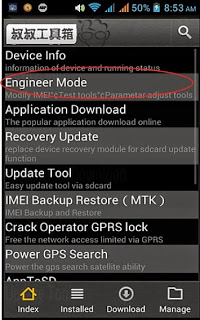
3. Now main step, Select Engineer >> Engineer Mode (MTK) option and scroll down.
4. Find the option CDS Information, when you get that click on it..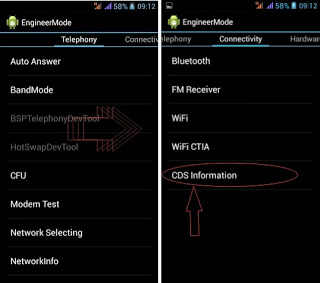
5. Click on Radio Information option »» you will see two options in this app called Phone 1 and Phone 2 »» click on Phone 2 option »»» you will see another new option AT+.
6. Now you need to replace AT+ to “ AT+(space)Your 15 Digit New IMEI Number “.
For Example: AT+ 123456789011156 »» click on SEND AT COMMAND to save your settings.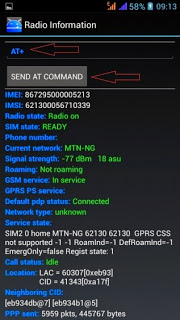
Finally , Your IMEI number will be Successfully changed. If you want to confirm !. Then Reboot your device and check your IMEI number again by dialing *#06#.
NOTE :
While changing your imei, should you get any response like; "command is not allowed in user build" . After clicking on COMMAND , instead of the normal "Command is sent!" Dont panic.
Just add one space between the AT+ and EGMR... That is AT+ space EGMR... Or just copy and paste this: AT+ EGMR=1,7,"IMEI Num" Then replace IMEI Num with the imei you generated.
Note: This tutorial is Only for Educational purpose. We are not responsible for any harm happened to you or your Android device by our methods. But our methods are tested and working. But if you have done any mistake in this process, as a result your android device can be damaged. Therefore, use this trick on your own risk.
Go to link download
Subscribe to:
Posts (Atom)