Showing posts with label account. Show all posts
Showing posts with label account. Show all posts
Thursday, April 27, 2017
International United States Ke Number Se Whatsapp Account Kaise Banaye
International United States Ke Number Se Whatsapp Account Kaise Banaye
Friends is post me ham aapko batayenge ki international phone number yaani united states ke number se whatsapp account kaise banaye.
Aapne united states ka naam ti suna hi hoga aur aap ye bhi jaante honge ki ye kaafi famous country hai. Aap chahe to is post ki madad se is country ka number pa sakte hai aur is number ki madad se whatsapp account bana sakte hai.
Iske liye aapko koi sim buy nahi karna padega. Ye sirf ek chhoti si trick se possible hai aur ye trick bilkul free hai. Bas iske liye aapko ek android app ki jaroorat padegi jiska naam primo hai.
Note - Ye trick only fun and knowladge purpose ke liye hai isliye iska use sirf fun ke liye hi kare. Is trick ka use kisi illigal work ke liye na kare. Yadi aap iska use kisi illigal work ke liye karte hai aur aapko kisi bhi prakar ka nuksaan hota hai to iska jimmedar mai aur hindihelpz.com nahi honge, iske jimmedar aap khud honge.
International [ United States ] Ke Number Se Whatsapp Account Kaise Banaye
[ Step - 1] Create Account On Primo App
1. Sabse pehle primo app install kare.
Download Primo App
2. Install hone ke baad open kare.
3. Create account option me click kare.
4. Ab aapko account create karne ke liye kuch details fill karna hai.
1) First name - Isme apna name fill kare.
2) Last name - Isme apna last name yaani surname fill kare.
3) Username - Isme aapko login ke liye username fill karna hai. Aap apni pasand ka koi bhi username fill kar dijiye. Example - Abc123 . Username yaad rakhe kyoki dubara login karte samay aapko iski jaroorat padegi.
4) Password - Apni pasand ka password fill kare jo yaad rahe. Iski bhi jaroorat dubara login karte samay padegi.
5) Confirm password - Jo password iske pehle wale box me fill kiya tha use hi dubara is box me fill kare.
Sabhi fields fill karne ke baad last me sign up button me click kare.
2) Last name - Isme apna last name yaani surname fill kare.
3) Username - Isme aapko login ke liye username fill karna hai. Aap apni pasand ka koi bhi username fill kar dijiye. Example - Abc123 . Username yaad rakhe kyoki dubara login karte samay aapko iski jaroorat padegi.
4) Password - Apni pasand ka password fill kare jo yaad rahe. Iski bhi jaroorat dubara login karte samay padegi.
5) Confirm password - Jo password iske pehle wale box me fill kiya tha use hi dubara is box me fill kare.
Sabhi fields fill karne ke baad last me sign up button me click kare.
5. Isme apna mobile number fill kare aur submit button me click kare. Iske baad aapke fill kiye hue mobile number me otp code aayega use fill karke confirm kare.
( Note - Mobile number jaroor fill kare aur verify kare. Yadi aap is step ko skip karte hai to aapko international number nahi milega. )
6. Iske baad aapka account successfully create ho jayega aur primo app ki home screen open ho jayegi.
7. Ooper ki taraf left corner me di hui 3 verticle lines me click karke menu open kare.
8. Menu open hone ke baad sabse neeche jakar dekhe, waha aapko ek united states ka mobile number dikhega. Isi number se whatsapp account banana hai isiliye use kahi par likh ke rakh le.
[ Step - 2 ] Create Whatsapp Account With United States Number
1. Whatsapp install kare and open kare.
2. Agree & continue button me click kare.
3. Country me untited states select kare.
4. Mobile number fill kare jo primo app se mila tha aur next button me click kare.
5. Iske baad otp ke liye call me option choose kare kyoki aapko iska message nahi milega.
6. Call me option choose karne ke baad turant primo app open kare. Open karne par whatsapp ka call aayega use attend kare. Isme 6 digit ka ek otp code bataya jayega jise kahi note kar le.
7. Iske baad whatsapp open kare aur jo 6 digit ka otp code call me bataya gaya tha use fill kare.
8. Iske baad whatsapp account create karne ke aage ke steps compelete kare.
9. Ab aap whatsapp se kisi ko bhi message ya call karenge to wo isi united states ke number se send hoga.
Note - Ye trick only fun and knowladge purpose ke liye hai isliye iska use sirf fun ke liye hi kare. Is trick ka use kisi illigal work ke liye na kare. Yadi aap iska use kisi illigal work ke liye karte hai aur aapko kisi bhi prakar ka nuksaan hota hai to iska jimmedar mai aur hindihelpz.com nahi honge, iske jimmedar aap khud honge.
Friends aapko ye post kaisi lagi hame comment me bataye. Ye post apne friends ke sath share kare. Hamare blog ki new updates facebook me pane ke liye hamara facebook page like kare aur email me pane ke liye hamara blog subscribe kare.
Go to link download

Sunday, April 16, 2017
HOW TO HACK FACEBOOK ACCOUNT PASSWORD USING BRUTE FORCE ATTACK
HOW TO HACK FACEBOOK ACCOUNT PASSWORD USING BRUTE FORCE ATTACK
Facebook Account hacking is not easy, but Tricks world provides you new and latest tricks to hack facebook accounts from android or from PC. i think you all read my previous articles on facebook hacking and according to team tekgyd they all are still working.

This (Facebook Hacking) is Only for Educational Purpose, Strictly Prohibited to use in wrong way
What Is Brute Force Attack?
Brute Force Attack is also known as Brute force cracking .It a a common trail & error method used by application programs to decode encrypted data such as Passwords, databases or other loop holes securities. This is a general definition of Brute force by google or other bloggers.
So, First lets know something about Brute force attacks, “A brute force attack is a trial-and-error method used to obtain information such as a user password or personal identification number (PIN).
In a brute force attack, automated software is used to generate a large number of consecutive guesses as to the value of the desired data.”
But, In our case I’ll be using a Python script and a Long Dictionary Of passwords. I have personally tried it on myself and it really works .
Also Read: Facebook phishing with undetectable profile
Requirement:
1. A Kali Machine / Or Any Python Engine Will work!
2. Facebook.py Download
3. A FaceBook id Of course
4. CrackStation Word List! Download from here
Now, Lets Start The Work
step 1. Install Python-mechanize using command mention below
[*] root@root:~#apt-get install python-mechanize
step 2. Add facebook.py using the command below
[*] root@root~# chmod +x facebook.py [*] root@root:~# python facebook.py
step 3. Now enter | Email | or | Phone number | or | Profile ID number| or | Username | of the victim,
step 4 . Now Give The "Path" Of Your CrackStation Word list
step 5. Now it will try all passwords present in the word list, So relax and have a cup of
coffee because it will take time depending on speed of your processor and password strength of your victim!
Go to link download
Saturday, April 8, 2017
How to approve Adsense account
How to approve Adsense account
Hello friends, today ill teach you how to approve adsense account. Every blogger wants their own adsense account but they dont know about adsense. Here I have tricks for ads approve.

Step.
1. Add About us contact us privacy ,sitemap disclaimer page on your blogger.
2. Create some labels and post minimum 3post on every label.
3. Add your blog on google search and bing search.
4. Publish qualitative and quantitative post on your blog.
5. Post minimum 300 words.
6. Make robot.txt on your blog.
7. Submitt google analytical and add Google analytical code on your blog.
Now apply your adsense account after 3-6 days you will receive conformation message from google
Step.
1. Add About us contact us privacy ,sitemap disclaimer page on your blogger.
2. Create some labels and post minimum 3post on every label.
3. Add your blog on google search and bing search.
4. Publish qualitative and quantitative post on your blog.
5. Post minimum 300 words.
6. Make robot.txt on your blog.
7. Submitt google analytical and add Google analytical code on your blog.
Now apply your adsense account after 3-6 days you will receive conformation message from google
Go to link download
Friday, March 31, 2017
HOW TO GET YOUR STYLISH FACEBOOK ACCOUNT VERIFIED WITH BLUE BADGE
HOW TO GET YOUR STYLISH FACEBOOK ACCOUNT VERIFIED WITH BLUE BADGE
Hello friends, Tricks World is back again with this new post. I’ve seen a lot of people asking me about How to verify a facebook.

Here many of peoples know that verified account not locked or disable easily. This is Facebook policy that if account is verified then it will not locked by simple reports or many id using by a mobile. So many of peoples want verified facebook account. But they dont know how to verify. Some peoples pay for verified account and some beg for it. But now i am going to teach you a very simple method discover by us how to verify fb id.
Also Read : HOW TO HACK FACEBOOK ACCOUNT PASSWORD USING BRUTE FORCE ATTACK
Lets follow some steps:
STEP1 :- Creat a new Facebook Account. If u want in stylish font Then You can make in stylish font.
STEP2 :- Now take a government proof and click a pic of that.
STEP3 :- Now change your fb account name and date of birth according to Govt proof.
STEP4 :- Now copy this code =>> http://#24255353309 Remove # from code and comment this code in your own facebook profile pic.
STEP5 :- After comment you will see a error message. Press ok and Login again in your id.
STEP6 :- When you will login again fb will show you that your fb acount locked and asking for verification. Dont do any verification. Just open new tab in your browser and open this link ==>> https://www.facebook.com/help/contact/319547548123767 (or search on google ==>> verify my facebook id)
STEP7 :- Now upload your govt proof here.
STEP8 :- After that support inbox page come. save this page in your bookmarks. Open this page after 3-4 hour. You will see fb message that your account is verified.
STEP9 :- Now login your acount. Put your Date of birth in verification and open your account.
STEP10 :- GOTO This link and recover your old name and date of birth from here.
Also Read : How To Make Facebook Id Viral In 5 Minutes – 2017
Note : Normal people can’t get verified by this manual verification method! You must be already having some fame in your field so that the fb staff will check and decide your verification!
Go to link download
Wednesday, March 22, 2017
How to Delete Fake Facebook Account
How to Delete Fake Facebook Account
Facebook is the most popular social network site in the world, but unfortunately, it is also one of the popular target amongst phishers and other social engineers. Tonnes of Facebook Profiles out there and the game is to identify which one is genuine.
Believe me, if you find a fake profile with your real name, then it may be a sign of serious identity theft. They would have imitated your profile and prepared it for some illegal online activities, or they may even use against you. They will also use to bully you or in other words,
Cyber Bullying.

Facebook fake profile holders have the same intention as Phishers , they will use your name to obtain more info. It is not difficult to identify Facebook fake profile , you just have to do a basic checkup. You can report a fake Facebook profile in two cases.
1. You are in Facebook, and someone is impersonating you.
2. You are not in Facebook, and someone is impersonating you.
Download Facebook hacker apk premium
You can also do the same for your friend if they are facing the same issue. Try to provide exact details while reporting.
steps.
Step 1:- Open the fake account profile of a person whose account you want deactivate or complain to facebook now go to setting button which is available in the right side of profile and click on it and then a drop down menu is open, after that click on report/block option.
Step 2 :- now a report/block menu is appear on your screen and then select option submit a report and click continue button.
Step 3 :- now select this is a fake account and then after selecting This timeline was created to bully or harass me and click continue.
Step 4 :- select block victim name.. and click continue.
Step 5 :- Now what can you can do you just request at least 25-30 your friends that are added in your friends list or his/her friends list to make the same report/block option to delete that fake account permanently.
They just follow the same steps which you will perform in the above the only change in the step 3 in place of this timeline was created to bully or harass me they select other option and click continue.
This is all about to delete a fake account but this tutorial is only for the existing facebook user, but if you don’t have facebook account or some one used to hack your E-mail id or used your photo for creating Fake account. This how you can stop them
Step 1 :- open the given link…
http://www.facebook.com/help/contact/?id=169486816475808
and select the appropriate option according to you. To fill the form and then send it.
Go to link download
Tuesday, March 21, 2017
Facebook Me Single Name Account Kaise Banaye
Facebook Me Single Name Account Kaise Banaye

Hi friends, Kya aapko pata hai ki aap facebook me single name ka account bana sakte hain. Aapne facebook me bohit se peoples ki profile dekhi hogi jinka single name ka account hota hai. Last name / surname nahi likha hota hai.
Internet me bohot si tricks moujood hai jinki madad se aap facebook me single name ka account bana sakte hai. But sabhi tricks me proxy, extension, application, pc etc. ki requirement hoti hai lekin is post mai aapko aisi trick bataunga jisse aapko sirf internet requirement hai aur aap is trick se kisi bhi phone ya pc ki madad se single name account bana sakte hain.
Mere se bohot se peoples ne question kiya ki facebook me single name account kaise banaye, facebook se last name / surname kaise hide kare, facebook se last name / surname kaise remove kare. Isi wajah se mai bohot hi easy trick lekar aaya hu.
Facebook Profile Se Last Name Remove Kaise Kare
1. Sabse pehle apne phone ya pc ke browser me www.facebook.com open kare.
2. Ab jis account ka last name hide karna hai use login kare.
3. Iske baad setting & privacy option open kare.
4. Language option choose kare.
5. Di gayi languages ki list me se tamil language select kare.
6. Iske baad wapas back karke setting me jayen aur general option choose kare.
7. Name option me click kare.
8. Last name remove kare aur change option me click kare.
9. Apna fb paasword enter kare aur done kare.
10. Aapka last name bina kisi issue ke remove ho jayega.
11. Iske baad setting me wapas jayen aur language option me jakar dobara english select kar den.
Done....!
Friends aapko ye post kaisi lagi hame comment me bataye aur aapko is post se related koi problem ho to bhi comment me pooch sakte hai. Ye post apne friends ke sath share kare. Hamare blog ki new updates facebook me pane ke liye hamara facebook page like kare aur email me pane ke liye hamara blog subscribe kare.
Go to link download
Monday, March 13, 2017
How To Hack Facebook Account From Android No PHISHING
How To Hack Facebook Account From Android No PHISHING
Hello Everyone, This Post tells you how to Hack someones Facebook account instantly (2017) in a simple way. You just need to know some of the friends of the Facebook account you need to hack.
Click here to download online Hacking software

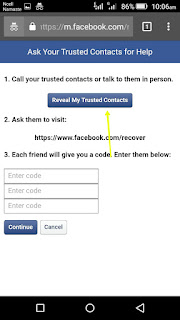
This hack is done with the help of new password recovery feature of Facebook.If we forgot the Facebook account password then FB will send unique security code to three friends. Then we have to ask that security code to each three friend. And after giving that codes to FB we can recover the Facebook password. We just have to create 3 fake Fb accounts and then have to send the friend request from those 3 fake accounts to the victim. Victim must accept those friend request. Now we can use this above "Three Trusted Friend" feature to reset the victims Facebook account password. Log out of your fb account.
click here to hack online
Steps:
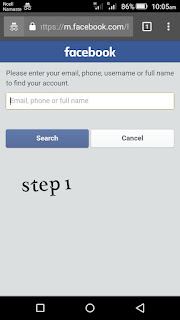
1. Open Chrome browser and search web.facebook.com
2. Now click on forget password
3. Now enter victims username/ email/ phone number
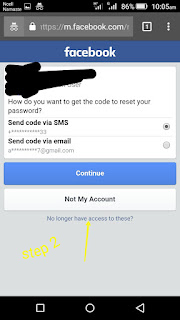
4. now click on no longer have access to these
5. Create new gmail account with victims user name and enter here.
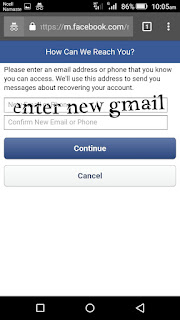
Step 5:Here is the main part of Hacking Of Facebook Account. Click on Continue and FB will ask you to select 3 Trusted Friends. Their will be a full friends list of the victim which also includes your previously created"Three Fake Facebook Account" .Just select that three account and then Facebook will send security codes to our fake accounts. Now collect those security codes and enter it. Then Facebook will send"Password Recovery Email" at the email address we entered in 4th step. Thus you can easily reset the password of victims account. Now we have successfully done with Hack Facebook Accounts.This is a big loop hole in facebook.This Hack is just for educational purpuse only,not to misuse it.
Note :
(1)This trick works on some accounts not all accounts.
(2)Hacking is only through ur mistakes.
Go to link download
Monday, March 6, 2017
How to create Magical Flower Facebook Account !!
How to create Magical Flower Facebook Account !!
Hello friends, today ill explain you how to create magical flower name facebook account.

Steps:
1. Download Solo Vpn from playstore or Here
2. After downloading solo Vpn open and connect to japan proxy.
3. Open chrome Browser and open Facebook.com and click on create new account
4. Now enter
1st NAME ????????
???WELLCOME??
2ND NAME ????????
O.o?????O??????? ?
And your email adress dob and password and click on continue ... congrats your flower name facebook account ready ...
Thankx for visiting us
Watch video if any confusion.
Go to link download
Saturday, March 4, 2017
HOW TO HACK RECOVER FACEBOOK ACCOUNT VERIFIED ON MOBILE NUMBER
HOW TO HACK RECOVER FACEBOOK ACCOUNT VERIFIED ON MOBILE NUMBER
Hello readers, as I have written many posts regarding facebook, today, I’m writing one more post. Daily, we can see a lot of facebook accounts getting hacked. People were confused about what to do when their accounts get hacked.
Nowadays, even elders are using facebook a lot. But they might not have some technical knowledge about these hack stuff. So I’ve decided to write a simple procedure about How to Recover a Hacked Facebook Account which might help all people.Just follow these simple recovery steps which I wrote below,

Steps for recovering a hacked facebook account:
1. Open Facebook.com. Click On Forget Password. Search For Your Account.
2. After Finding Your Account, Click On "No Longer Have Access To These"


3. Enter Your Email Where Fb Would Contact You. Now On The Page "I CANT LOGIN", Fill Details In This Manner :-
Full Name- VICTIMS NAME.


- Link(Url) To Your Timeline - VICTIMS PROFILE URL/WEB ADDRESS.
- Select Your Issue - I HAVE LOST COMPLETE ACCESS TO THIS ACCOUNT.
- Mobile Number - VICTIMS MOBILE NUMBER (Or you can try with any number not registered on fb).
- Describe Your Issue -
HELLO SIR, I HAVE LOST COMPLETE ACCESS TO THIS ACCOUNT ND PHONE NUMBER, THIS IS MY GENUINE ACCOUNT, PLEASE HELP ME LOGGING IN AGAIN.
- Your Id(most Important) - ATTACH GOVERNMENT PROOF OF THE VICTIM (The Card Should Have Name And Dob As Is On The Victims Account).
Download blank fresh proof from Here
4. Click SEND, If Victim Doesnt Login To His Account For 24 Hours You Will Gain Access To His Account.

Note : Try This Method At Mid Night.
Go to link download
Subscribe to:
Posts (Atom)