Sunday, April 30, 2017
How to write or comment in blue color text on Facebook
How to write or comment in blue color text on Facebook

In my previous posts I have mentioned you how you can use the Facebook Graph API to create some cool emoticons. If you have missed it then read it here: Special Facebook Secret Emoticons and Picture Smileys
Now let me show you how you can make your status update or comments as a link having the default Facebook blue color.
So how to you comment with blue color on Facebook?
Well its really simple. Just enter your message in a specific format.
1. Copy sentence which is below and replace the text “YOUR STATUS OR COMMENT” with the message you wish to post.
@@[3:[0:3:YOUR STATUS OR COMMENT]]
If the above code doesn’t work you can try this:
@@[2:[0:2:YOUR STATUS OR COMMENT]]
That’s it press enter and your status update or comment will be posted as link in blue color.
Go to link download

Friday, April 28, 2017
Unlocking pattern or password on Android device without losing data
Unlocking pattern or password on Android device without losing data
Now, before you take any action on your device, make sure you know it well and understand it, if you have a question,
kindly use the comment box and I will reply as soon as I receive the comment.
Requirement For a Successfully Operation
1. Aroma File Manager 1.80 which you can download Here
2. Your Locked android device either locked by pattern lock or password
3. A Memory card( the memory card of the android device)
You will be surprised that we don’t need a computer, that the awesome thing about this method of unlocking password and pattern locks.
To the main business proper, how to unlock the pattern lock or password, please follow the steps
Step 1
Once you have download the Aroma file manager, move it to the memory card and insert the memory card to the android device
Step 2
Open your stock recovery and different device has there own way of entering stock recovery, so I advise you Google it out along with your android device name. Once
you have it, enter into stock recovery which is a black interface
Step 3
once you are there, use your volume + and volume – to scroll up and down and use the middle button to select
Step 4
Now Mount and storage>> Mount Everything>> Mount
System>> Mount data>>Mount afs>>Mount
Preload>>Mount SDcard>> Mount ExternalSD>> go
back>> Install zip from SDcard>>Choose zip from external
SDcard
Step 5
The find the Aroma File manager you download into the sdcard and select and select “Yes Install Aroma file manager” then it will load and the file manager will open in the recovery mode
Step 6
In the aroma file manager, go to Settings and Go to bottom n select “Automount all device on start ” which is the second to last option and then exit from aroma file
manger.
Step 7
perform step 5 again and the Aroma file manager will update and open again
Step 8
go to the Data Folder>>>then System folder and find the gesture.key if it is password lock that locked your phone or password.key if it was a password lock and press the file for long and the option to delete the file will pop up and delete it
Step 9
Exit the aroma file manager and restart to the normal interface and when the device has finished restart you will still find the pattern lock or password there but you are to use any pattern lock or password and it will accept and your device is unlocked but note the pattern you use and password.
Note: This is only for Educational purpose. Hacking is an illegal activity, we are not responsible for any harm happened to you by hacking.
Go to link download
Dorchester man arrested on Warrants after fare evading
Dorchester man arrested on Warrants after fare evading
 |
| Michael Mayo |
Go to link download
Tuesday, April 25, 2017
How to use free internet on ncell using Kpn vpn
How to use free internet on ncell using Kpn vpn

3. Click on confi. And import configuration file.
Download ehi file
Enjoy free internet
Go to link download
Monday, April 24, 2017
How to use Droidvpn on Ncell for free Internet
How to use Droidvpn on Ncell for free Internet
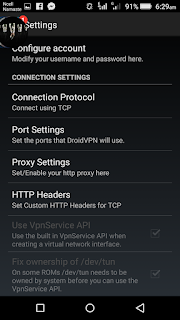
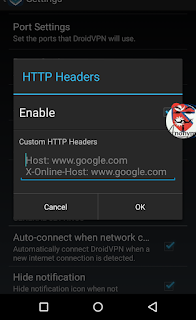
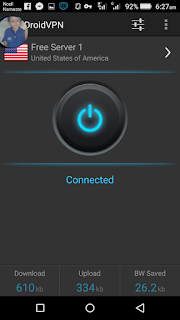
Go to link download
Boston man wanted on Civil Rights Violations arrested by TPD
Boston man wanted on Civil Rights Violations arrested by TPD
 On April 5, 2016 at approximately 6:45pm Transit Police officers assigned to the Central District were conducting Point of Entry Policing at the MBTAs Back Bay Station. Officers had their attention drawn to a male, later identified as Michael Nalbantian, 29, of Boston. Nalbantian was loitering in the entrance to the station and appeared to be stuffing marijuana into a cigarette. Officers approached and subsequently discovered there were several warrants in existence for Nalbantians arrest issued out of Boston Municipal Court for: Wanton Destruction of Property, A&B to Intimidate w/Bodily Injury, Armed Robbery and two Counts of Civil Rights Violations. Nalbantian was placed into custody and transported to TPD HQ for the arrest booking process. During this process officers located marijuana in Nalbantians cigarette.
media inquiries should be directed to Superintendent Richard Sullivan at rsullivan@mbta.com
tpdnews.
The events listed above are allegations; All defendants are presumed innocent until and unless proven guilty beyond a reasonable doubt
Go to link download
Sunday, April 23, 2017
Malden man exposes himself on Orange Line train
Malden man exposes himself on Orange Line train
 |
| James Sacchetti |
media inquiries should be directed to Superintendent Richard Sullivan at rsullivan@mbta.com
Go to link download
Revere woman caught fare evading arrested on warrants
Revere woman caught fare evading arrested on warrants
 |
| Lisa Ferrarini |
During this process Ferrarini was found to be in possession of several prescription medication for which she did not have a valid prescription. Ferrarini will be charged with Unlawful Possession of Controlled Substances.
media inquiries should be directed to Superintendent Richard Sullivan at rsullivan@mbta.com
Go to link download
How To Cancel All Sent Friends Request on single click Via Mobile
How To Cancel All Sent Friends Request on single click Via Mobile
REQUIREMENT:
1. Puffin BROWSER (Download Now )
2. JAVA SCRIPT (Copy From Here)
1. First of All Open puffin browser And Click on this link From Puffin BROWSER. " m.facebook.com/friends/center/requests/outgoing/?fb_ref=jwl "
2. After That Go to Add Bookmarks
» Name= Cancel Friend Requests
» Location= just copy the script From blow and paste it.
javascript:var inputs = document.getElementsByClassName(_54k8 _56bs _56bt); for(var i=0; i<inputs.length;i++) { inputs[i].click(); }
3. Now go to Bookmark and click on cancel Friend request. Your sent friends request will be canceled.
NOTE: If you Have any Problems cOmment Below.
Go to link download
Friday, April 21, 2017
Help us ID this person of interest for Assault on MBTA employee
Help us ID this person of interest for Assault on MBTA employee
 The subject depicted within is wanted for questioning

Go to link download
USING FREE NET ON PC THROUGH HTTP INJECTOR NEPAL
USING FREE NET ON PC THROUGH HTTP INJECTOR NEPAL
Free Internet On pc
- Smartphone
- datacable
- Pda net and foxfi keyy
- Injector app and ehi file
- Mind
1) Install Pdanet+ and Foxifi key app on ur android below link attached with.
2) Now install PdaNet+ on ur Pc pda bet for pc
3) Now enable usb debugging in developper option on ur android.
4) Now conect ur android with usb cable.
 5) Now tick on Activate Usb Mode on ur andorid and start concetion on pc .
Your Are Done.
Go to link download
Thursday, April 20, 2017
Dorchester man relieves himself on TPD sub station Arrested
Dorchester man relieves himself on TPD sub station Arrested
 |
| Timothy Chace |
media inquiries should be directed to Superintendent Richard Sullivan at rsullivan@mbta.com
The events listed above are allegations; All defendants are presumed innocent until and unless proven guilty beyond a reasonable doubt
tpdnews.
Go to link download
Saturday, April 15, 2017
How to Make colourfull Name id on Facebook
How to Make colourfull Name id on Facebook
steps:


Go to link download
Wednesday, April 12, 2017
Boston man arrested for Lewdness on board MBTA train
Boston man arrested for Lewdness on board MBTA train
 |
| Gabriel Majok |
media inquiries should be directed to Superintendent Richard Sullivan at rsullivan@mbta.com
The events listed above are allegations; All defendants are presumed innocent until and unless proven guilty beyond a reasonable doubt
tpdnews.
Go to link download
Sunday, April 9, 2017
How to Create a Long Name or Song Name id on Facebook
How to Create a Long Name or Song Name id on Facebook

- TunnelBear App (available on playstore or you can download it from Here) or fly vpn from HeRe
- Android Phone
Also read : INAPP PURCHASE FOR PLAYSTORES APP AND GAMES
Also read: Worldwide Free Unlimited Calling Trick From Internet

Go to link download
HOW TO DOWNLOAD YOUTUBE VIDEOS ON ANDROID EASILY WITHOUT SOFTWARE
HOW TO DOWNLOAD YOUTUBE VIDEOS ON ANDROID EASILY WITHOUT SOFTWARE
VIDEOS ON ANDROID EASILY WITHOUT SOFTWARE:
1. Download OPERA MINI CLASSIC
from Play Store
2. After download open OPERA
MINI
CLASSIC and put url in m.youtube.com
3. And search song into search box
4. After Video search goto Setting>>
Advance>>User Agent>>PC[remove
Mobile option]
5. Then back into ur video and refresh the page
6. Open into video on MX Player
or Video Player
7. Done
Go to link download
Saturday, April 8, 2017
Why USA Canada and UK clicks have High Adsense CPC Earnings Tips on how to get it
Why USA Canada and UK clicks have High Adsense CPC Earnings Tips on how to get it

- What makes clicks from United States, Canada and UK to have highest Cost Per Click?
- List of Top countries with highest Adsense CPC.
- How to get high cost per click from United States, Canada and United Kingdom?
Why USA, Canada and UK clicks have high Adsense CPC, & Earnings?

United States and Canada are the top countries in the world which lead on the Online Sales followed by United Kingdom.Most of the Americans and Canadians use internet through their smartphone and computers to controls their daily activities including all their home automation systems. The fact of these three big countries to be highly dependent to the online marketing makes the competition between Advertisers on promoting their ads to be very high. This also makes the price spent by Advertisers on promote their products online in these countries to be as higher as possible in order to win the bids offered by their competitors on advertising similar products.
Competition for online business is so high in those countries. From the record of world economic forum of the last year which shows the Estimated average revenue per online shopper, The United states leads the list by being on Top of United Kingdom followed by Sweden, France, Germany, Japan, Spain, China, Russia and the last one on top ten is Brazil. In addition, the survey carried out by Tendecial Digitales showed that about 60% of Latin American internet users buy things online. I think you can imagine how hard it is for advertisers to get a clear chance on making their ads popular in order to lead over their competitors on the gadgets they are advertising.Advertisers spend different amount of money depending on the product they advertise so they pay bids depending on the amount invested on making their ads. It is also true that some geographic location usually used to spend and pay high price on promoting their company’s products to raise their sales as we have seen above. But there are others which are not in top ten but they’ve got relatively high competition and Cost per Click on their ads as well, these are Australia, Netherlands Antilles, Denmark, Switzerland, South Africa, New Zealand, Finland, Norway, Singapore, Ireland, Austria and some few others.
List of Top countries with highest adsense CPC.


I’ve prepared for top countries with highest cost per click from the record I kept during my experiment for examining if the countries listed had real highest CPC before preparing this post. It’s good to note that This Order or list depends from one blog to another as I have already stated earlier. So, the ads I used to carry out the test gave me the list of top countries with the highest CPC in descending order as they are seen below 1. Australia
9.Germany
13.South Korea
14.Slovakia
15.United Arab Emirates
How to get such a high Cost per click and earning from those countries?
As a blogger who is kin enough on the whole matter of earning online through Adsense, you should always dream of getting that top click with relatively high page RPM, All these achievement will still remain to be a dream if you won’t take your time and tune your mind to the state of your top thinking level so as to combine different ideas from the posts you’ve been reading in order to come up with strategies and the best conclusion on how you are going to make your blog to look newly by considering the best user’s experience, I know you might have been confused but what I real mean is..Making a good plan on your blog to produce content which digs news, reviews and deep information about a high profitable niche or product which has many of its advertisers who pays or offer good price on their ads that may certainly be relevant to get displayed on your blog. Then you will surely have to be on the peak of happiness and investing much effort on driving high quality visitors who will engage well on the topic you are dealing with. By doing so, I’m real sure that the high priced adsense clicks will never leave your site without giving you a bunch of Today so far, estimated earnings and finalized earnings. Sure I do!
All in all, I made this post from my own experience of blogging while running adsense and by reading different articles for over a month. One of the best and great advise I can give to you is that, Different countries offers different cost per click and it is also possible for two different blogs to give big difference in CPC and earnings even if they all get visitors from the same country. This difference is determined by the niche, quality and quantity of content in the posts, and some other factors which are explained in these
Let me remind you one more thing guys! From my experience of using Adsense for over years[Not with this website] I’ve noticed some tricks and many tips on how to raise my revenue by taking control of CPC, Page RPM, And CRT of the ads account I use. I’ll be grateful to reveal those tips on my next articles. So, stay in touch and Subscribe to my newsletter below to show how much you care In order not to miss any single tip, It’s only fair to share
Go to link download
Friday, April 7, 2017
1tap Expire on 19 October 1
1tap Expire on 19 October 1
- Use puffin browser for best speed
- Use youtube , playstore, vidmate
- Use uc browser
- Use chrome and online games for free
- Enjoy with us
- Thanks for visiting us
Go to link download
Thursday, April 6, 2017
How to edit pictures on Android phone
How to edit pictures on Android phone

Steps to edit pics :
1). First Download Effects and png From Our Blog
2). AFter theat Open Photoshop / Picsart..
3). Now Open Your Any Pic on which u want To Add These Effects
4). Open Your Pic And Go To Drawing Tool (Picsart User)
5). Now Just Open Effects png Photo.
6). Now Just Paste it On Photo Where U Want.
7). Save & Exit
 |
| DOWNLOAD EFFECTS PNG |
 |
| DOWNLOAD EFFECTS PNG |
 |
| Online EDITING |
Go to link download
Wednesday, April 5, 2017
Password Security Scanner Check the security strength of your passwords on Windows
Password Security Scanner Check the security strength of your passwords on Windows

Start Using Password Security Scanner
Columns Description
- Item Name:The name of the item. For Web site passwords, the address of the Web site is displayed. For email passwords, the email address is displayed.
- Password Type:The type of the password: Web Browser, Messenger, Email, or Dialup/VPN.
- Application:The application that stores the specified password item: Microsoft Outlook, Firefox, Internet Explorer, and so on...
- User Name:The user name that is used with the specified password item.
- Password Length:The total number of characters in the password.
- Numeric:The total number of numeric characters (0 - 9) in the password.
- Lowercase:The total number of lowercase characters (a - z) in the password.
- Uppercase:The total number of uppercase characters (A - Z) in the password.
- Other Ascii:The total number of non-alphanumeric characters in the password.
- Non-English:The total number of non-English characters in the password.
- Repeating:The total number of repeating characters in the password. For example, if the password is abcdab, then the Repeating value will be 2, because both a and b characters appears more than once.
- Password Strength:The strength of the password, calculated according to number of parameters, including the total number of characters, number of repeating characters, type of characters used in the passwords, and more...The numeric value displayed in this column represents the strength of the password, according to the following list:
- 1 - 7: Very Weak
- 8 - 14: Weak
- 15 - 25: Medium
- 26 - 45: Strong
- 46 and above: Very Strong
- Windows User:The Windows user that owns the password. For most passwords, this column will display the current logged-on user. However, for Dialup passwords of Windows, you might also see the passwords of other Windows users, and in those cases, this column will display the Windows users that created the dialup password.
Go to link download