Showing posts with label scanner. Show all posts
Showing posts with label scanner. Show all posts
Saturday, April 29, 2017
Bing Dork Scanner Tool to extract urls from a bing search
Bing Dork Scanner Tool to extract urls from a bing search
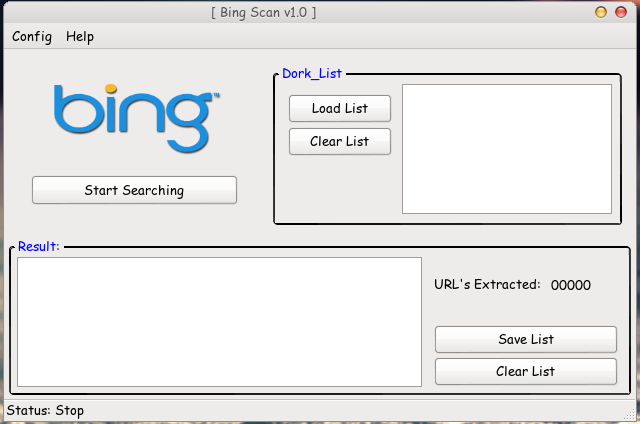
This is a simple script with GUI, to extract urls from a bing search.
Support only HTTP proxy.
Required Perl Modules:
- LWP
- Gtk2
- Glib
- uft8
- threads
- threads::shared
- URI::Escape
Download Bing Dork Scanner
Go to link download

Tuesday, April 25, 2017
Netsparker v3 5 5 Web Application Security Scanner
Netsparker v3 5 5 Web Application Security Scanner

Netsparker Web Application Security Scanner can find and report web application vulnerabilities such as SQL Injection and Cross-site Scripting (XSS) and security issues on all web applications and websites regardless of the platform and the technology they are built on.
Netsparker is very easy to use and its unique detection and safe exploitation techniques allow it to be dead accurate in reporting hence it is the first and only False Positive Free web vulnerability scanner, therefore users can focus on remediating reported vulnerabilities and security issues without wasting time on learning how to use the web vulnerability scanner or verify its findings.
NEW FEATURES
* New option available to specify the type of parameter when configuring URL rewrite rules, e.g. numeric, date, alphanumeric
IMPROVEMENTS
* Improved the performance of the DOM Parser
* Improved the performance of the DOM cross-site scripting scanner
* Optimized DOM XSS Scanner to avoid scanning pages with same source code
* Changed the default HTTP User agent string of built-in policies to Chrome web browser User agent string
* Improved selected element simulation for select HTML elements
* Added new patterns for Open Redirect engine
FIXES
* Fixed a bug in WSDL parser which prevents web service detection if XML comments are present before the definitions tag
* Fixed a bug in WSDL parser which prevents web service detection if an external schema request gets a 404 not found response
* Fixed a bug that occurs when custom URL rewrite rules do not match the URL with injected attack pattern and request is not performed
* Fixed a configure form authentication wizard problem where the web browser does not load the page if the target site uses client certificates
* Fixed a crash in configure form authentication wizard that occurs when HTML source code contains an object element with data: URL scheme is requested
* Fixed a bug in DOM Parser where events are not simulated for elements inside frames
* Fixed a cookie parsing bug where a malformed cookie was causing an empty HTTP response
Download Netsparker v3.5.5
Go to link download
Monday, April 24, 2017
Nmap 6 47 Free Security Scanner For Network Exploration Security Audits
Nmap 6 47 Free Security Scanner For Network Exploration Security Audits

Nmap is a utility for port scanning large networks, although it works fine for single hosts. Sometimes you need speed, other times you may need stealth. In some cases, bypassing firewalls may be required. Not to mention the fact that you may want to scan different protocols (UDP, TCP, ICMP, etc.). Nmap supports Vanilla TCP connect() scanning, TCP SYN (half open) scanning, TCP FIN, Xmas, or NULL (stealth) scanning, TCP ftp proxy (bounce attack) scanning, SYN/FIN scanning using IP fragments (bypasses some packet filters), TCP ACK and Window scanning, UDP raw ICMP port unreachable scanning, ICMP scanning (ping-sweep), TCP Ping scanning, Direct (non portmapper) RPC scanning, Remote OS Identification by TCP/IP Fingerprinting, and Reverse-ident scanning. Nmap also supports a number of performance and reliability features such as dynamic delay time calculations, packet timeout and retransmission, parallel port scanning, detection of down hosts via parallel pings.
Nmap is ...
- Flexible: Supports dozens of advanced techniques for mapping out networks filled with IP filters, firewalls, routers, and other obstacles. This includes many port scanning mechanisms (both TCP & UDP), OS detection, version detection, ping sweeps, and more. See the documentation page.
- Powerful: Nmap has been used to scan huge networks of literally hundreds of thousands of machines.
- Portable: Most operating systems are supported, including Linux, Microsoft Windows, FreeBSD, OpenBSD, Solaris, IRIX, Mac OS X, HP-UX, NetBSD, Sun OS, Amiga, and more.
- Easy: While Nmap offers a rich set of advanced features for power users, you can start out as simply as "nmap -v -A targethost". Both traditional command line and graphical (GUI) versions are available to suit your preference. Binaries are available for those who do not wish to compile Nmap from source.
- Free: The primary goals of the Nmap Project is to help make the Internet a little more secure and to provide administrators/auditors/hackers with an advanced tool for exploring their networks. Nmap is available for free download, and also comes with full source code that you may modify and redistribute under the terms of the license.
- Well Documented: Significant effort has been put into comprehensive and up-to-date man pages, whitepapers, tutorials, and even a whole book! Find them in multiple languages here.
- Supported: While Nmap comes with no warranty, it is well supported by a vibrant community of developers and users. Most of this interaction occurs on the Nmap mailing lists. Most bug reports and questions should be sent to the nmap-dev list, but only after you read the guidelines. We recommend that all users subscribe to the low-traffic nmap-hackers announcement list. You can also find Nmap on Facebook and Twitter. For real-time chat, join the #nmap channel on Freenode or EFNet.
- Acclaimed: Nmap has won numerous awards, including "Information Security Product of the Year" by Linux Journal, Info World and Codetalker Digest. It has been featured in hundreds of magazine articles, several movies, dozens of books, and one comic book series. Visit the press pagefor further details.
- Popular: Thousands of people download Nmap every day, and it is included with many operating systems (Redhat Linux, Debian Linux, Gentoo, FreeBSD, OpenBSD, etc). It is among the top ten (out of 30,000) programs at the Freshmeat.Net repository. This is important because it lends Nmap its vibrant development and user support communities.
Changelog Nmap 6.47:
o Integrated all of your IPv4 OS fingerprint submissions since June 2013
 (2700+ of them). Added 366 fingerprints, bringing the new total to 4485.
 Additions include Linux 3.10 - 3.14, iOS 7, OpenBSD 5.4 - 5.5, FreeBSD 9.2,
 OS X 10.9, Android 4.3, and more. Many existing fingerprints were improved.
 Highlights: http://seclists.org/nmap-dev/2014/q3/325 [Daniel Miller]

o (Windows, RPMs) Upgraded the included OpenSSL to version 1.0.1i. [Daniel Miller]

o (Windows) Upgraded the included Python to version 2.7.8. [Daniel Miller]

o Removed the External Entity Declaration from the DOCTYPE in Nmaps XML. This
 was added in 6.45, and resulted in trouble for Nmap XML parsers without
 network access, as well as increased traffic to Nmaps servers. The doctype
 is now:


o [Ndiff] Fixed the installation process on Windows, which was missing the
 actual Ndiff Python module since we separated it from the driver script.
 [Daniel Miller]

o [Ndiff] Fixed the ndiff.bat wrapper in the zipfile Windows distribution,
 which was giving the error, "Microsoft was unexpected at this time." See
 https://support.microsoft.com/kb/2524009 [Daniel Miller]

o [Zenmap] Fixed the Zenmap .dmg installer for OS X. Zenmap failed to launch,
 producing this error:
 Could not import the zenmapGUI.App module:
 dlopen(/Applications/Zenmap.app/Contents/Resources/lib/python2.6/lib-dynload/glib/_glib.so, 2):
 Library not loaded: /Users/david/macports-10.5/lib/libffi.5.dylib
 Referenced from:
 /Applications/Zenmap.app/Contents/Resources/lib/python2.6/lib-dynload/glib/_glib.so
 Reason: image not found.

o [Ncat] Fixed SOCKS5 username/password authentication. The password length was
 being written in the wrong place, so authentication could not succeed.
 Reported with patch by Pierluigi Vittori.

o Avoid formatting NULL as "%s" when running nmap --iflist. GNU libc converts
 this to the string "(null)", but it caused segfault on Solaris. [Daniel Miller]

o [Zenmap][Ndiff] Avoid crashing when users have the antiquated PyXML package
 installed. Python tries to be nice and loads it when we import xml, but it
 isnt compatible. Instead, we force Python to use the standard library xml
 module. [Daniel Miller]

o Handle ICMP admin-prohibited messages when doing service version detection.
 Crash reported by Nathan Stocks was: Unexpected error in NSE_TYPE_READ
 callback. Error code: 101 (Network is unreachable) [David Fifield]

o [NSE] Fix a bug causing http.head to not honor redirects. [Patrik Karlsson]

o [Zenmap] Fix a bug in DiffViewer causing this crash:
 TypeError: GtkTextBuffer.set_text() argument 1 must be string or read-only
 buffer, not NmapParserSAX
 Crash happened when trying to compare two scans within Zenmap. [Daniel Miller]
Download Nmap 6.47
Go to link download
Thursday, April 20, 2017
WiFi software Acrylic WiFi Free v2 1 WiFi analyzer software and WLAN scanner for network analysts
WiFi software Acrylic WiFi Free v2 1 WiFi analyzer software and WLAN scanner for network analysts

Acrylic WiFi Professional is the best WiFi analyzer software to identify access points and wifi channels, and to analyze and resolve incidences on 802.11a/b/g/n/ac wireless networks in real time.
It is a perfect tool for advanced users and professional WiFi network analysts and administrators to control their office wireless network performance and who is connected to it, identify access point data transmission speeds, andD optimize their company’s WiFi network channels.
Access WiFi network detailed information, including hidden wireless networks, and make the most of unique features such as monitor mode to capture and analyze all wireless device traffic, device viewer, equipment inventory, and WiFi speed analysis.
WiFi analyzer software features
Resolve incidences and verify the good performance of your wireless networks with a unique set of functionalities not available in any other software today.
Download WiFi software Acrylic WiFi Free v2.1
Go to link download
Wednesday, April 19, 2017
ZMap 1 2 1 The Internet Scanner
ZMap 1 2 1 The Internet Scanner

ZMap is an open-source network scanner that enables researchers to easily perform Internet-wide network studies. With a single machine and a well provisioned network uplink, ZMap is capable of performing a complete scan of the IPv4 address space in under 45 minutes, approaching the theoretical limit of gigabit Ethernet.
ZMap can be used to study protocol adoption over time, monitor service availability, and help us better understand large systems distributed across the Internet.
While ZMap is a powerful tool for researchers, please keep in mind that by running ZMap, you are potentially scanning the ENTIRE IPv4 address space and some users may not appreciate your scanning.
Command Line Arguments
Common Options
These options are the most common options when performing a simple scan. We note that some options are dependent on the probe module or output module used (e.g. target port is not used when performing an ICMP Echo Scan).
- -p, --target-port=port
- TCP port number to scan (e.g. 443)
- -o, --output-file=name
- Write results to this file. Use - for stdout
- -b, --blacklist-file=path
- File of subnets to exclude, in CIDR notation (e.g. 192.168.0.0/16), one-per line. It is recommended you use this to exclude RFC 1918 addresses, multicast, IANA reserved space, and other IANA special-purpose addresses. An example blacklist file is provided in conf/blacklist.example for this purpose.
Scan Options
- -n, --max-targets=n
- Cap the number of targets to probe. This can either be a number (e.g.
-n 1000) or a percentage (e.g.-n 0.1%) of the scannable address space (after excluding blacklist) - -N, --max-results=n
- Exit after receiving this many results
- -t, --max-runtime=secs
- Cap the length of time for sending packets
- -r, --rate=pps
- Set the send rate in packets/sec
- -B, --bandwidth=bps
- Set the send rate in bits/second (supports suffixes G, M, and K (e.g.
-B 10Mfor 10 mbps). This overrides the--rateflag. - -c, --cooldown-time=secs
- How long to continue receiving after sending has completed (default=8)
- -e, --seed=n
- Seed used to select address permutation. Use this if you want to scan addresses in the same order for multiple ZMap runs.
- --shards=n
- Split the scan up into N shards/partitions among different instances of zmap (default=1). When sharding,
--seedis required - --shard=n
- Set which shard to scan (default=0). Shards are indexed in the range [0, N), where N is the total number of shards. When sharding
--seedis required. - -T, --sender-threads=n
- Threads used to send packets (default=1)
- -P, --probes=n
- Number of probes to send to each IP (default=1)
- -d, --dryrun
- Print out each packet to stdout instead of sending it (useful for debugging)
Network Options
- -s, --source-port=port|range
- Source port(s) to send packets from
- -S, --source-ip=ip|range
- Source address(es) to send packets from. Either single IP or range (e.g. 10.0.0.1-10.0.0.9)
- -G, --gateway-mac=addr
- Gateway MAC address to send packets to (in case auto-detection does not work)
- -i, --interface=name
- Network interface to use
Probe Options
ZMap allows users to specify and write their own probe modules for use with ZMap. Probe modules are responsible for generating probe packets to send, and processing responses from hosts.
- --list-probe-modules
- List available probe modules (e.g. tcp_synscan)
- -M, --probe-module=name
- Select probe module (default=tcp_synscan)
- --probe-args=args
- Arguments to pass to probe module
- --list-output-fields
- List the fields the selected probe module can send to the output module
Output Options
ZMap allows users to specify and write their own output modules for use with ZMap. Output modules are responsible for processing the fieldsets returned by the probe module, and outputing them to the user. Users can specify output fields, and write filters over the output fields.
- --list-output-modules
- List available output modules (e.g. tcp_synscan)
- -O, --output-module=name
- Select output module (default=csv)
- --output-args=args
- Arguments to pass to output module
- -f, --output-fields=fields
- Comma-separated list of fields to output
- --output-filter
- Specify an output filter over the fields defined by the probe module
Additional Options
- -C, --config=filename
- Read a configuration file, which can specify any other options.
- -q, --quiet
- Do not print status updates once per second
- -g, --summary
- Print configuration and summary of results at the end of the scan
- -v, --verbosity=n
- Level of log detail (0-5, default=3)
- -h, --help
- Print help and exit
- -V, --version
- Print version and exit
Download ZMap 1.2.1
Go to link download
Wednesday, April 5, 2017
Netsparker v3 5 Web Application Security Scanner
Netsparker v3 5 Web Application Security Scanner

Netsparker Web Application Security Scanner can find and report web application vulnerabilities such as SQL Injection and Cross-site Scripting (XSS) and security issues on all web applications and websites regardless of the platform and the technology they are built on.
Netsparker is very easy to use and its unique detection and safe exploitation techniques allow it to be dead accurate in reporting hence it is the first and only False Positive Free web vulnerability scanner, therefore users can focus on remediating reported vulnerabilities and security issues without wasting time on learning how to use the web vulnerability scanner or verify its findings.
Changelog - 3.5.3
NEW FEATURES
* DOM based cross-site scripting vulnerability scanning* Chrome based web browser engine for DOM parsing
* URL rewrite rules configuration wizard (to scan parameters in URLs)
* "Ignore Vulnerability from Scan" option to exclude vulnerabilities from reports
NEW SECURITY TESTS
* Nginx web server Out-of-date version check* Perl possible source code disclosure
* Python possible source code disclosure
* Ruby possible source code disclosure
* Java possible source code disclosure
* Nginx Web Server identification
* Apache Web Server identification
* Java stack trace disclosure
IMPROVEMENTS
* Improved the correctness and coverage of Remote Code Execution via Local File Inclusion vulnerabilities* Improved cross-site scripting vulnerability confirmation patterns
* Added support for viewing JSON arrays in document roots in request/response viewers
* Added support for Microsoft Office ACCDB database file detection
* Improved DOM parser to exclude non-HTML files
* Improved PHP Source Code Disclosure vulnerability detection
* Improved Nginx Version Disclosure vulnerability template
* Improved IIS 8 Default Page detection
* Improved Email List knowledgebase report to include generic email addresses
* Improved Configure Form Authentication wizard by replacing embedded record browser with a Chrome based browser
* Improved the form authentication configuration wizard to handle cases where Basic/NTLM/Digest is used in conjunction with Form Authentication
* Added a cross-site scripting attack pattern which constructs a valid XHTML in order to trigger the XSS
* Added double encoded attack groups in order to reduce local file inclusion vulnerability confirmation requests
* Added status bar label which displays current VDB version and VDB version update notifications
* Added login activity indicator to Scan Summary Dashboard
* Added a new knowledgebase out-of-scope reason for links which exceed maximum depth
* Updated external references in cross-site scripting vulnerability templates
* Improved DOM parser by providing current cookies and referer to DOM/JavaScript context
* Added several new DOM events to simulate including keyboard events
* Improved the parsing of "Anti-CSRF token field names" setting by trimming each individual token name pattern
* Added support for simulating DOM events inside HTML frames/iframes
* Consolidated XSS exploitation function name (netsparker()) throughout all the areas reported
* Removed redundant semicolon followed by waitfor delay statements from time based SQLi attack patterns to bypass more blacklistings
* Changed default user-agent string to mimic a Chrome based browser
* Improved LFI extraction file list to extract files from target system according to detected OS
* Removed outdated PCI 1.2 classifications
FIXES
* Fixed indentation problem of bullets in knowledgebase reports* Fixed path disclosure reports in MooTools JavaScript file
* Fixed KeyNotFoundException occurs when a node from Sitemap tree is clicked
* Fixed NullReferenceException thrown from Boolean SQL Injection Engine
* Fixed an issue in WebDav Engine where an extra parameter is added when requesting with Options method
* Fixed a bug where LFI exploitation does not work for double encoded paths
* Fixed a bug in Export file dialog where .nss extension isnt appended if file name ends with a known file extension
* Fixed a bug in Configure Form Authentication wizard where the number of scripts loaded shows incorrectly
* Fixed a bug which occurs while retesting with CSRF engine
* Fixed a bug where retest does not work after loading a saved scan session
* Fixed a bug where Netsparker reports out of date PHP even though PHP is up to date
* Fixed a UI hang where Netsparker tries to display a binary response in Browser View tab
* Fixed an ArgumentNullException thrown when clicking Heartbleed vulnerability
* Fixed a bug where Netsparker makes requests to DTD URIs in XML documents
* Fixed a bug in Scan Policy settings dialog where list of user agents are duplicated
* Fixed a typo in ViewState MAC Not Enabled vulnerability template
* Fixed a bug in auto updater where the updater doesnt honour the AutoPilot and Silent command line switches
* Fixed XSS exploit generation code to handle cases where input name is "submit"
* Fixed a bug that prevents Netsparker.exe process from closing if you try to close Netsparker immediately after starting a new scan
* Fixed a UI hang happens when the highlighted text is huge in response source code
* Fixed issues with decoded HTML attribute values in text parser
* Fixed session cookie path issues according to how they are implemented in modern browsers
* Fixed scan stuck at re-crawling issue for imported scan sessions
* Fixed highlighting issues for possible XSS vulnerabilities
* Fixed a crash due to empty/missing URL value for form authentication macro requests
* Fixed a NullReferenceException in Open Redirect Engine which occurs if redirect response is missing Location header
* Fixed an error in authentication macro sequence player happens when the request URI is wrong or missing
Download Netsparker v3.5
Go to link download
Password Security Scanner Check the security strength of your passwords on Windows
Password Security Scanner Check the security strength of your passwords on Windows

This utility scans the passwords stored by popular Windows applications (Microsoft Outlook, Internet Explorer, Mozilla Firefox, and more...) and displays security information about all these passwords. The security information of every stored password includes the total number of characters, number of numeric characters, number of lowercase/uppercase characters, number of repeating characters, and password strength. You can use this tool to determine whether the passwords used by other users are secured enough, without watching the passwords themselves.
Start Using Password Security Scanner
Password Security Scanner doesnt require any installation process or additional dll files. In order to start using it, simply run the executable file - PasswordScan.exe
After you run PasswordScan.exe, Password Security Scanner scans the passwords stored on your system, and then displays the security information of all found passwords inside the main window.
You can also go to the Advanced Options window (F9) and choose to displays only insecure passwords with low number of characters or with low password strength value.
Columns Description
- Item Name:The name of the item. For Web site passwords, the address of the Web site is displayed. For email passwords, the email address is displayed.
- Password Type:The type of the password: Web Browser, Messenger, Email, or Dialup/VPN.
- Application:The application that stores the specified password item: Microsoft Outlook, Firefox, Internet Explorer, and so on...
- User Name:The user name that is used with the specified password item.
- Password Length:The total number of characters in the password.
- Numeric:The total number of numeric characters (0 - 9) in the password.
- Lowercase:The total number of lowercase characters (a - z) in the password.
- Uppercase:The total number of uppercase characters (A - Z) in the password.
- Other Ascii:The total number of non-alphanumeric characters in the password.
- Non-English:The total number of non-English characters in the password.
- Repeating:The total number of repeating characters in the password. For example, if the password is abcdab, then the Repeating value will be 2, because both a and b characters appears more than once.
- Password Strength:The strength of the password, calculated according to number of parameters, including the total number of characters, number of repeating characters, type of characters used in the passwords, and more...The numeric value displayed in this column represents the strength of the password, according to the following list:
- 1 - 7: Very Weak
- 8 - 14: Weak
- 15 - 25: Medium
- 26 - 45: Strong
- 46 and above: Very Strong
- Windows User:The Windows user that owns the password. For most passwords, this column will display the current logged-on user. However, for Dialup passwords of Windows, you might also see the passwords of other Windows users, and in those cases, this column will display the Windows users that created the dialup password.
Download Password Security Scanner
Go to link download
Monday, March 13, 2017
FuckShitUp Multi Vulnerabilities Scanner written in PHP
FuckShitUp Multi Vulnerabilities Scanner written in PHP

Basically, FSU is bunch of tools written in PHP-CLI. Using build-in functions, you are able to grab urls using search engines - and so, dork for interesting files and full path disclosures. Using list of urls, scanner will look for Cross Site Scripting, Remote File Inclusion, SQL Injection and Local File Inclusion vulnerabilities. It is able to perform mass bruteforce attacks for specific range of hosts, or bruteforce ssh with specific username taken from FPD. Whenever something interesting will be found, like vulnerability or broken auth credentials, data will be saved in .txt files - just like urls, and any other files. FSU is based on PHP and text files, its still under construction so i am aware of any potential bugs. Principle of operation is simple.
More urls -> more vulns. For educational purposes only.
Intro
- Data grabbing:
- URLs (geturl/massurl) -> (scan)
- Configs, Databases, SQLis (dork)
- Full Path Disclosures / Users (fpds) -> (brutefpds)
- Top websites info (top)
- Massive scanning
- XSS, SQLi, LFI, RFI (scan)
- FTP, SSH, DBs, IMAP (multibruter)
- Accurate SSH bruteforce (brutefpds)
Plan
- Web Apps
- Grab urls via geturl or massurl (massurl requires list of tags as file)
- Scan urls parameters for vulns with scan
- Servers
- Pick target, get ip range
- Scan for services on each IP and bruteforce with multibruter
- Grab full path disclosures, and so linux usernames
- Perform SSH bruteforce for specific user with brutefpds
- Info grabbing
- Use dork for automatic dorking
- Use fpds for full path disclosure grabbing
- Use search for searching someone in ur databases
- Use top for scanning all top websites of specific nation
- Others
- Stat shows actual statistics and informations
- Show display specific file
- Clear and filter - remove duplicates, remove blacklisted urls
Others
MultiBrtuer requirements (php5):
- php5-mysql - for mysql connections
- php5-pgsql - for postgresql connections
- libssh2-php - for ssh connections
- php5-sybase - for mssql connections
- php5-imap - for imap connections
TODO:
- Fix problems with grabbing large amount of urls
- More search engines
- SQL Injector
- RFI shell uploader
- FSU is not secure as it should be
Download FuckShitUp
Go to link download
Thursday, March 9, 2017
Softperfect Network Scanner Full Version Free Download Free2PC
Softperfect Network Scanner Full Version Free Download Free2PC
Softperfect Network Scanner Full Version Free Download Free2PC
Go to link download
Wednesday, March 8, 2017
MASSCAN Mass IP port scanner fastest Internet port scanner
MASSCAN Mass IP port scanner fastest Internet port scanner

This is the fastest Internet port scanner. It can scan the entire Internet in under 6 minutes, transmitting 10 million packets per second.
It produces results similar to
nmap, the most famous port scanner. Internally, it operates more like scanrand, unicornscan, and ZMap, using asynchronous transmission. The major difference is that its faster than these other scanners. In addition, its more flexible, allowing arbitrary address ranges and port ranges.NOTE: masscan uses a custom TCP/IP stack. Anything other than simple port scans will cause conflict with the local TCP/IP stack. This means you need to either use the
-S option to use a separate IP address, or configure your operating system to firewall the ports that masscan uses.This tool is free, but consider funding it here: 1MASSCANaHUiyTtR3bJ2sLGuMw5kDBaj4T
Building
On Debian/Ubuntu, it goes something like this:$ sudo apt-get install git gcc make libpcap-dev
$ git clone https://github.com/robertdavidgraham/masscan
$ cd masscan
$ make
This puts the program in the
masscan/bin subdirectory. Youll have to manually copy it to something like /usr/local/bin if you want to install it elsewhere on the system.The source consists of a lot of small files, so building goes a lot faster by using the multi-threaded build:
$ make -j
While Linux is the primary target platform, the code runs well on many other systems. Heres some additional build info:
- Windows w/ Visual Studio: use the VS10 project
- Windows w/ MingGW: just type
make - Windows w/ cygwin: wont work
- Mac OS X /w XCode: use the XCode4 project
- Mac OS X /w cmdline: just type
make - FreeBSD: type
gmake - other: I dont know, dont care
Usage
Usage is similar tonmap. To scan a network segment for some ports:# masscan -p80,8000-8100 10.0.0.0/8
This will:
- scan the 10.x.x.x subnet, all 16 million addresses
- scans port 80 and the range 8000 to 8100, or 102 addresses total
- print output to
<stdout>that can be redirected to a file
--echo feature. This dumps the current configuration and exits. This output can be used as input back into the program:# masscan -p80,8000-8100 10.0.0.0/8 --echo > xxx.conf
# masscan -c xxx.conf --rate 1000
Download MASSCAN
Go to link download
Arachni v1 0 Web Application Security Scanner Framework
Arachni v1 0 Web Application Security Scanner Framework

Arachni is an Open Source, feature-full, modular, high-performance Ruby framework aimed towards helping penetration testers and administrators evaluate the security of web applications.
It is smart, it trains itself by monitoring and learning from the web applications behavior during the scan process and is able to perform meta-analysis using a number of factors in order to correctly assess the trustworthiness of results and intelligently identify (or avoid) false-positives.
Unlike other scanners, it takes into account the dynamic nature of web applications, can detect changes caused while travelling through the paths of a web application’s cyclomatic complexity and is able to adjust itself accordingly. This way, attack/input vectors that would otherwise be undetectable by non-humans can be handled seamlessly.
Moreover, due to its integrated browser environment, it can also audit and inspect client-side code, as well as support highly complicated web applications which make heavy use of technologies such as JavaScript, HTML5, DOM manipulation and AJAX.
Finally, it is versatile enough to cover a great deal of use cases, ranging from a simple command line scanner utility, to a global high performance grid of scanners, to a Ruby library allowing for scripted audits, to a multi-user multi-scan web collaboration platform.
Download Arachni v1.0
Go to link download
Subscribe to:
Posts (Atom)