Showing posts with label password. Show all posts
Showing posts with label password. Show all posts
Friday, April 28, 2017
Unlocking pattern or password on Android device without losing data
Unlocking pattern or password on Android device without losing data
Steps On Bypassing or Unlocking Pattern Lock or Password on Android Devices Without Losing Data:

Now, before you take any action on your device, make sure you know it well and understand it, if you have a question,
kindly use the comment box and I will reply as soon as I receive the comment.
Requirement For a Successfully Operation
1. Aroma File Manager 1.80 which you can download Here
2. Your Locked android device either locked by pattern lock or password
3. A Memory card( the memory card of the android device)
You will be surprised that we don’t need a computer, that the awesome thing about this method of unlocking password and pattern locks.
To the main business proper, how to unlock the pattern lock or password, please follow the steps
Step 1
Once you have download the Aroma file manager, move it to the memory card and insert the memory card to the android device
Step 2
Open your stock recovery and different device has there own way of entering stock recovery, so I advise you Google it out along with your android device name. Once
you have it, enter into stock recovery which is a black interface
Step 3
once you are there, use your volume + and volume – to scroll up and down and use the middle button to select
Step 4
Now Mount and storage>> Mount Everything>> Mount
System>> Mount data>>Mount afs>>Mount
Preload>>Mount SDcard>> Mount ExternalSD>> go
back>> Install zip from SDcard>>Choose zip from external
SDcard
Step 5
The find the Aroma File manager you download into the sdcard and select and select “Yes Install Aroma file manager” then it will load and the file manager will open in the recovery mode
Step 6
In the aroma file manager, go to Settings and Go to bottom n select “Automount all device on start ” which is the second to last option and then exit from aroma file
manger.
Step 7
perform step 5 again and the Aroma file manager will update and open again
Step 8
go to the Data Folder>>>then System folder and find the gesture.key if it is password lock that locked your phone or password.key if it was a password lock and press the file for long and the option to delete the file will pop up and delete it
Step 9
Exit the aroma file manager and restart to the normal interface and when the device has finished restart you will still find the pattern lock or password there but you are to use any pattern lock or password and it will accept and your device is unlocked but note the pattern you use and password.
Note: This is only for Educational purpose. Hacking is an illegal activity, we are not responsible for any harm happened to you by hacking.
Now, before you take any action on your device, make sure you know it well and understand it, if you have a question,
kindly use the comment box and I will reply as soon as I receive the comment.
Requirement For a Successfully Operation
1. Aroma File Manager 1.80 which you can download Here
2. Your Locked android device either locked by pattern lock or password
3. A Memory card( the memory card of the android device)
You will be surprised that we don’t need a computer, that the awesome thing about this method of unlocking password and pattern locks.
To the main business proper, how to unlock the pattern lock or password, please follow the steps
Step 1
Once you have download the Aroma file manager, move it to the memory card and insert the memory card to the android device
Step 2
Open your stock recovery and different device has there own way of entering stock recovery, so I advise you Google it out along with your android device name. Once
you have it, enter into stock recovery which is a black interface
Step 3
once you are there, use your volume + and volume – to scroll up and down and use the middle button to select
Step 4
Now Mount and storage>> Mount Everything>> Mount
System>> Mount data>>Mount afs>>Mount
Preload>>Mount SDcard>> Mount ExternalSD>> go
back>> Install zip from SDcard>>Choose zip from external
SDcard
Step 5
The find the Aroma File manager you download into the sdcard and select and select “Yes Install Aroma file manager” then it will load and the file manager will open in the recovery mode
Step 6
In the aroma file manager, go to Settings and Go to bottom n select “Automount all device on start ” which is the second to last option and then exit from aroma file
manger.
Step 7
perform step 5 again and the Aroma file manager will update and open again
Step 8
go to the Data Folder>>>then System folder and find the gesture.key if it is password lock that locked your phone or password.key if it was a password lock and press the file for long and the option to delete the file will pop up and delete it
Step 9
Exit the aroma file manager and restart to the normal interface and when the device has finished restart you will still find the pattern lock or password there but you are to use any pattern lock or password and it will accept and your device is unlocked but note the pattern you use and password.
Note: This is only for Educational purpose. Hacking is an illegal activity, we are not responsible for any harm happened to you by hacking.
Go to link download

Monday, April 24, 2017
Oracle Password Auditor Oracle Password Recovery Auditing Tool
Oracle Password Auditor Oracle Password Recovery Auditing Tool

Oracle Password Auditor is the FREE Oracle database password recovery and auditing software.
It not only helps you to recover lost or forgotten Oracle database password but also audit Oracle database setup in an corporate environment by discovering the weak password configurations.
During auditing operation, it detects special cases such as Account Lockout, Incorrect Oracle SID, Session Limit problems etc. In such cases it stops the operation rather than blindly continuing with the errors. Penetration testers can use this feature to detect any account lockout issues and further verify if it is susceptible to such DDOS attacks.
It uses simple & faster dictionary based password recovery method. Also in the beginning it can automatically check for well known default user/password combinations.
It is very easy to use with a cool GUI interface and a handy tool for IT administrators & Penetration Testers.
It works on wide range of platforms starting from Windows XP to Windows 8.
Download Oracle Password Auditor
Go to link download
Thursday, April 20, 2017
Saved Wi Fi Ka Password Kaise Pata Kare
Saved Wi Fi Ka Password Kaise Pata Kare

Hi friends, is post me ham aapko batayenge ki saved wi - fi ka password kaise pata kare. Saved wi - fi se matlab hai ki yadi ham kabhi kisi wi - fi se connect hote hai to wo aapki device me save ho jata hai lekin uska password ham nahi dekh sakte hai but is post ki madad se aap password dekh sakte hai.
Saved Wi - Fi Ka Password Dekhne Ke Faayde
1. Yadi aap kisi friend se uske wi - fi se connect hone ko bolte ho aur wo aapko password na batakar khud hi dalkar connect kar deta hai but wo hame show nahi hota. aap ise dekh sakte hai.
2. Aap apne wi - fi ka password bhool gaye hai aur wo aapki device se connected tha to uska password dobara pata kar sakte hai.
Saved Wi - Fi Ka Password Kaise Pata Kare
Mai yaha aapko 2 methods bataunga wi - fi password dekhne ki. isse pehle ham iski requirements jaan lete hai.
Requirements -:
1. Phone rooted hona chahiye, yadi nahi hai to neeche di hui link se pehle apne phone ko root kare.
> Android Phone Ko Without PC Root Kaise Kare.
2. Saved wi - fi
1st Method -:
1. Wps Wpa Tester application install kare aur open kare.
Download Wps Wpa Tester
2. Iske baad terms & conditions ka message show hoga usme yes select kare.

3. Iske baad root found ka message show hoga isme ok select kare.

4. Iske baad root permission maangega isme grant select kare.

5. Upar diye hue saved ke icon me click kare.

6. Ab aap dekhenge ki aapke phone ke sabhi saved wi - fi ke name aur unke password aapko show honge.

4. Iske baad root permission maangega isme grant select kare.
5. Upar diye hue saved ke icon me click kare.
6. Ab aap dekhenge ki aapke phone ke sabhi saved wi - fi ke name aur unke password aapko show honge.
DONE
2nd Method -:
1. Es File Explorer install kare aur open kare.
2. Menu open kare aur device option me click kare.
3. data folder open kare.
4. iske baad misc folder open kare.
5. iske baad wi fi folder open kare.
6. iske baad wpa_supplicant.conf name ki file select kare aur es note editor me open kare.
7. ab isme jaha jaha ssid likha hai wo wi fi names hai aur unke just neeche psk likha hai wo unke passwords hai.
Download Es File Explorer
2. Menu open kare aur device option me click kare.
3. data folder open kare.
4. iske baad misc folder open kare.
5. iske baad wi fi folder open kare.
6. iske baad wpa_supplicant.conf name ki file select kare aur es note editor me open kare.
7. ab isme jaha jaha ssid likha hai wo wi fi names hai aur unke just neeche psk likha hai wo unke passwords hai.
Done
Aapko ye post kaisi lagi hame comment me batayen, is post se related koi question ya pareshani ho to aap hamse comment me pooch sakte hai. Ye post apne friends ke sarh bhi share kare. Hamare blog ki new post email dwara pane ke lie hamara blog subscribe kare aur fb par pane ke liye hamara facebook page like kare.
Go to link download
Sunday, April 16, 2017
HOW TO HACK FACEBOOK ACCOUNT PASSWORD USING BRUTE FORCE ATTACK
HOW TO HACK FACEBOOK ACCOUNT PASSWORD USING BRUTE FORCE ATTACK
Facebook Account hacking is not easy, but Tricks world provides you new and latest tricks to hack facebook accounts from android or from PC. i think you all read my previous articles on facebook hacking and according to team tekgyd they all are still working.

This (Facebook Hacking) is Only for Educational Purpose, Strictly Prohibited to use in wrong way
What Is Brute Force Attack?
Brute Force Attack is also known as Brute force cracking .It a a common trail & error method used by application programs to decode encrypted data such as Passwords, databases or other loop holes securities. This is a general definition of Brute force by google or other bloggers.
So, First lets know something about Brute force attacks, “A brute force attack is a trial-and-error method used to obtain information such as a user password or personal identification number (PIN).
In a brute force attack, automated software is used to generate a large number of consecutive guesses as to the value of the desired data.”
But, In our case I’ll be using a Python script and a Long Dictionary Of passwords. I have personally tried it on myself and it really works .
Also Read: Facebook phishing with undetectable profile
Requirement:
1. A Kali Machine / Or Any Python Engine Will work!
2. Facebook.py Download
3. A FaceBook id Of course
4. CrackStation Word List! Download from here
Now, Lets Start The Work
step 1. Install Python-mechanize using command mention below
[*] root@root:~#apt-get install python-mechanize
step 2. Add facebook.py using the command below
[*] root@root~# chmod +x facebook.py [*] root@root:~# python facebook.py
step 3. Now enter | Email | or | Phone number | or | Profile ID number| or | Username | of the victim,
step 4 . Now Give The "Path" Of Your CrackStation Word list
step 5. Now it will try all passwords present in the word list, So relax and have a cup of
coffee because it will take time depending on speed of your processor and password strength of your victim!
Go to link download
Friday, April 7, 2017
Mail Password Decryptor All in one eMail Password Recovery Software
Mail Password Decryptor All in one eMail Password Recovery Software

Mail Password Decryptor is the FREE software to instantly recover Mail Account passwords from popular email clients and other desktop applications.
You can recover your lost password for email accounts like Gmail, Yahoo Mail, Hotmail or Windows Live Mail from email applications such as Microsoft Outlook, Thunderbird, IncrediMail, GTalk & many more.
Mail Password Decryptor automatically crawls through each of these applications and instantly recovers all of the stored mail account passwords.
It is very handy tool not only for for Penetration testers but also for Forensic investigators.
It works on both 32-bit & 64-bit platforms starting from Windows XP to latest operating system Windows 8.
Features
Current version support password recovery from following Popular email clients & desktop apps
- Microsoft Outlook Express
- Microsoft Outlook 2002/XP/2003/2007/2010/2013
- Mozilla Thunderbird
- Windows Live Mail 2012
- IncrediMail
- Foxmail v6.x - v7.x
- Windows Live Messenger
- MSN Messenger
- GTalk
- GMail Notifier
- PaltalkScene IM
- Pidgin (Formerly Gaim) Messenger
- Miranda Messenger
- Windows Credential Manager
Here are the unique features
- Automatically detect and decrypt stored encrypted passwords from popular email clients & desktop applications.
- Password Recovery from latest versions of supported applications.
- Recover password of any length and complexity.
- Automatically discovers all supported Applications and recovers all the stored passwords.
- Save the recovered password list to HTML/XML/Text/CSV file
- Easier and faster to use with its enhanced user friendly GUI interface.
- Support for local Installation and uninstallation of the software.
Download Mail Password Decryptor
Go to link download
Thursday, April 6, 2017
9 Popular Password Manager Apps Found Leaking Your Secrets
9 Popular Password Manager Apps Found Leaking Your Secrets

Making sure your passwords are secure is one of the first line of defense – for your computer, email, and information – against hacking attempts, and Password Managers are the one recommended by many security experts to keep all your passwords secure in one place.
Password Managers are software that creates complex passwords, stores them and organizes all your passwords for your computers, websites, applications and networks, as well as remember them on your behalf.
But what if your Password Managers itself are vulnerable?
Well, its not just an imagination, as a new report has revealed that some of the most popular password managers are affected by critical vulnerabilities that can expose user credentials.
The report, published on Tuesday by a group of security experts from TeamSIK of the Fraunhofer Institute for Secure Information Technology in Germany, revealed that nine of the most popular Android password managers available on Google Play are vulnerable to one or more security vulnerabilities.
Popular Android Password Manager Apps Affected By One Or More Flaws
The team examined LastPass, Keeper, 1Password, My Passwords, Dashlane Password Manager, Informaticores Password Manager, F-Secure KEY, Keepsafe, and Avast Passwords – each of which has between 100,000 and 50 Million installs.
"The overall results were extremely worrying and revealed that password manager applications, despite their claims, do not provide enough protection mechanisms for the stored passwords and credentials," TeamSIK said.In each application, the researchers discovered one or more security vulnerabilities – a total of 26 issues – all of which were reported to the application makers and were fixed before the groups report went public.
Encryption Keys for Master Key Hard-Coded in the Apps Code
According to the team, some password manager applications were vulnerable to data residue attacks and clipboard sniffing. Some of the apps stored the master password in plain text or even exposed encryption keys in the code.
For example, one high severity flaw affected Informaticores Password Manager app, which was due to the app storing the master password in an encrypted form with the encryption key hard coded in the apps code itself. A similar bug was also discovered in LastPass.
In fact, in some cases, the users stored passwords could have easily been accessed and exfiltrated by any malicious application installed on the users device.
Besides these issues, the researchers also found that auto-fill functions in most password manager applications could be abused to steal stored secrets through "hidden phishing" attacks.
And whats more worrisome? Any attacker could have easily exploited many of the flaws discovered by the researchers without needing root permissions.
List of Vulnerable Password Managers and Flaws Affecting Them
Heres the list of vulnerabilities disclosed in some of the most popular Android password managers by TeamSIK:
MyPasswords
- Read Private Data of My Passwords App
- Master Password Decryption of My Passwords App
- Free Premium Features Unlock for My Passwords
1Password – Password Manager
- Subdomain Password Leakage in 1Password Internal Browser
- HTTPS downgrade to HTTP URL by default in 1Password Internal Browser
- Titles and URLs Not Encrypted in 1Password Database
- Read Private Data From App Folder in 1Password Manager
- Privacy Issue, Information Leaked to Vendor 1Password Manager
LastPass Password Manager
- Hardcoded Master Key in LastPass Password Manager
- Privacy, Data leakage in LastPass Browser Search
- Read Private Data (Stored Master password) from LastPass Password Manager
Informaticore Password Manager
- Insecure Credential Storage in Microsoft Password Manager
Keeper Password Manager
- Keeper Password Manager Security Question Bypass
- Keeper Password Manager Data Injection without Master Password
Dashlane Password Manager
- Read Private Data From App Folder in Dashlane Password Manager
- Google Search Information Leakage in Dashlane Password Manager Browser
- Residue Attack Extracting Master Password From Dashlane Password Manager
- Subdomain Password Leakage in Internal Dashlane Password Manager Browser
F-Secure KEY Password Manager
- F-Secure KEY Password Manager Insecure Credential Storage
Hide Pictures Keepsafe Vault
- Keepsafe Plaintext Password Storage
Avast Passwords
- App Password Stealing from Avast Password Manager
- Insecure Default URLs for Popular Sites in Avast Password Manager
- Broken Secure Communication Implementation in Avast Password Manager
Go to link download
Wednesday, April 5, 2017
Password Security Scanner Check the security strength of your passwords on Windows
Password Security Scanner Check the security strength of your passwords on Windows

This utility scans the passwords stored by popular Windows applications (Microsoft Outlook, Internet Explorer, Mozilla Firefox, and more...) and displays security information about all these passwords. The security information of every stored password includes the total number of characters, number of numeric characters, number of lowercase/uppercase characters, number of repeating characters, and password strength. You can use this tool to determine whether the passwords used by other users are secured enough, without watching the passwords themselves.
Start Using Password Security Scanner
Password Security Scanner doesnt require any installation process or additional dll files. In order to start using it, simply run the executable file - PasswordScan.exe
After you run PasswordScan.exe, Password Security Scanner scans the passwords stored on your system, and then displays the security information of all found passwords inside the main window.
You can also go to the Advanced Options window (F9) and choose to displays only insecure passwords with low number of characters or with low password strength value.
Columns Description
- Item Name:The name of the item. For Web site passwords, the address of the Web site is displayed. For email passwords, the email address is displayed.
- Password Type:The type of the password: Web Browser, Messenger, Email, or Dialup/VPN.
- Application:The application that stores the specified password item: Microsoft Outlook, Firefox, Internet Explorer, and so on...
- User Name:The user name that is used with the specified password item.
- Password Length:The total number of characters in the password.
- Numeric:The total number of numeric characters (0 - 9) in the password.
- Lowercase:The total number of lowercase characters (a - z) in the password.
- Uppercase:The total number of uppercase characters (A - Z) in the password.
- Other Ascii:The total number of non-alphanumeric characters in the password.
- Non-English:The total number of non-English characters in the password.
- Repeating:The total number of repeating characters in the password. For example, if the password is abcdab, then the Repeating value will be 2, because both a and b characters appears more than once.
- Password Strength:The strength of the password, calculated according to number of parameters, including the total number of characters, number of repeating characters, type of characters used in the passwords, and more...The numeric value displayed in this column represents the strength of the password, according to the following list:
- 1 - 7: Very Weak
- 8 - 14: Weak
- 15 - 25: Medium
- 26 - 45: Strong
- 46 and above: Very Strong
- Windows User:The Windows user that owns the password. For most passwords, this column will display the current logged-on user. However, for Dialup passwords of Windows, you might also see the passwords of other Windows users, and in those cases, this column will display the Windows users that created the dialup password.
Download Password Security Scanner
Go to link download
Monday, April 3, 2017
Asterisk Password Spy v3 1 Windows Asterisk Password Recovery Tool
Asterisk Password Spy v3 1 Windows Asterisk Password Recovery Tool

Asterisk Password Spy is the FREE tool to instantly reveal the hidden password behind asterisks (*****).
Its user friendly interface can help you to easily find the passwords from any Windows based application.You can simply drag the search icon to any password box to find the real password hidden by those asterisks.
Most applications do not display real password in the login box for security reasons and instead they show the asterisks (****). But often there is need to know the actual password especially if you have forgotten password that you have entered while ago.
In such cases, AsteriskPasswordSpy will help you to easily find out the real password hidden behind asterisks.
It works on wide range of platforms starting from Windows XP to latest operating system Windows 8.
Features
- Instantly reveal the hidden password behind asterisks.
- Support most of the windows based applications
- Nice user friendly GUI interface makes it easier & faster
- Show password of any length & complexity
- Sort feature to quickly arrange and search through discovered passwords.
- Save the recovered password list to HTML/XML/CSV file.
- Support for local Installation and uninstallation of the software.
How to Use?
AsteriskPasswordSpy is easy to use with its simple GUI interface.
Here are the brief usage details
- Launch AsteriskPasswordSpy on your system
- Now simply drag the search icon to any password box to reveal the passwords.
- When you place it over the password box, it will automatically highlight it and password is added to list as shown in the screenshot below.
- Finally you can save all recovered password list to HTML/XML/CSV file by clicking on Export button and then select the type of file from the drop down box of Save File Dialog.
Download Asterisk Password Spy v3.1
Go to link download
Saturday, April 1, 2017
Hack a Facebook Gmail yahoo password with winspy
Hack a Facebook Gmail yahoo password with winspy
Hello friends today i will explain you how to hack the Facebook password or accounts remotely using win-spy. Its a 100% working hack and you can easily hack anyones Facebook account or password using this hack. In this tutorial i will explain you how to hack Facebook and other passwords of any user using Win-spy.

Hacking Facebook account is very easy and just requires not more than 10 minutes of work. Dont worry i will also tell you how to protect your facebook account or passwords from such hacks and hackers. But for this you must know how hackers hack your facebook account. So first i teach you how to hack facebook account remotely and then i will tell how to protect yourself from this.
STEPS TO HACK FACEBOOK PASSWORD:
1. First of all download Winspy keylogger software from link given below:
????????
http://win-spy-software.en.malavida.com/
2. After downloading winspy keylogger to hack Facebook account password, run the application. On running, a dialog box will be prompted. Now, create an user-id and password on first run and hit apply password. Remember this password as it is required each time you start Winspy and even while uninstalling.
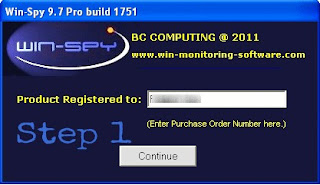
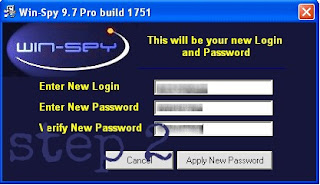
3. Now, another box will come, explaining you the hot keys(Ctrl + Shift + F12) to start the Winspy keylogger software.
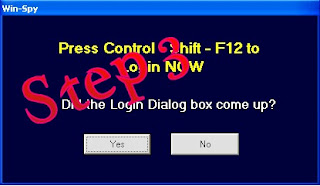
4. Now, on pressing hot keys, a login box will come asking userid and password. Enter them and click OK.
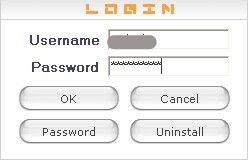
5. Now, Winspy’s main screen will be displayed as shown in image below:
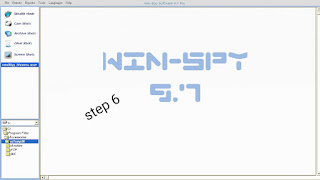
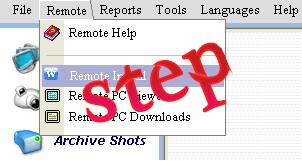
6. Select Remote at top, then Remote install.
7. On doing this, you will get a popup box as shown in image. Now, fill in the following information in this box.
user - type in the victim’s name
.file name - Name the file to be sent. Use the name such that victim will love to accept it.
.file icon - keep it the same
.picture - select the picture you want to apply to the keylogger.
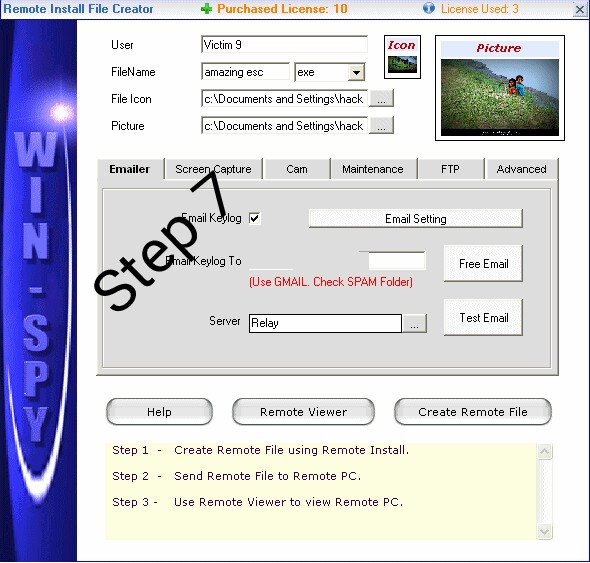
In the textfield of “Email keylog to”, enter your email address. Hotmail accounts do not accept keylog files, so use another emailaccount id,my sugession is using a Gmail id Thats it. This much is enough. If you want, can change other settings also.
8. After you have completed changing settings, click on “Create Remote file”. Now just add your picture to a winrar archive. Now, what you have to do is only send this key log file to your victim. When victim will open this file, all keystrokes typed by victim will be sent to your email inbox. Thus, you will get all his passwords and thus will be able to hack his email accounts and even Facebook account password.
Any kind Of facing Problem Comment below.
How to protect yourself from these hacks?
Prevention is always better than cure so always follow these steps:
1. Dont use cracked softwares and dont download them from unauthorized websites.
2. Always keep your antivirus and anti-spyware up to date.
3. Always scan the files before transferring them to your USB.
4. Do not allow other users to use your PC i.e password protect it.
NOTE: This tutorial is for Educational purposes only i.e. to make you aware how hackers hack your Facebook accounts. Please dont misuse it. I am not responsible for any damage caused by you.
Go to link download
Tuesday, March 28, 2017
Browser Password Remover Browser Website Login Password Removal Software
Browser Password Remover Browser Website Login Password Removal Software

Browser Password Remover is the free software to quickly display and remove all the stored website login passwords from popular browsers.
Most of the web browsers allow users to remember passwords and stores them into local database file. This file and all the stored passwords within it can be accessed by any one logged into the system. This is very risky especially on shared computers as well as on public systems such as in internet cafe.
Browser Password Remover helps you to automatically list and remove any such stored passwords from all the popular browsers.
Here are the currently supported web browsers,
- Firefox
- Internet Explorer [v7.x - v10.x]
- Google Chrome
- Google Chrome Canary/SXS
- CoolNovo Browser
- Opera Next
- Comodo Dragon Browser
- SeaMonkey Browser
- SRWare Iron Browser
- Flock Browser
One of the unique feature of this tool is that it allows you to remove the stored login passwords from any User on the local system or any other computer.
Before removing the passwords, you can also take a Backup of recovered password in HTML/XML/TEXT format.
Browser Password Remover is fully Portable and works on both 32-bit/64-bit platforms starting from Windows XP to Windows 8.
Download Browser Password Remover
Go to link download
Saturday, March 25, 2017
How to Bypass Android pattern and password using CMD
How to Bypass Android pattern and password using CMD
Forgot the password or pattern on any android phone? Here is the solution.

Hello friends i have a Ways to remove Forgotten Passcode/Patterns on Any Android phone or tablet. Android pattern lock, is more popular these day, and it is something good to keep your Android phone from unauthorized or unwanted access. But it is very usual, that you may forget your pattern or passcode you have enabled on your device, and there it becomes annoying, when you are unable to use your phone anymore. So, follow the below instruction and methods to remove forgot pattern or Passcode on any Android and Tablet devices.
1. First of all connect your device to the PC and make sure USB debugging is enabled.
2. Now on your Windows PC, Go to START-
>RUN–>Type CMD.
3. Now one by one type the following commands in the command window;
“Adb shell
cd/data/data/com.android.providers.settings/
databases
sqlite3 settings.db
update system set value=0 where
name=’lock_pattern_autolock’;
update system set value=0 where
name=’lockscreen.lockedout permanently’;
.quit“
4. After applying the above stated commands, reboot your device now.
After normal reboot, you again will notice Lock pattern screen, but this time, you will have the choice to create a new
pattern lock code for your device.
5. Successfully your pattern unlocked.
If it was useful for you, share it with your friends and leave a comment.....
NOTE: All tutorial are only for Educational purpose. Hacking is an illegal activity, we are not responsible for any harm happened to you by hacking.
Hello friends i have a Ways to remove Forgotten Passcode/Patterns on Any Android phone or tablet. Android pattern lock, is more popular these day, and it is something good to keep your Android phone from unauthorized or unwanted access. But it is very usual, that you may forget your pattern or passcode you have enabled on your device, and there it becomes annoying, when you are unable to use your phone anymore. So, follow the below instruction and methods to remove forgot pattern or Passcode on any Android and Tablet devices.
STEP:
1. First of all connect your device to the PC and make sure USB debugging is enabled.
2. Now on your Windows PC, Go to START-
>RUN–>Type CMD.
3. Now one by one type the following commands in the command window;
“Adb shell
cd/data/data/com.android.providers.settings/
databases
sqlite3 settings.db
update system set value=0 where
name=’lock_pattern_autolock’;
update system set value=0 where
name=’lockscreen.lockedout permanently’;
.quit“
4. After applying the above stated commands, reboot your device now.
After normal reboot, you again will notice Lock pattern screen, but this time, you will have the choice to create a new
pattern lock code for your device.
5. Successfully your pattern unlocked.
If it was useful for you, share it with your friends and leave a comment.....
NOTE: All tutorial are only for Educational purpose. Hacking is an illegal activity, we are not responsible for any harm happened to you by hacking.
Go to link download
Wednesday, March 15, 2017
RAR Password Unlocker Serial Key 5 0 Crack Download Full Working
RAR Password Unlocker Serial Key 5 0 Crack Download Full Working
RAR Password Unlocker Serial Key 5.0 Crack Download Full Working
Go to link download
Eset Nod32 Antivirus 8 Username And Password 2016 Free Download
Eset Nod32 Antivirus 8 Username And Password 2016 Free Download
Eset Nod32 Antivirus 8 Username And Password 2016 Free Download
Go to link download
Friday, March 10, 2017
Alat Periksa Saat Sign in PC Anda Dari Pencuri Password Yang Berbahaya
Alat Periksa Saat Sign in PC Anda Dari Pencuri Password Yang Berbahaya
Sindikat kejahatan menggunakan internet untuk mencuri uang dari pelanggan yang tidak curiga dalam perbankan online. Beberapa dari perangkat lunak yang dikembangkan oleh para penjahat ini mengkhawatirkan. Misalnya, mengambil kasus satu program yang digunakan untuk mencuri uang dari hampir 10.000 rekening.
Perangkat lunak trojan menyebar melalui lampiran email berbahaya. Klik pada lampiran, dan program terinstal di komputer Anda yang rute semua lalu lintas internet Anda melalui server hacker yang kebetulan berada di jaringan anonim Tor. Jadi meskipun tampak bahwa Anda sedang berbicara dengan situs web bank Anda, Anda benar-benar terhubung ke server hacker yang melakukan pekerjaan yang baik meniru bank. Selain itu juga menangkap semua username dan password yang Anda masukkan.
Para ahli keamanan selalu menyarankan bahwa jangan pernah mengetik data rahasia seperti password perbankan ke situs web kecuali situs yang menggunakan enkripsi, yang akan terlihat jelas karena simbol gembok pada browser Anda dan https: // (s singkatan secure/aman) pada awal alamat web. Tapi hacker berhasil menemukan cara sekitar ini, dengan menggunakan software trojan untuk menginstal "sertifikat nakal" file di komputer korban. Sebuah sertifikat memberitahu komputer yang server dan situs untuk percaya. Jadi, ketika Anda melihat https: // dan simbol gembok, ini hanya menunjukkan Anda bahwa komputer Anda telah dibujuk untuk percaya situs bank palsu penjahat .
Sigcheck, adalah utilitas gratis dari SysInternals, akan memindai PC Anda dan mencari file sertifikat yang mencurigakan yang telah diinstal. Jika menemukan apapun, Anda kemudian dapat menghapus mereka melalui cara standar dalam Windows.
Untuk mendapatkan Sigcheck, pergi ke https://technet.microsoft.com/en-us/sysinternals/bb897441.aspx dan download file 0,6 MB. Ini portabel, tetapi adalah sebuah utilitas berbasis baris perintah. Jadi untuk menjalankannya, pergi ke command prompt dan ketik:
Sigcheck -TV
Atau jika Anda ingin menggunakan versi 64-bit, mengubah Sigcheck untuk sigcheck64. Idealnya, Anda hanya perlu melihat pesan yang mengatakan ada Sertifikat Ditemukan.
NB:
Kebetulan, jika Anda berpikiran secara teknis dan ingin melihat apakah program ini mampu mendeteksi sertifikat palsu, ada cara yang aman untuk melakukannya. Download alat http debugging disebut Fiddler dari http://www.telerik.com/fiddler dan menginstalnya, lalu pilih opsi untuk memecahkan kode lalu lintas https. Program ini akan menginstal palsu (belum benar-benar aman dalam hal ini) sertifikat pada komputer Anda untuk melakukan hal ini. Anda kemudian dapat menggunakan Sigcheck untuk mendeteksi itu. Namun, kecuali Anda sangat tertarik melihat bagaimana Sigcheck berperilaku ketika menemukan sertifikat yang mencurigakan, tidak perlu untuk melakukan langkah ini. Cukup berjalan Sigcheck pada komputer Anda akan cukup.
Sumber: http://www.techsupportalert.com
Go to link download
Sunday, March 5, 2017
ParanoiDF PDF Analysis Suite Password cracking redaction recovery DRM removal malicious JavaScript extraction and more
ParanoiDF PDF Analysis Suite Password cracking redaction recovery DRM removal malicious JavaScript extraction and more

The swiss army knife of PDF Analysis Tools. Based on peepdf - http://peepdf.eternal-todo.com.
Features
Interactive Console: Type "help" to get a list of commands. Type "help [command]" to get a description/usage on specific command.
- crackpw This executes Nacho Barrientos Ariass PDFCrack tool by performing an OS call. The command allows the user to input a custom dictionary, perform a benchmark or continue from a saved state file. If no custom dictionary is input, this command will attempt to brute force a password using a modifiable charset text file in directory "ParanoiDF/pdfcrack". (http://pdfcrack.sourceforge.net/)
- decrypt This uses an OS call to Jay Berkenbilts "QPDF" which decrypts the PDF document and outputs the decrypted file. This requires the user-password. (http://qpdf.sourceforge.net/)
- encrypt Encrypts an input PDF document with any password you specify. Uses 128-bit RC4 encryption.
- embedf Create a blank PDF document with an embedded file. This is for research purposes to show how files can be embedded in PDFs. This command imports Didier Stevens Make-pdf-embedded.py script as a module. (http://blog.didierstevens.com/programs/pdf-tools/)
- embedjs Similiar to "embedf", but embeds custom JavaScript file inside a new blank PDF document. If no custom JavaScript file is input, a default app.alert messagebox is embedded (http://blog.didierstevens.com/programs/pdf-tools/)
- extractJS This attempts to extract any embedded JavaScript in a PDF document. It does this by importing Blake Hartsteins Jsunpackns "pdf.py" JavaScript tool as a module, then executing it on the file. (https://code.google.com/p/jsunpack-n/)
- redact Generate a list of words that will fit inside a redaction box in a PDF document. The words (with a custom sentence) can then be parsed in a grammar parser and a custom amount can be displayed depending on their score. This command requires a tutorial to use. Please read "redactTutorial.pdf" in directory "ParanoiDF/docs".
- removeDRM Remove DRM (editing, copying etc.) restrictions from PDF document and output to a new file. This does not need the owner-password and there is a possibility the document will lose some formatting. This command works by calling Kovid Goyals Calibres "ebook-convert" tool. (http://calibre-ebook.com/)
Download ParanoiDF
Go to link download
Wednesday, March 1, 2017
Crunch Password Cracking Wordlist Generator
Crunch Password Cracking Wordlist Generator

Crunch is a wordlist generator where you can specify a standard character set or a character set you specify. crunch can generate all possible combinations and permutations.
Features
- crunch generates wordlists in both combination and permutation ways
- it can breakup output by number of lines or file size
- now has resume support
- pattern now supports number and symbols
- pattern now supports upper and lower case characters separately
- adds a status report when generating multiple files
- new -l option for literal support of @,%^
- new -d option to limit duplicate characters see man file for details
- now has unicode support
Basic Usage
./crunch [min length] [max length] [character set] [options]

./crunch 3 3 ABC!@%
Crunch will now generate the following amount of data: 864 bytes
0 MB
0 GB
0 TB
0 PB
Crunch will now generate the following number of lines: 216
AAA
AAB
AAC
AA!
AA@
AA%
ABA
...
Download Crunch
Go to link download
Tuesday, February 28, 2017
Facebook Password Remover All in one Facebook Login Password Removal Tool
Facebook Password Remover All in one Facebook Login Password Removal Tool

Facebook Password Remover is the free all-in-one tool to quickly remove the stored Facebook Login passwords from your system.
This helps you to delete any accidently (or otherwise) stored Facebook password on any public/shared computers so that your Facebook account remains safe.
Currently it supports Facebook password removal from following applications,
- Firefox
- Internet Explorer [v7.x - v10.x]
- Google Chrome
- Google Chrome Canary/SXS
- CoolNovo Browser
- Opera Next
- Comodo Dragon Browser
- SeaMonkey Browser
- SRWare Iron Browser
- Flock Browser
One of the unique feature of this tool is that it allows you to remove even the encrypted Facebook passwords, belonging to any user account either on local system or any other computer.
Before removing the passwords, you can also take a backup of recovered Facebook password list in HTML/XML/TEXT format.
Facebook Password Remover is fully Portable and works on both 32-bit/64-bit platforms starting from Windows XP to Windows 8.
Features
- Instantly decrypt and show all the Facebook passwords on your system
- Remove either selected ones or all the stored Facebook passwords with just a click
- Support recovery and removal from latest versions of Applications
- Create backup password report in HTML/XML/TEXT format
- Auto detects the current password store location
- Remove password from any user account on local or another system
- Remove even encrypted Facebook passwords
- Free and Easy to Use GUI based Tool
- Fully portable, can be run anywhere without JAVA, .NET components
- Includes Installer for local Installation & Uninstallation
Download Facebook Password Remover
Go to link download
Subscribe to:
Posts (Atom)