Showing posts with label bypass. Show all posts
Showing posts with label bypass. Show all posts
Sunday, April 30, 2017
How To Bypass SMS Verification Of Any Website Service
How To Bypass SMS Verification Of Any Website Service
If you don’t want to give your phone number to a website while creating an account, DON’T GIVE IT TO THEM, because today I’m going to show you a trick that you can use to bypass SMS verification of any website/service.
Are you ready for the hack? If yes,…… Let’s do this!
Before jumping into the how to guide, take a look at the things you can learn from this article:
- Free SMS receive online services.
- How to Bypass Facebook, Tinder, Twitter, Whatsapp, Instagram, Chatroulette, GMail or Yahoo SMS verification.
- Make fake accounts!
That means, you can bypass any phone verification API by using the below trick.
Bypassing SMS Verification:
- Using Recieve-SMS-Online.info
Recieve SMS Online is a free service that allows anyone to receive SMS messages online. It has a fine list of disposable numbers from India, Romania, Germany, USA, United Kingdom, Netherlands, Italy, Spain and France.
Here is how to use Recieve SMS Online to bypass SMS verification:
1. Go to www.receive-sms-online.info:
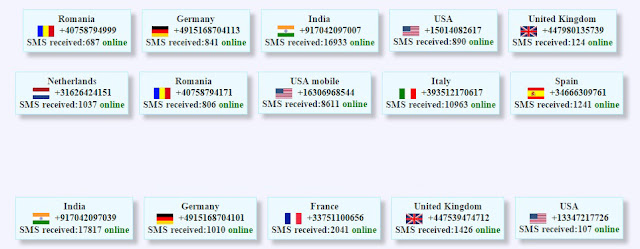


2. Select any phone number from the website, then enter the number as your mobile number on the “Phone number” box:
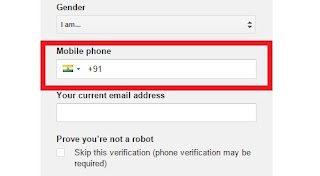
3. Send the verification code…. ( If that number is not working, skip to the next one)
4. Click on the selected number on the website. You will be directed to the inbox:
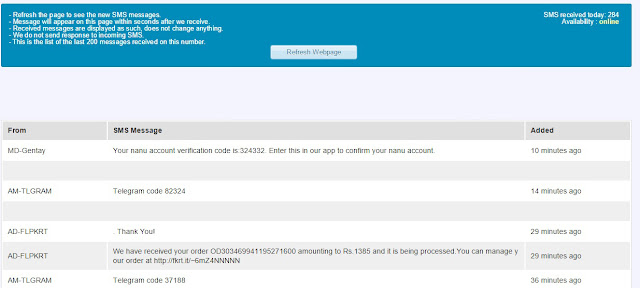
5. You can find the verification code in the disposable inbox. Enter the code in the verification code field, then click verify code.
6. The account should now be verified.
There are many free SMS receive services available online. Some of them are given below:
- http://receivesmsonline.in
- http://hs3x.com
- http://sms-receive.net
- http://www.receive-sms-now.com
- http://www.receivesmsonline.net
- http://receive-sms-online.com
- http://receive-sms.com
- http://receivesmsonline.com
- http://receivefreesms.net
Go to link download

Wednesday, April 5, 2017
How To Bypass Android Pattern Lock Without Losing The Data
How To Bypass Android Pattern Lock Without Losing The Data
All of us using Smartphones today mostly have a lock device on our devices. This lock system is basically to protect our personal data from getting leaked or visible to other people. Also, in a case where your phone is stolen or lost, locks always help in protecting your phones.
Now with the constant usage of phones and other accounts where passwords are needed, we at times forget the password that we have applied to lock our phones. This thing has become very common lately. In a hurry, when we want to open our phones, we forget the lock we have set.
Well, now there is nothing to worry about. Here, I have explained few techniques especially for android users by which they can unlock their phones easily even if they have forgotten their lock.
Follow the below given steps to bypass android pattern lock without losing data:
Requirements:-
- Android SDK tool For PC- Download From Here
- Android phone with USB Debugging enabled
- Data Cable
How To Enable USB Debugging On Your Android Device
- Go to the Settings of the Phone
- Then About Phone
- Tap On Build Number 7 Times
- Now a pop up will appear “You Have Now Become A Developer”
- Then again go to settings
- There you will see “Developer Option”
- Open it and check “USB Debugging”
How To Bypass Android Pattern Lock
1. Connect your android device to PC/Laptop.
2. Now open the folder where you installed “ Android SDK Tool “.
3. Generally it is available here In Your PC –
Users>>App Data>>Local>>Android>>Android SDK>>Platform Tools4. Enable “ Show Hidden Files And Folder ” In your PC as the folder is hidden.
5. Now right click on “ Platform Tools ” Folder and select “ Open Command Window Here “.

6. Now enter this command:
adb shell
cd /data/data/com.android.providers.settings/databases
sqlite3 settings.db
update system set value=0 where name=’lock_pattern_autolock’;
update system set value=0 where name=’lockscreen.lockedoutpermanently’;
.quit
If above command is not working then put:
adb shell rm /data/system/gesture.key
7. Reboot your phone and you will see that your pattern lock is removed.
NOTE: USB Debugging must be enabled before the pattern lock. If it is not then this whole process will not work.
When you reboot the device, you would see a pattern lock which gets disabled. So, in this way, you can easily bypass android pattern lock, password or pin without losing data or formatting the device. If you have any problem regarding this, comment below.
Go to link download
Saturday, March 25, 2017
How to Bypass Android pattern and password using CMD
How to Bypass Android pattern and password using CMD
Forgot the password or pattern on any android phone? Here is the solution.

Hello friends i have a Ways to remove Forgotten Passcode/Patterns on Any Android phone or tablet. Android pattern lock, is more popular these day, and it is something good to keep your Android phone from unauthorized or unwanted access. But it is very usual, that you may forget your pattern or passcode you have enabled on your device, and there it becomes annoying, when you are unable to use your phone anymore. So, follow the below instruction and methods to remove forgot pattern or Passcode on any Android and Tablet devices.
1. First of all connect your device to the PC and make sure USB debugging is enabled.
2. Now on your Windows PC, Go to START-
>RUN–>Type CMD.
3. Now one by one type the following commands in the command window;
“Adb shell
cd/data/data/com.android.providers.settings/
databases
sqlite3 settings.db
update system set value=0 where
name=’lock_pattern_autolock’;
update system set value=0 where
name=’lockscreen.lockedout permanently’;
.quit“
4. After applying the above stated commands, reboot your device now.
After normal reboot, you again will notice Lock pattern screen, but this time, you will have the choice to create a new
pattern lock code for your device.
5. Successfully your pattern unlocked.
If it was useful for you, share it with your friends and leave a comment.....
NOTE: All tutorial are only for Educational purpose. Hacking is an illegal activity, we are not responsible for any harm happened to you by hacking.
Hello friends i have a Ways to remove Forgotten Passcode/Patterns on Any Android phone or tablet. Android pattern lock, is more popular these day, and it is something good to keep your Android phone from unauthorized or unwanted access. But it is very usual, that you may forget your pattern or passcode you have enabled on your device, and there it becomes annoying, when you are unable to use your phone anymore. So, follow the below instruction and methods to remove forgot pattern or Passcode on any Android and Tablet devices.
STEP:
1. First of all connect your device to the PC and make sure USB debugging is enabled.
2. Now on your Windows PC, Go to START-
>RUN–>Type CMD.
3. Now one by one type the following commands in the command window;
“Adb shell
cd/data/data/com.android.providers.settings/
databases
sqlite3 settings.db
update system set value=0 where
name=’lock_pattern_autolock’;
update system set value=0 where
name=’lockscreen.lockedout permanently’;
.quit“
4. After applying the above stated commands, reboot your device now.
After normal reboot, you again will notice Lock pattern screen, but this time, you will have the choice to create a new
pattern lock code for your device.
5. Successfully your pattern unlocked.
If it was useful for you, share it with your friends and leave a comment.....
NOTE: All tutorial are only for Educational purpose. Hacking is an illegal activity, we are not responsible for any harm happened to you by hacking.
Go to link download
Monday, March 20, 2017
Top 8 iCloud Bypass tools
Top 8 iCloud Bypass tools


1. iCloud Bypass tool
This tool is one of the most used iCloud bypass tool in the market. It can be useful when you want iCloud activation bypass, remove iCloud account or even circumventing the lock iCloud. icloud activation lock removal tool

It is very functional and is used for more than one purpose.
Most people who have used is very satisfied with this tool.
It works with almost all iOS devices.
Cons
There have been some complaints about the download speed.
Although most people seem satisfied with this application, it has a relatively low rating of just 3.5 stars.
Supported devices
IPhone 6S Plus, iPhone 6, iPhone 6 and iPhone 6, iPhone 5, iPhone 5C, iPhone 5, iPhone 4S, iPhone 4, iPad Air, iPad Mini, iPad 4/3, iPad 2.
Compatible versions of iOS
iOS 9.0 iOS 8.1, iOS 8.0.2 / 1, iOS 8 iOS 7.1.1, iOS 7.1, iOS 7.0.6, iOS 7.0.5
Download URL: http://sourceforge.net/projects/icloudbypasstool/
2. iCloudin
This is another iCloud Bypass tool that will help you unlock iCloud quite easily. It works on all Apple devices. It is very easy to use and 100% free. Those who have used this tool attest to its effectiveness. You can also get easy to follow tutorials on how to use the Website. Best iCloud Bypass Tools

It is free for use
It is very easy to use
The tutorials will help you start and guide you through the whole process
It runs on most iOS devices
Cons
website tool is a bit messy so you may experience some problems finding what you are looking for.
However, it should be classified by those who have used it so no classification reputation as clear.
Supported devices
iPhone 6s Plus, iPhone 6s, iPhone 6 and iPhone 6, iPhone 5, iPhone 5C, iPhone 5, iPhone 4S, iPhone 4, iPad Air, iPad Mini, iPad 4/3, iPad 2
Compatible versions of iOS
iOS 9.0 iOS 8.1, iOS 8.0.2 / 1, iOS 8 iOS 7.1.1, iOS 7.1, iOS 7.0.6, iOS 7.0.5
Download : http://idevice.eu.pn/icloudin-1-0-free-software/
3. iCloud easy tool release
Mu open easy iCloud unlock tool is another tool widely available and widely used to help unblock or prevent iCloud. It is easy to use and very fast too. It comes with a tutorial to help you understand and use effectively.

Unlocks or divert your iCloud in less than 10 minutes
It works with all iOS devices and all iOS
IMEI code allows you to use your phone to unlock your iPhone
Cons
Only it comes with a Windows Download
IPhone 6S Plus, iPhone 6, iPhone 6 and iPhone 6, iPhone 5, iPhone 5C, iPhone 5, iPhone 4S, iPhone 4, iPad Air, iPad Mini, iPad 4/3, iPad 2
Compatible versions of iOS
iOS 9.0 iOS 8.1, iOS 8.0.2 / 1, iOS 8 iOS 7.1.1, iOS 7.1, iOS 7.0.6, iOS 7.0.5
Download : http://appleiphoneiOS.blogspot.it/2015/07/open-my-icloud-easy-unlck-tool.html
4. Doulci iCloud removal tool
Its one of the most efficient iCloud removal tool. It is easy to use and works on all iOS device like the iPod Touch. It allows you to run your own server to bypass iCloud. bypass icloud activation tool.zip download free

It’s easy to use
It works on all iOS devices and all iOS
It’s free
website has incredible support tool with tutorials that can be used
Cons
You have to complete a survey to download the tool
Supported devices
All models of iPhone, iPad all models, all models of iPod touch
IOS supported
iOS 7, iOS iOS iOS 7.1 September 8
Download : http://www.doulci-activator.com/
5. Official iPhone Unlock
This is more a service than a tool. It also works much the same way as the tools we have already seen. It will Unlock your iPhone permanently without JailBreak – through the IMEI of your phone that is available on the Apple iTunes database. icloud bypass tool free download

It is a professional service that is run by professionals so you do not have to worry about using any software.
It is easy and efficient.
The service has a great reputation among those who have used it before.
Cons
You have to pay for the service. Prices are $ 19.95 and depends on the amount you pay on your device.
supported devices
All models of iPhone, iPad all models, all models of iPod touch
IOS supported
iOS 7, iOS iOS iOS 7.1 September 8
Service URL: https://www.officialiphoneunlock.co.uk/activation-lock-removal.php?gclid=CjwKEAjw67SvBRC1m5zPv4GboAUSJAB6MJlkLd71FLegeuPc0TL41z63G3b-8RWGMpbm3soItpdb8RoCBX_w_wcB
6. bypass icloud activation tool
This tool connects directly to Apple’s servers to activate iCloud. It is also a very easy to use ad one of the constant gaining popularity lately. icloud activation lock removal jailbreak

It is easy to download and use
website provides round tool that issues the clock support for anyone
Cons
It is a bit more complicated to use than the others we have seen before
Download URL : http://www.bypassicloudactivation.tools/bypass-icloud-activation-lock-tool-iphone/
7. Remove the locking tool iCloud activation
This tool allows you can easily bypass iCloud. website tool also gives you valuable information about how to use the device to make it easy. It is also 100% free.

It is totally free
It is easy to download and use
Developers will give you information and great support
Cons
It does not have a very high rating among users
supported devices
All models of iPhone, iPad all models, all models of iPod touch
IOS supported
iOS 7, iOS iOS 8 7.1
iOS 8 iOS 9
Download URL: http://www.bypassicloudlock.tools/remove-icloud-lock-on-your-iphone-permanent-any-devices/
8. GadgetWide
This works the same way as the others we have seen before although it is credited with being one of the best tools to prevent activation of iCloud. It is easy to use even GadgetWide offer support and tutorials if you get stuck on any subject.

One of the most highly skilled tools on the market
It is free to download and use
Highly efficient and easy to use
Cons
You have to download the software to your computer before using this tool
Supported devices
All models of iPhone, iPad all models, all models of iPod touch
IOS supported
iOS 7, iOS iOS iOS 7.1 September 8
Download URL : http://www.gadgetwide.com/
These tools are the best icloud activation lock removal tool 2017. Have you successfully unlocked your iPhone using iCloud removal tool software? Leave a comment.
Go to link download
Friday, March 10, 2017
How to Bypass OTP or Mobile Number Verification in Android
How to Bypass OTP or Mobile Number Verification in Android
Now a days Every site (fb, twitter, google and etc) & app (viber, whatsapp, paytm, mcent, freecharge) verify otp Via sms when we make New account so we cannot Loot These Apps Because of Limited Number of Mobile Number , But today we share a Method of How to Bypass Otp Verification in Android Mobile . You can use this trick to make Many accounts on Social Networking Sites , bypassing their Mobile Number Security verification by This method.

Some Basic Requirements For Method 1:
Heres is the list of top Android Apps that you can use to bypass otp in various apps.
1. +1 - Primo , nextplus , groove ip, Text Me App
2. +63 - talk 2
3. +33 - Onoff
4. +92 - Mobilink
5. +44 - fwcall (website) , Swytch
6. +60 - Voopee
7. +391 - Rapbox
8. +1 - Voxox
9. +903 - Drap 2
List of The Websites Who Provides Online Phone Number Verification (28 Sites)
1. http://receivesmsonline.me
2. https://www.proovl.com/numbers
3. http://www.esendex.com.au/send-sms-online
4. https://sms-online.co
5. http://receive-sms-online.com
6. http://receivesmsonline.eu
7. http://freereceivesmsonline.com
8. http://www.e-receivesms.com
9. http://receive-sms.com
10. https://www.receivesmsonline.net
11. http://receivefreesms.net
12. http://receivesmsonline.in
13. http://hs3x.com
14. http://receive-a-sms.com
15. http://www.receive-sms-online.info
16. https://www.textmagic.com/free-tools/receive-free-sms-online
17. http://www.receive-sms-now.com
18. http://receivesmsonline.com
19. http://freesmsverification.com
20. https://smsreceivefree.com
21. http://sms.sellaite.com
22. http://receiveonlinesms.biz
23. http://getsms.org
24. http://receivefreesms.com
25. http://mfreesms.com/receivesms.php
26. http://www.textlocal.com/receiving-text-messages-online
27. http://receivesmsverification.com
28. http://www.virtty.com/en
These all apps and site are available on google play and google. These app/site give a private number that you can use as personal number. You can use that number to bypass otps in various apps like whatsapp, facebook, mcent, viber and much more. You can also make phone calls from these apps without using your real number by paying few bucks.
Some Basic Requirements For Method 1:
- Android Mobile or device.
- One American Server based Vpn.
- Fresh Mind for Understand this steps.
Heres is the list of top Android Apps that you can use to bypass otp in various apps.
1. +1 - Primo , nextplus , groove ip, Text Me App
2. +63 - talk 2
3. +33 - Onoff
4. +92 - Mobilink
5. +44 - fwcall (website) , Swytch
6. +60 - Voopee
7. +391 - Rapbox
8. +1 - Voxox
9. +903 - Drap 2
List of The Websites Who Provides Online Phone Number Verification (28 Sites)
1. http://receivesmsonline.me
2. https://www.proovl.com/numbers
3. http://www.esendex.com.au/send-sms-online
4. https://sms-online.co
5. http://receive-sms-online.com
6. http://receivesmsonline.eu
7. http://freereceivesmsonline.com
8. http://www.e-receivesms.com
9. http://receive-sms.com
10. https://www.receivesmsonline.net
11. http://receivefreesms.net
12. http://receivesmsonline.in
13. http://hs3x.com
14. http://receive-a-sms.com
15. http://www.receive-sms-online.info
16. https://www.textmagic.com/free-tools/receive-free-sms-online
17. http://www.receive-sms-now.com
18. http://receivesmsonline.com
19. http://freesmsverification.com
20. https://smsreceivefree.com
21. http://sms.sellaite.com
22. http://receiveonlinesms.biz
23. http://getsms.org
24. http://receivefreesms.com
25. http://mfreesms.com/receivesms.php
26. http://www.textlocal.com/receiving-text-messages-online
27. http://receivesmsverification.com
28. http://www.virtty.com/en
These all apps and site are available on google play and google. These app/site give a private number that you can use as personal number. You can use that number to bypass otps in various apps like whatsapp, facebook, mcent, viber and much more. You can also make phone calls from these apps without using your real number by paying few bucks.
Steps To Bypass Otp Sms Verification using app (Method-1)
1. First of All , Connect your mobile vpn by American server.
It’s doesn’t matter you use free or paid vpn, only use that has an American Server. If you don’t have any American Server vpn then Download This hotspot shield CLICK Www . Install and open it »»Connect to An American Server.
2. Now Download Text Me App / any app, which is give one free mobile number to get sms.
3. Install it and Create new account by Any fake mail or Google or facebook.
Choose your Country , and Your Number.
Press on “Confirm” to get this number.»» Now click on “Setting” Option.»» Enter your Nick Name. »»Done , You get Your own free Mobile number for Sms Verification.
Unlimited Mobile Number For Sms Verification By ‘Text Me’ App
By above method you get one free mobile Number , But follow below steps to get more Free numbers.
1. Navigate to Setting>> Apps »» Find Text me App in your Downloaded apps.
2. Now clear data of this app.
3. Again open App and Make new account by Any fake mail.
4. Follow above steps to get again new mobile number.
How to Bypass Phone Number Verification With Above Websites List (Method-2)
1. At First, of all, You will Open that Above website from your browser, and then simply click on any number of your choice.
2. After that Enter number in any app of your choice.
3. Now you can simply Enter the Code in App / Website and you now you are completely done, Your SMS verification will be bypassed without providing your real number.
So Guys, This was the one of the best ever and the great method for bypassing OTP verification, Which is also known as SMS or Phone number verification any website or application.
Go to link download
Wednesday, March 1, 2017
How to bypass SIM lock activation for IOS 10 on Iphone 6
How to bypass SIM lock activation for IOS 10 on Iphone 6
How to bypass SIM lock activation for IOS 10 on Iphone 5s and iphone 6
Hello, this is how to bypass the white SIM lock page SIM activation screen without having the original sim card or using the dial anything.
This phone couldn’t be unlocked by the service provider, unfortunately i do not even know what was the original sim card. I just wanted to use the phone apps and iphone music. After iphone update for ios10 , I couldn’t get passed the Hello and SIM lock page. I just happened to stumble upon this method by playing around with the SIM card ejection sim port.
To bypass this you want to go to the SIM verify page after you get passed the white Hello page and wifi page.
Get a paperclip or a skinny pen and push the sim ejector and play with it some times.
It will take a few minutes or you may get lucky on your first try.
You want to see your app screen stay on with “No SIM Card Installed”, press ok and use your phone normally.
Get a paperclip or a skinny pen and push the sim ejector and play with it some times.
It will take a few minutes or you may get lucky on your first try.
You want to see your app screen stay on with “No SIM Card Installed”, press ok and use your phone normally.
If your phone is filled up with memory, you can also get the storage option to pop up on your app page which also works too.
How to bypass SIM lock activation for IOS 10 on Iphone 6
Go to link download
Subscribe to:
Posts (Atom)