Showing posts with label use. Show all posts
Showing posts with label use. Show all posts
Sunday, April 30, 2017
Tuesday, April 25, 2017
How to use free internet on ncell using Kpn vpn
How to use free internet on ncell using Kpn vpn
Steps

3. Click on confi. And import configuration file.

1. Download and install the app kpn tunnel from Here
2. Open kpn tunnel ani click on right corner.3. Click on confi. And import configuration file.
Download ehi file
Enjoy free internetGo to link download

Monday, April 24, 2017
How to use Droidvpn on Ncell for free Internet
How to use Droidvpn on Ncell for free Internet
In this new tutorial we are going to share the new configuration of DroidVPN which will help you to have free internet in your Android devices, regardless of where you live. We hope this tutorial works as well as It did for us and many others.
Requirements for success
1. You must have 4.0 or higher Android version or a rooted device
2. You should not have mobile balance or it will be consume
3. You need to have an active data plan, but this must be 0 MB
4. We need to open an account at the official website of the DroidVPN App
Steps
1. Download and install Droid vpn from
2. After successfully install droidvpn app in your android phone, and sign up in it with your account. after that, follow below steps.
3. After Sign into your app, now it will show a dialog box, that is this app is trusted, then tick i trust this app, and hit ok
4. After that, it will open main screen of the app, and then in top right corner of the app, and select Settings Icon
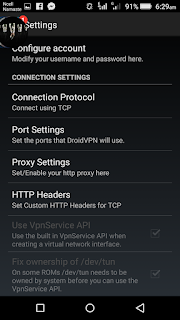
5. Now, Select Connection Protocol Option from there and select weather UDP or TCP port is open. in my case, TCP port 443 is opened in my country.
6. After Enter TCP / UDP port successfully, select HTTP Headers from menu.
7. Enter below code in the box
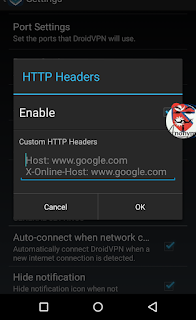
Host: t.co
X-Online-Host: t.co
We have entered t.co because this site is free from Ncell officially.
8. After that hit save, and Turn on internet from your ncell sim card.
9. Go back to main screen of the app, and select Big Button, and it will connect.
And you are done ! Now you are using Free Internet With Droidvpn in your Ncell sim card.
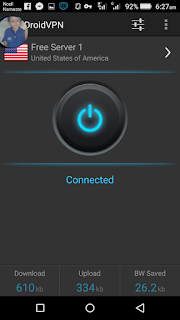
So guys, this was the easy guide for use how to use droidvpn for Ncell . You can use this trick in your Ncell sim cards, and enjoy free internet. remember that this trick will work only in 0 balance, and without any data packs. speed will also be very low. you can use only 250 Mb daily from this trick. if you use more, then this trick will block in your sim card. so use this trick, and also checkout Idea Droidvpn trick.
Go to link download
Saturday, April 8, 2017
Debit card kya hai debit card ka use online transaction ke liye kaise karte hai Full guide
Debit card kya hai debit card ka use online transaction ke liye kaise karte hai Full guide
Bohot se log isi confusion me rehte hai ki debit card kya hai? Atm card ko hi debit card kaha jata hai. aap ye to jante hi hai Atm/debit card ka use Atm machine se paise nikalne ke liye kaise kiya jata hai. Lekin ham is post me janenge ki Debit card ka use online transaction karne ke liye kaise karte hai. debit card kaise banwate hai, iska use kaha-kaha karte hai, aur is ke kya-kya fayde hai.
Iske pehle ham jaan lete hai ki debit card ka use ham kaha-kaha kar sakte hai.

Debit card ka use kisliye kiya jata hai
Jaisa ki mene aapko bataya Debit card ka use online transaction ke liye kiya jata hai.
1. Online shoping ke liye kare Debit card ka use
Aap sabhi khud jante hai aur dekh rahe honge ki online shoping ka craze kitna badh gaya hai. Online shoping ke liye adhiktar Amazon, flipkart, snapdeal, Homeshop18 jesi site ka use kiya jata hai.In site se yadi ham koi samaan buy karte hai to kuch samaan me hame Cash on delivery ka option milta hai. Kuch samaan buy karne ke liye Cash on delivery ka option nahi milta to ese me hame online banking ka use karna padta hai jiske liye aap debit card ka use kar sakte hai.
2. Online recharge aur bill payment ke liye
Yadi aapko apne mobile, Dth me recharge karana ho ya postpaid sim ka bill paid karna ho to aap debit card ke use se ye kaam ghar bethe kar sakte hai.online recharge ke liye aap Paytm, mobikwik aur freecharge jaisi website aur application ka use kar sakte hai.3. Apni website/blog ke liye kare debit card ka use
Yadi aapki website/blog hai to aapko apni website ke liye Domain, hosting aur other cheez buy karne ke liye debit card ka use kar sakte hai.4. Other work ke liye
Aap yadi apni study ke liye ya job ke liye kisi bhi prakar ka form submit karte hai to aapko uske liye ek nischit payment karna hota hai jiske liye aap debit card ka use kar sakte hai.Aap sabhi itna to jaan gaye honge ki debit card ka use aap kaha aur kis work ke liye kar sakte hai.
Ab ham janenge debit card ka upyog kaise kiya jata hai.
Debit card ka use kaise karte hai online transaction ke liye
Aap jab bhi kisi bhi cheez ke liye payment karte hai to usme payment karne ke liye kuch option diye hote hai.
Example- credit card, debit card, net banking, mobile banking, paypal etc.
In options me se aapko debit card select karna hai uske baad ki process me aapko detail se samjhane ke liye point to point bata raha hu.
Me yaha par paytm ka example de raha hu jisme mene recharge ke liye debit card ka use kiya hai.


1. Card no. me aapko apne debit card ka 16 digit ka number dalna hai jo ki aapke debit card ke front me hi likha hoga. (Image me dekhe)
2. month and year me aapko apne debit card ka expiry month and year likhna hai jo aapke debit card ke front me card no. ke neeche likha hoga. (Image me dekhe)
3. Yaha par CVV code likhna hai. CVV ka matlab hota card verification value hota hai jo ki debit card ke back me likha hota hai. (image me dekhe)
Pay now me click kare
4. Ab ek new page khulega jo ki aapke bank ka page hoga. Isme aapko OTP (one time password) dalna hai. OTP aapke mobile number me aayega jo aapke bankaccount me registered hai.
Debit card kaise banwate hai
Debit card banwana bohot hi aasan hai. Iske liye aap apne najdeeki kisi bhi bank me account banwaye. account 2-3 din me ban jata hai uske baad aap bank jakar atm ka form fill kar ke submit kare.
NOTE- Form me apna mobile number jaroor likhe aur bank account khulwate samay bhi mobile number submit karna na bhoole, kyoki OTP aapke registered mobile number me hi aayega aur bina OTP ke aap transaction nahi kar sakte hai.
atm card ka form submit karne ke 5-10 din ke andar aapko Debit card bank ya postman ke madhyam se mil jayega.
Debit card ke fayde
1. online transaction ke liye sabse accha madhyam hai.
2. aap yadi 18 saal se kam ke bhi hai to bhi Debit card banwa sakte hai. Jabki net banking, mobile banking ya paypal ke liye 18 ka hona jaroori hai.
3. isme id, password bagerah yaad rakhne ki jhanjhat nahi rehti hai. Debit card ke use ke liye card no., card ki expiry date, cvv lagta hai aur ye sab card me hi likha hota hai aur OTP hamare mo. nu. me message ke dwara aa jata hai. jabki net banking, mobile banking ke liye id password yaad rakhna hota hai.
4. Debit card ka use kahi bhi kabhi bhi kiya ja sakta hai.
Friends ummid hai ye jankari aapke liye helpfull sabit hogi. aisi hi jankari email dwara ya fb me pane ke liye hamara fb page like kare aur subscribe kare.
Go to link download
Sunday, April 2, 2017
How to make free call without sim card use Red international number
How to make free call without sim card use Red international number
Today we post free calling apps or
free calling trick without sim card , IN this trick you don’t need sim card for calling and its unlimited also by our trick. You just Download free app and then dial your friends number your call is connected then you can call freely also good feature is call quality is also very good so guys just try it.
How To Make Free Calls Without sim card

Just you need small internet for install this application.
1. Firstly Download Dingtone calling app CLICK HERE .
2. Install and Open Dingtone
3. Register For free account on it by entering name , profile, email and etc.
4. Accept terms and click on next
5. Done ! Now you can call freely without sim card.
Unlimited trick :
1. Now goto More option and click on get More Credit option.
2. Click on Refer and Earn option and then copy your refer link.
3. Now share it with your friends and earn upto 1000 free credit.
So friends this is the full guide for how to make free call without sim card. This app is really awesome and working very faster than other apps. The call quality is really very good.
Hope you guys like this trick. Share this trick with your friends if you like this trick. Keep visiting for latest updates.
free calling trick without sim card , IN this trick you don’t need sim card for calling and its unlimited also by our trick. You just Download free app and then dial your friends number your call is connected then you can call freely also good feature is call quality is also very good so guys just try it.
How To Make Free Calls Without sim card
Just you need small internet for install this application.
1. Firstly Download Dingtone calling app CLICK HERE .
2. Install and Open Dingtone
3. Register For free account on it by entering name , profile, email and etc.
4. Accept terms and click on next
5. Done ! Now you can call freely without sim card.
Unlimited trick :
1. Now goto More option and click on get More Credit option.
2. Click on Refer and Earn option and then copy your refer link.
3. Now share it with your friends and earn upto 1000 free credit.
DOWNLOAD DINGTONE CREDIT ADDER
Final Words :So friends this is the full guide for how to make free call without sim card. This app is really awesome and working very faster than other apps. The call quality is really very good.
Hope you guys like this trick. Share this trick with your friends if you like this trick. Keep visiting for latest updates.
Go to link download
Whatsapp Ke New Font Fixedsys Ka Use Kaise Kare
Whatsapp Ke New Font Fixedsys Ka Use Kaise Kare

Is post me ham janenge ki whatsapp ke new font fixedsys ka use kaise kare. Whatsapp dino din naye naye features add karte ja raha hai apne users ke liye. whatsapp ke voice calling feature launch kiye jyada samay nahi hua aur abhi kuch hi dino pehle whatsapp ne Bold, italic aur strikethrough font ka feature add kiya tha.
aur abhi haal hi me whatsapp me fixedsys font ka feature add kiya hai. ye whatsapp ka hidden feature hai jiske bare me whatsapp ne koi jikra nahi kiya hai. fixedsys font ke text normal text se thodi chhote dikhte hai. to chaliye jante hai whatsapp ke new feature fixedsys ka use kaise kare.
aur abhi haal hi me whatsapp me fixedsys font ka feature add kiya hai. ye whatsapp ka hidden feature hai jiske bare me whatsapp ne koi jikra nahi kiya hai. fixedsys font ke text normal text se thodi chhote dikhte hai. to chaliye jante hai whatsapp ke new feature fixedsys ka use kaise kare.
Whatsapp Ke Hidden Feature Fixedsys Font Ka Use kaise Kare
Is font ka use karne ke liye aapko message ke aage 3 baar (`) sign ka use karna hai aur 3 baar message ke peeche. Example dekhiye screenshot ke sath.
Normal font - Hindi Helpz
Fixedsys font - ```Hindi Helpz```
Fixedsys font - ```Hindi Helpz```

is tarike se aap whatsapp me fixedsys font ka use kar sakte hai.
Friends aapko ye whatsapp trick kaisi lagi hame comment me bataye aur ye whatsapp trick apne friends ke sath bhi share kare. Aapko is post se related koi problem ho to hame comment me bataye. esi hi new new tricks fb par pane ke liye hamara fb page like kare aur email me pane ke liye hamari website subscribe kare.
Also Read :
? 1 Android phone me 2-2 whatsapp kaise chalate hai.
? 10 whatsapp tricks hindi me, jo shayad aap nahi jante.
? Whatsapp me friend ki profile picture kaise change kare, whatsapp trick (prank).
Also Read :
? 1 Android phone me 2-2 whatsapp kaise chalate hai.
? 10 whatsapp tricks hindi me, jo shayad aap nahi jante.
? Whatsapp me friend ki profile picture kaise change kare, whatsapp trick (prank).
Go to link download
Friday, March 24, 2017
Tor Browser 3 6 3 Use Tor on Windows Mac OS X or Linux without needing to install any software
Tor Browser 3 6 3 Use Tor on Windows Mac OS X or Linux without needing to install any software

The Tor software protects you by bouncing your communications around a distributed network of relays run by volunteers all around the world: it prevents somebody watching your Internet connection from learning what sites you visit, it prevents the sites you visit from learning your physical location, and it lets you access sites which are blocked.
The Tor Browser lets you use Tor on Windows, Mac OS X, or Linux without needing to install any software. It can run off a USB flash drive, comes with a pre-configured web browser to protect your anonymity, and is self-contained.
Here is the complete changelog:
- All Platforms
- Update Firefox to 24.7.0esr
- Update obfsproxy to 0.2.12
- Update FTE to 0.2.17
- Update NoScript to 2.6.8.33
- Update HTTPS Everywhere to 3.5.3
- Bug 12673: Update FTE bridges
- Update Torbutton to 1.6.11.0
- Bug 12221: Remove obsolete Javascript components from the toggle era
- Bug 10819: Bind new third party isolation pref to Torbutton security UI
- Bug 9268: Fix some window resizing corner cases with DPI and taskbar size.
- Linux:
- Bug 11102: Set Window Class to "Tor Browser" to aid in Desktop navigation
- Bug 12249: Dont create PT debug files anymore
Download Tor Browser 3.6.3
Go to link download
Thursday, March 23, 2017
Jio Prime Membership Kaise Activate Kare March 2018 Tak Free Jio 4G Use Karne Ke Liye
Jio Prime Membership Kaise Activate Kare March 2018 Tak Free Jio 4G Use Karne Ke Liye

Reliance company ke chairman mukesh ambani ji ne jio ke liye ek naya membership plan launch kiya hai jise jio prime naam diya hai. Yadi ap jio user hain to shayad aapne bhi is plan ke baare me suna hoga aur yadi nahi suna hai to is post ko dhyan se padhe, ye post aapke liye bohot kaam ki hai.
Aap log ye baat acche se jaante honge ki reliance jio dino din aage hi badhta ja raha hai. Reliance jio apni launching ke 170 days me hi 100 million subscribers collect kar liya tha. Har ek second me jio se 7 new customer judte hai.
> Aapke Phone Me Nahi Chal Rahi Jio Sim To Kya Kare.
> 2G/3G Phone Se Jio Sim Ka Barcode Kaise Nikale.
Ambani ji ke mutabik jio users 1 month me 100 crore gb se bhi jyada data use kar lete hain aur per day 3.3 crore gb se bhi jyada data use kar lete hain.
Ambani ji me announce kiya hai ki jio ki free service 31 march ke baad khatm hone wali hai. 31 march ke baad koi bhi jio user without prime membership ke jio ki free service ka lutf nahi utha payega.
Jio prime membership plan ke liye aapko 99 rupay ka subscription karna hoga jiske baad aap har month 303 rupay kharch karke jio ke happy new year plan ka maja le sakte hai jisme aapko free 1 gb data, phone call, sms etc. milenge.
Jio Prime Membership Kaise Activate Kare
Jio prime membership aap sirf 99 rs kharch karke 1 march se 31 march tak kabhi bhi neeche diye hue steps ki madad se suvscribe kar sakte hai.
1. Jio Site
1) www.jio.com open kare.
2) Quick pay option me se recharge option select kare.
3) Apne jio account se login kare.
4) Buy membership me click kare.
5) Jio prime membership select kare.
6) Jio prime membership ke liye 99 rs pay kare.
2) Quick pay option me se recharge option select kare.
3) Apne jio account se login kare.
4) Buy membership me click kare.
5) Jio prime membership select kare.
6) Jio prime membership ke liye 99 rs pay kare.
1 april 2017 se aapke number me jio prime membership activate ho jayegi.
2. MyJio App
1) MyJio app open kare aur login kare.
2) Left menu open kare buy membership option choose kare.
3) Jio prime membership me click kare.
4) 99 rs pay kare.
2) Left menu open kare buy membership option choose kare.
3) Jio prime membership me click kare.
4) 99 rs pay kare.
Done....
3. Offline
Aap apne najdiki kisi bhi jio store par jaye aur waha par upasthit staff se jio prime membership ke liye bolen. Unhe 99 rs cash ya card se payment kare. Thodi der ki process ke baad wo aapke number pe jio prime membership ke liye apply kar denge.
> Reliance Jio Ke Najdeeki Store Ka Pata Kaise Kare
Jio Prime Membership Me Kya Kya Free Milega 31 March 2017 Tak
Jio prime membership me happy new year offer ki tarah same plan milega jisme unlimited call, sms and internet data ke saath saath JioTV, JioMusic, JioMags, Jio Cinema and JioXpressNews bhi free rahega.
1) Daily 1 GB high Speed data + unlimited data with 125Kbps.
2) Unlimited jio premium apps -JioTV, JioMusic, JioMags, Jio Cinema and JioXpressNews.
3) Unlimited free calling with free roaming.
4) Unlimited high speed 4g data in night (2 am to 5 am).
2) Unlimited jio premium apps -JioTV, JioMusic, JioMags, Jio Cinema and JioXpressNews.
3) Unlimited free calling with free roaming.
4) Unlimited high speed 4g data in night (2 am to 5 am).
Kya Hoga Yadi Aapne Jio Prime Membership Plan Subscribe Nahi Kiya
Jaisa ki hamne aapko bataya ki jio prime membership plan me aapko happy new year offer ki tarah sab kuch free milega sirf ek baar ke 99 rs aur monthly 303 rs pay karne par but yadi aap ise subscribe nahi karte to aapko high priced jio plans use karna padega. Aap www.myjio.com me recharge ki list dekh sakte hai ki aapko kitna amount pay karne par kitna benifit milega. Haalanki jio ke regular plans bhi baaki sim ke mukaable saste hai but jio prime membership isse bhi sasta hai.
Final Words :
Friends poori post padhne ke baad shayad aapko khud hi pata chal gaya hoga ki aapke liye kya sahi hai but fir bhi ek baar mai aapse kehna chahunga ki yadi aapko jyada benifit chahiye to is plan ko jald se jald subscribe kar le. Yaad rakhe ki ise aap 1 march se 31 march tak hi subscribe kar sakte hai isiliye der na kare aur is shaandaar offer ko haath se na jaane de.
Friends aapko ye post kaisi lagi hame comment me bataye aur aapko is post se related koi problem ho to bhi comment me pooch sakte hai. Ye post apne friends ke sath share kare. Hamare blog ki new updates facebook me pane ke liye hamara facebook page like kare aur email me pane ke liye hamara blog subscribe kare.
Go to link download
Tuesday, March 14, 2017
Whatsapp Ke Reply Feature Ka Use Kaise Kare
Whatsapp Ke Reply Feature Ka Use Kaise Kare

Whatsapp me ek reply feature include hai. kya aapko iske baare me pata hai aur kya aap iska use karte hai. agar nahi to ham aapko is post me isi feature ki jankari detail se batayenge.
Read Also: whatsapp me fixedsys font kaise use kare.
whatsapp ne abhi haal hi me ek aur Reply feature add kiya hai. is post me ham isi bare me janenge.
isko ham 2 step me samjhenge. pehle janenge ki iska kya use hai iske baad janenge ki iska use kaise karte hai.
Read Also: whatsapp me fixedsys font kaise use kare.
whatsapp ne abhi haal hi me ek aur Reply feature add kiya hai. is post me ham isi bare me janenge.
isko ham 2 step me samjhenge. pehle janenge ki iska kya use hai iske baad janenge ki iska use kaise karte hai.
Whatsapp Ka Reply Feature Kya Hai
Yadi aap whatsapp use kar rahe hai to ye to pakka hai ki aap 4-5 ya is se jyada whatsapp group me add honge. group me bahut se messages aate rehte hai ese me yadi ham kisi member ke message ka reply karte hai to kabhi-kabhi group ke dusre member samajh baithte hai ki aapne unke message ka reply kiya hai. to whatsapp ke new reply feature ki madad se aap is samasya se bach sakte hai.
is feature se hoga ye ki aap kisi bhi message ko select karke uska reply kar sakte hai. aap kisi bhi message ka reply karenge to aapke message ke sath jis message ka reply kar rahe hai uske sender ka number aur us message ki 2 line bhi add ho jayengi aur koi bhi is message me click karke dekh sakta hai ki kis message ka reply kiya gaya hai.
to aapko samajh me aa gaya hoga ki iska kya use hai. ab dekhte hai ki iska use kaise kare.
is feature se hoga ye ki aap kisi bhi message ko select karke uska reply kar sakte hai. aap kisi bhi message ka reply karenge to aapke message ke sath jis message ka reply kar rahe hai uske sender ka number aur us message ki 2 line bhi add ho jayengi aur koi bhi is message me click karke dekh sakta hai ki kis message ka reply kiya gaya hai.
to aapko samajh me aa gaya hoga ki iska kya use hai. ab dekhte hai ki iska use kaise kare.
Whatsapp Ke Reply Feature Ka Use Kaise Kare
Whatsapp open karne ke baad us group/conversation ko open kare jiske message ka reply karna hai. iske baad jis message ka reply karna hai usme long press karke use select kare aur oopar ki taraf left corner me reply jo reply ka icon hai usme click kare (screenshot dekhe).

iske baad apna message type kare aur send kar de. aapka send kiya hua message kuch is type se dikhega (screenshot dekhe).

Aap is message me jaise hi tap karenge to ye aapko us message me pahucha dega jiska aapne reply kiya hai.
Jaroori nahi ki iska use sirf whatsapp group me bas kar sakte hai. iska use aap personal chating me bhi kar sakte hai.
Last Words
Friends i hope ki aapko acche se samajh aa gaya hoga ki whatsapp ke reply feature kya hai aur iska use kaise karte hai. whatsapp ki is hindi trick se aapki thodi bahut help to hogi hi.
Aapko ye whatsapp trick acchi lagi ho to apne friends ke sath bhi share kare. Hindi Helpz ki new updates apne facebook wall par pane ke liye hamara Fb Page like kare ya email me pane ke liye hamari website subscribe kare. Thanxxxx.....
Go to link download
Thursday, March 9, 2017
dos ssh Use BIOS ram hacks to make a SSH server
dos ssh Use BIOS ram hacks to make a SSH server

Use BIOS ram hacks to make a SSH server out of any INT 10 13h app (MS-DOS is one of those)
You can find a demo Youtube Video here below:
Download dos_ssh
Go to link download
Subscribe to:
Posts (Atom)