- Add user interface localizations in many additional languages
- Add support for devices with fixed-focus camera
- Add support for devices with no camera
- Slightly improved support for Snapdragon 435 devices
- Bug fixes and performance enhancements
Showing posts with label video. Show all posts
Showing posts with label video. Show all posts
Tuesday, April 25, 2017
Youtube Video Background Me Kaise Play Kare
Youtube Video Background Me Kaise Play Kare

Is post me mai aapko bohot hi kaam ki trick batane wala hu. Youtube video background me kaise play karen? Yadi ham youtube me videos dekhte hue koi other work karna chahen to nahi kar sakte hain kyoki yadi ham koi other work karte hain ya youtube ko minimize karte hai to video stop ho jati hai. Isiliye ham ye trick lekar aaye hain.
Wese to internet me bohot si tricks moujood hain jinki madad se aap youtube videos ko background me play kar sakte hain but in tricks ki requirement heavy hoti hain jaise ki aapka phone rooted hona chahiye etc. But is post me di gai tericks se aap non rooted phone me bhi youtube videos ko background me play kar sakte hai wo bhi bohot easy method se.
> Android Phone Ke Youtube App Me Ads Block Kaise Kare
> Youtube Videos Ko Song Aur Video Me Convert Kaise Kare
> Youtube Videos Ko Song Aur Video Me Convert Kaise Kare
Is post me batayi gayi tricks ki madad se aap youtube videos ko background me play kar ke apna manchaha other work bhi kar sakte hain. Yadi aapko apne phone me koi application use karna hai, games khelna hai ya koi doosra work karna hai to wo bhi aap aasani se bina kisi problem ke kar sakte hain aur aapki youtube video bhi background me chalti rahegi.
Youtube Videos Ko Background Me Play Kaise Kare
Mai yaha par 2 methods bataunga jinki madad se aap easily youtube videos ko background me play kar sakenge.
First Method - Awesome Pop-Up Video
1. Sabse pehle neeche di hui link se awesome pop-up video app download kare aur open kare.
3. Ab window ka size apne hisaab se change karen.
Download
2. Ab search box youtube video search kare jo aapko dekhna hai aur play karen ya url box youtube video ka url paste kare.3. Ab window ka size apne hisaab se change karen.
Iske baad aap jo bhi karna chahe kar sakte hain. Ye app youtube ke similar hai. Isme aapko sabhi youtube videos mil jayengi.
Second Method - Flytube
1. Sabse pehle neeche di hui link se flytube app install kare aur open kare.
Download
2. Iske baad search box me wo youtube video search kare jo aapko dekhna hai aur play kare.Iske baad aapko jo bhi app run karna hai kar sakte hai. Ye app awesome pop-up video app ki tarah hi hai.
Friends aapko ye post kaisi lagi hame comment me bataye aur aapko is post se related koi problem ho to bhi comment me pooch sakte hai. Ye post apne friends ke sath share kare. Hamare blog ki new updates facebook me pane ke liye hamara facebook page like kare aur email me pane ke liye hamara blog subscribe kare.
Go to link download

Monday, April 24, 2017
Tool Untuk Mengambil Video Dari Cache di Browser Web Anda
Tool Untuk Mengambil Video Dari Cache di Browser Web Anda
Jika Anda pernah mengklik "delete offline content" di browser web Anda dan memperhatikan berapa banyak ruang disk yang akan dibebaskan, Anda akan tahu bahwa browser menyimpan salinan lokal dari hampir segala sesuatu yang Anda telah melihat. Tidak hanya halaman teks dan gambar, tetapi seluruh video juga. Kadang-kadang bisa agak canggung jika Anda memeriksa cache browser dari seseorang yang tidak menyadari bahwa ini berlangsung!
Jika Anda tahu di mana menemukan folder cache browser Anda, Anda dapat mengambil video dari sana. Yang berarti bahwa Anda dapat kembali menonton sesuatu tanpa perlu mendownload atau ingat situs yang Anda menemukannya di. Anda juga dapat menyimpan salinan lokal di lokasi yang lebih permanen, sekali Anda menyadari bahwa sesuatu yang Anda tersandung pada sebenarnya layak disimpan.

Video Cache View, dari Nir Sofer selalu baik, adalah alat yang Anda butuhkan untuk menjelajahi tembolok video Anda. Download dari http://www.nirsoft.net/utils/video_cache_view.html untuk memulai. Ini kurang dari 1 MB untuk men-download dan malware-bebas menurut VirusTotal dan Web of Trust.
Ketika Anda menjalankan itu, program ini akan mencari semua lokasi cache browser Anda (dengan asumsi Anda menggunakan salah satu browser terkenal). Anda kemudian dapat melihat daftar video yang disimpan dan memilih apa yang harus dilakukan dengan mereka. Dan jika Anda memutuskan bahwa Anda tidak benar-benar membutuhkan salah satu dari mereka, maka Anda dapat menghapus mereka semua untuk membebaskan banyak ruang disk.
sumber http://www.techsupportalert.com/
Go to link download
Sunday, April 23, 2017
SnapTube VIP – YouTube Downloader HD Video v4 14 0 8692 Cracked APK
SnapTube VIP – YouTube Downloader HD Video v4 14 0 8692 Cracked APK

SnapTube – YouTube Downloader HD Video
SnapTube – The downloader videos and music easier from YouTube.
Features
- DOWNLOAD IN MULTIPLE RESOLUTIONS
MP4 videos are available in resolutions: choose the small size of 360 pixels or the high-definition 720 pixels. - DIRECT MP3 DOWNLOADS
Download any YouTube music video directly as an MP3 file. No extra encoding process or plugin needed. Save space and listen to your favorite music video anytime you want. - SEARCH VIDEOS WITH KEYWORDS
Search a video with keywords. Easily find the exact video you want. - DISCOVER NEW VIDEOS
Explore videos in your favorite categories like Music and Movies. Discover new videos with recommended lists from our curators. - MANAGE VIDEO DOWNLOADS
Pause, cancel or resume a video download. Delete the videos you don’t need anymore. Manage all of your video downloads in one place. - NO ADS
Clean design lets you focus on your videos. No annoying ads.
How to Install?
- Download and install apk file as usual
- Done and Enjoy!

Screenshots


Download & Links
Car Insurance | Auto Car | Online Rate Quote | Online Car Insurance This blog containing useful information about car insurances,auto car insurances quote and tips in dealing with insurances
Auto Insurance Vancouver,Car Insurances Quotes,Life Insurances,Student Loan. auto insurance,auto insurance FAQ,Auto Insurance Quotes,auto insurance ticket,auto insurances,auto insurances article,Auto insurances tips,car insurance,car insurance quote,car insurance save ,car insurance tips ,cheap auto insurance ,cheap car insurance ,flood insurance,Inexpensive auto insurance,Long-Term Care Insurance ,travel insurance ,Types of Auto Insurance .
Go to link download
Friday, April 21, 2017
Android Phone Me Floating Video Player Kaise Add Kare
Android Phone Me Floating Video Player Kaise Add Kare
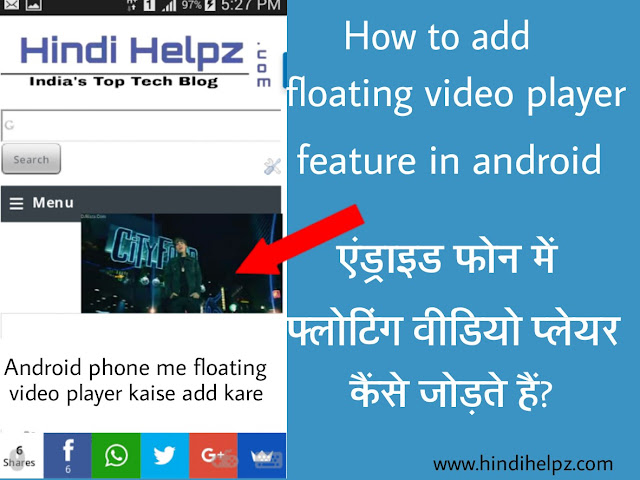
Is post me ham aapko batayenge ki aap apne phone me floating video feature kaise enable ya add kar sakte hai.
Kuch phone me pehle se hi multiwindow / multitasking feature aata hai jisme ek baar me bahut se work kar sakte hai aur ese hi aap usme video player ko chhote size me karke apna other work bhi kar sakte hai. ye feature har phone me nahi hota lekin ham is post ko padhne ke baad aap apne phone me bhi ye feature add kar sakenge.
Kuch phone me pehle se hi multiwindow / multitasking feature aata hai jisme ek baar me bahut se work kar sakte hai aur ese hi aap usme video player ko chhote size me karke apna other work bhi kar sakte hai. ye feature har phone me nahi hota lekin ham is post ko padhne ke baad aap apne phone me bhi ye feature add kar sakenge.
Read Also :
? Android Phone Se Full Page Ka Screenshot Kaise Lete Hai.
? Delete Hue Message Aur Call Log Wapas Kaise Laye.
? Whatsapp Me Color Text Kaise Likhte Hai.
Floating Video Feature Kaise Add Karte Hai
Floating video feature ham ek third party app ki madad se enable karenge jo hame play store me bhi mil jayega.
1. Sabse pehle PlayerX Video Player download kare aur open kare.
3. iske baad neeche ki taraf right side me jo option diya hai use choose kare. (image me dekhe)
Download PlayerX Video Player
2. Iske baad video choose kare jise play karna hai aur play kare.3. iske baad neeche ki taraf right side me jo option diya hai use choose kare. (image me dekhe)
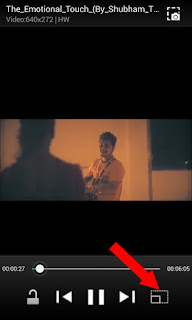
4. iske baad aap dekhenge ki ek mini float player show ho raha hai.
Ab aap doosra work bhi kar sakte hai apne phone par. is player ko aap khiska kar jaha chahe apni suvidha ke anusar set kar sakte hai aur do ungliyo ki madad se aap iska size bada ya chhota kar sakte hai.
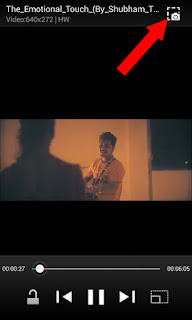
Isme ek aur extra feature hai jis se aap video se screenshot le sakte hai. screenshot lene ke player me upar ki taraf icon bana hai usme tap kare. (image me dekhe)
Isme ek aur extra feature hai jis se aap video se screenshot le sakte hai. screenshot lene ke player me upar ki taraf icon bana hai usme tap kare. (image me dekhe)
PlayerX Video Player Ke Features
1. Sabse pehle aur main feature to yahi hai ki iski madad se ham floating player add kar sakte hai.
2. PlayerX video player me video se screenshot lene ke liye option diya hua hai.
3. Video ki brightness kam jyada kar sakte hai.
4. Video ko zoom kar sakte hai.
5. Video screen lock ka option bhi hai.
6. Float player ko khiska ke kahi par bhi set kar sakte hai.
7. Float player ka size kam jyada kar sakte hai.
2. PlayerX video player me video se screenshot lene ke liye option diya hua hai.
3. Video ki brightness kam jyada kar sakte hai.
4. Video ko zoom kar sakte hai.
5. Video screen lock ka option bhi hai.
6. Float player ko khiska ke kahi par bhi set kar sakte hai.
7. Float player ka size kam jyada kar sakte hai.
Friends ye app aapko kaisa laga hame comment me bataye aur esi hi tricks fb par pane ke liye hamara facebook page like kare.
Go to link download
Saturday, April 15, 2017
Free Video Editor
Free Video Editor
VSDC Video Editor merupakan program gratis untuk Windows yang, seperti namanya, memungkinkan Anda mengedit video di komputer Anda. Jadi jika Anda telah menggunakan kamera video digital atau telepon untuk menangkap beberapa klip video dan Anda ingin mengubahnya menjadi sesuatu yang lebih profesional, ini adalah software yang Anda butuhkan.
Anda dapat dengan mudah memotong hal-hal yang tidak Anda inginkan. Adapun bit Anda ingin menyimpan, Anda dapat membagi mereka ke dalam adegan yang terpisah dan kemudian mengatur ulang mereka yang Anda inginkan.

Program ini cukup kuat, dan mungkin akan memerlukan waktu untuk menguasai. Tapi pasti layak tekun sebagai program gratis ini dikemas dengan fitur yang akan membuat video Anda menonjol.
Anda dapat download di http://www.videosoftdev.com/free-video-editor dan itu sekitar 35 MB. Ini bebas malware menurut VirusTotal dan Web of Trust. Ada juga saluran Youtube di https://www.youtube.com/user/FlashIntegro dengan beberapa tutorial yang berguna.
Go to link download
Monday, April 10, 2017
Youtube se video aur song download kaise kare bina kisi software ke
Youtube se video aur song download kaise kare bina kisi software ke

Hindi Helpz me aapka swagat hai. Hindi Helpz aapke liye new youtube trick lekar aaya hai- Youtube se videos aur song download kaise kare (without any app). Aap log to jante hi hai ki Youtube kitna popular hai. iski Global (world) rank- 2nd hai, youtube me kai millions peoples daily videos dekhte hai aur laakho videos daily upload hoti hai.
ye Google ka hi ek famous product hai but iski sabse badi samsya hai ki youtube hame downloading ka permission nahi deta aur na hi koi option available hai. Youtube me daily kai million log videos dekhte hai aur laakho videos upload ki jaati hai. aapko youtube me world ki lagbhag sabhi videos mil jayengi but samsya ye hai aap inhe download nahi kar sakte. but me aapko aaj aisi trick bata raha hu jis se aap video aur audio aasani se download kar sakenge. To friends me aapka jyada samay na lete hue point me aata hu.
Youtube se video download kaise karte hai
1. Apne browser me Youtube.com open kare.2. Aapko jo video download karna hai search box me search kare.
3. Ab video ko open kare.
 |
5. Ab browser me New tab open kare aur url box me link copy kar de. link kuch is tarah se hogi.
https://m.youtube.com/watch?v=Tt_aqmgGu58

6. Ab aapko link me Youtube ke aage jo https://m. likha hai use cut karke SS jodna hai . is tarah se.
SSyoutube.com/watch?v=Tt_aqmgGu58

7. iske baad jo page kuch khulega usme aapko us video ki sabhi qualities mil jayengi. 3gp, mp4, avi, hd etc. (image me dekhe)
8. Aapko jis quality ki video download karna ho usme click kare aur download kar le.
Friends hamne video download karna to seekh liye ab seekhte hai youtube se audio download karna.
Youtube se Mp3 download kaise kare.
1. upar bataye hue tarike se jis video ko download karna hai uski link copy kare.2. www.youtube-mp3.org is site ko open kare.

3. Ab jo page khulega usme ek box diya hua hai usme copy ki hui link ko paste kare aur convert video me click kare. ( image me dekhe )
4. convert video me click karne ke baad video 2-5 second me convert ho jayegi uske baad download option me click karke download kar le.
Aapne Youtube video se mp3 download karna bhi seekh liya.
Is trick se Youtube se video aur audio download karne ke faayde.
1. Ye dono sites bilkul free hai. iske liye aapko kisi prakar se paise paid nahi karne honge.
2. Iske liye kisi bhi App ki jaroorat nahi hai.
3. Is trick ka use aap Mobile aur desktop dono me kar sakte hai.
4. Method bilkul simple hai koi bhi aasani se kar sakta hai.
5. Ye tarika bilkul legal hai kisi bhi prakar se farji nahi hai.
Friends aap logo ko ye trick kesi lagi hame comment me bataye. aur kuch samajh na aa raha ho to aap comment me pooch sakte hai.
Aage bhi esi tricks paane ke liye hamara blog subscibe kare aur hamara Fb page like kare.
Thanx....
Go to link download
Saturday, April 8, 2017
SnapTube VIP – YouTube Downloader HD Video v4 14 1 8690 Cracked APK
SnapTube VIP – YouTube Downloader HD Video v4 14 1 8690 Cracked APK
SnapTube – YouTube Downloader HD Video
SnapTube – The downloader videos and music easier from YouTube.
Features
- DOWNLOAD IN MULTIPLE RESOLUTIONS
MP4 videos are available in resolutions: choose the small size of 360 pixels or the high-definition 720 pixels. - DIRECT MP3 DOWNLOADS
Download any YouTube music video directly as an MP3 file. No extra encoding process or plugin needed. Save space and listen to your favorite music video anytime you want. - SEARCH VIDEOS WITH KEYWORDS
Search a video with keywords. Easily find the exact video you want. - DISCOVER NEW VIDEOS
Explore videos in your favorite categories like Music and Movies. Discover new videos with recommended lists from our curators. - MANAGE VIDEO DOWNLOADS
Pause, cancel or resume a video download. Delete the videos you don’t need anymore. Manage all of your video downloads in one place. - NO ADS
Clean design lets you focus on your videos. No annoying ads.
How to Install?
- Download and install apk file as usual
- Done and Enjoy!
Screenshots
Download & Links
SnapTube VIP – YouTube Downloader HD Video Cracked APK / Mirror (6.7 MB) – Ads removed | No need to install VIP AdBlock
Go to link download
Monday, April 3, 2017
FreeMake Video Converter Key Gold Pack Crack Download Full Free
FreeMake Video Converter Key Gold Pack Crack Download Full Free
FreeMake Video Converter Key Gold Pack Crack Download Full Free
Go to link download
Friday, March 31, 2017
Download Viva Video Pro Version Free
Download Viva Video Pro Version Free
 |
| Credit - vivavideo download |
Aap yadi video editing ka shounk rakhte hai to sahaya hi aapne viva video ka naam na suna ho. viva vedio android ke liye sabse best video editor hai, isme bahut se features hai. iska jo simple version hai aur us se aap video edit karke save karte hai to usme viva video ka watermark bhi add ho jata hai aur yadi aap ise hatana chahte hai to aapko iska pro version download karna padega.
Viva video ka pro version 2.99 us $ ka hai matlab lagbhag 200 indian rs. ka buy karna padta hai. lekin yaha se aap ise free me download kar sakte hai
Pro version me other aur bhi bahut se features hai.
Viva video ka pro version 2.99 us $ ka hai matlab lagbhag 200 indian rs. ka buy karna padta hai. lekin yaha se aap ise free me download kar sakte hai
Pro version me other aur bhi bahut se features hai.
Download Viva Video Pro Version Free
Viva video ka pro version free me download karne ke liye is link ko copy kar ke dusre tab me open kare-
https://drive.google.com/file/d/0B5ZmOQE5TynnWFd4elVFVDdfUDA/view?usp=docslist_api
Viva Video Pro Ke Features
? Watermark-free videos
? Unlimited video length
? Title ke liye custom font suport karta hai
? PIP feature support karta hai.
? Multi title add kar sakte hai bubble animation ke sath.
? Multi music aur dubbing add kar sakte hai
? Bohut se themes, effects hai.
? Isme 60+ video effect hai.
? Photos ki slidshow video bana sakte hai.
? Video ko trim kar sakte hai.
? Bahut si videos ko jodkar ek video bana sakte hai.
? Video me title, text, filter, music etc. add kar sakte hai.
? Video ko gallary me export kar sakte hai.
? Video ko facebook, instagram, youtube, vine, gmail etc. me share karne ka option hai.
? Unlimited video length
? Title ke liye custom font suport karta hai
? PIP feature support karta hai.
? Multi title add kar sakte hai bubble animation ke sath.
? Multi music aur dubbing add kar sakte hai
? Bohut se themes, effects hai.
? Isme 60+ video effect hai.
? Photos ki slidshow video bana sakte hai.
? Video ko trim kar sakte hai.
? Bahut si videos ko jodkar ek video bana sakte hai.
? Video me title, text, filter, music etc. add kar sakte hai.
? Video ko gallary me export kar sakte hai.
? Video ko facebook, instagram, youtube, vine, gmail etc. me share karne ka option hai.
Disclaimer :
Hindi Helpz only provides the Android Apps which are already available throughout the Internet on several websites. If you are the Copyright Owner of this App and you want it removed from here, please Contact Us and We will remove your App ?.
Hindi Helpz only provides the Android Apps which are already available throughout the Internet on several websites. If you are the Copyright Owner of this App and you want it removed from here, please Contact Us and We will remove your App ?.
Go to link download
Wednesday, March 15, 2017
Top Best Android Video Player 2017
Top Best Android Video Player 2017
Top Best Android Video Player 2017
MX Player Pro
THIS IS THE AD-FREE VERSION OF MX PLAYER.
Powerful video player with advanced hardware acceleration and subtitle support.
a) HARDWARE ACCELERATION - Hardware acceleration can be applied to more videos with the help of new HW+ decoder.
b) MULTI-CORE DECODING - MX Player is the first Android video player which supports multi-core decoding. Test result proved that dual-core devices performance is up to 70% better than single-core devices.
c) PINCH TO ZOOM, ZOOM AND PAN - Easily zoom in and out by pinching and swiping across the screen. Zoom and Pan is also available by option.
d) SUBTITLE GESTURES - Scroll forward/backward to move to next/previous text, Up/down to move text up and down, Zoom in/out to change text size.
e) KIDS LOCK - Keep your kids entertained without having to worry that they can make calls or touch other apps. (plugin required)
VLC for Android

VLC media player is a free and open source cross-platform multimedia player that plays most multimedia files as well as discs, devices, and network streaming protocols.
This is the port of VLC media player to the Android™ platform. VLC for Android can play any video and audio files, as well as network streams, network shares and drives, and DVD ISOs, like the desktop version of VLC.
VLC for Android is a full audio player, with a complete database, an equalizer and filters, playing all weird audio formats.
VLC is intended for everyone, is totally free, has no ads, no in-app-purchases, no spying and is developed by passionate volunteers. All the source code is available for free.
Features
––––––––
VLC for Android™ plays most local video and audio files, as well as network streams (including adaptive streaming), DVD ISOs, like the desktop version of VLC. It also support disk shares.
All formats are supported, including MKV, MP4, AVI, MOV, Ogg, FLAC, TS, M2TS, Wv and AAC. All codecs are included with no separate downloads. It supports subtitles, Teletext and Closed Captions.
VLC for Android has a media library for audio and video files, and allows to browse folders directly.
VLC has support for multi-track audio and subtitles. It supports auto-rotation, aspect-ratio adjustments and gestures to control volume, brightness and seeking.
It also includes a widget for audio control, supports audio headsets control, cover art and a complete audio media library.
KMPlayer (Play, HD, Video)
KMPlayer is compatible with all desktop platforms, and now you can use KMPlayer on Android, too!
With 300 million global users, KMPlayer is growing and improving all the time. Experience the best media player, KMPlayer!
? Experience your videos like never before with KMPlayer
? Movies, TV Shows, Animations, Homemade & Mobile Phone Videos, and video file, watch them in the highest quality with maximum control.
? KMPlayer supports HD videos and 30 languages; there is a KMPlayer for everyone!
? KMPlayer is optimized for subtitles control, video playback speed, favorite playlist, and much more.
? KMPlayer is built for today’s smart phone users! All for free!
321 Media Player

Features:
VIDEO PLAYER
Plays all the video formats smoothly, supports hd, full hd and 4k videos.
Supported formats:
.3g2 .3gp .3gp2 .3gpp .amv .asf .avi .divx .drc .dv .f4v .flv .gvi .gxf .ismv .iso .m1v .m2v .m2v .m2ts .m4v .mkv .mov .mp2 .mp2v .mp4 .mp4v .mpe .mpeg .mpeg1 .mpeg2 .mpeg4 .mpg .mpv2 .mts .mtv .mxf .mxg .nut .nuv .ogm .ogv .ogx .ps .rec .rm .rmvb .tod .ts .tts .vob .vro .webm .wm .wmv .wtv .xesc
AUDIO PLAYER
Plays all the audio formats, enjoy the best music experience.
Supported formats:
.3ga .a52 .aac .ac3 .adt .adts .aif .aifc .aiff .amr .aob .ape .awb .caf .dts .flac .it .m4a .m4b .mid .mka .mlp .mod .mpa .mp1 .mp2 .mp3 .mpc .mpga .oga .ogg .oma .opus .ra .ram .rmi .s3m .spx .tta .voc .vqf .w64 .wav .wma .wv .xa .xm
GOM Player

NO.1 Video Player
Enjoy the easy and convenient free player on mobile with the same reputation of Gom Media Player!
We definitely support basic functions!
We support non-encoding, speed control, finger gesture, subtitle management, section movement, light control, etc.
[Features]
1. Variety of non-encoded video files including mp4 types can be played.
2. You can play 360 videos
3. Convenient UI, such as slide menus and intuitive screen options.
4. You can manage the list of your favorite videos.
5. You can screen shot the screen while it is being played.
6. We support sleep timer function
7. It is possible to connect to Dropbox, GoogleDrive, OneDrive, WebDAV, and FTP
8. We support advanced settings
Go to link download
Tuesday, March 14, 2017
Youtube Downloader Video Downloader Untuk Android
Youtube Downloader Video Downloader Untuk Android
Jika Anda sedang mencari lebih banyak pilihan dari yang menawarkan TubeMate dalam video downloader, FrostWire tampaknya merupakan alternatif yang ideal dengan lebih banyak fitur dan kemampuan.

FrostWire menghubungkan Anda ke situs web, seperti YouTube untuk video, SoundCloud untuk musik dan file audio, Internet Archive untuk akses ke koleksi bahan digital, dan untuk beberapa mesin pencari torrent untuk (P2P) konten Peer-to-Peer file-sharing.
Sebuah kunci untuk mendapatkan apa yang Anda inginkan adalah dengan menggunakan FrostWire membangun-dalam pencarian fungsi-memasukkan beberapa kata kunci atau sisipkan link ke aplikasi dan mengembalikan daftar lengkap hasil pencarian, diklasifikasikan ke Audio, Video, Gambar, Dokumen dan banyak lagi, siap untuk Anda untuk menjelajahi, memilih dan men-download salah satu dari mereka ke perangkat Anda.
Hasil pencarian berdasarkan beberapa sumber diaktifkan pada aplikasi melalui Pengaturan Pencarian. Anda dapat mempersempit mereka turun dengan memilih hanya sumber daya yang Anda butuhkan, seperti YouTube.com untuk mendapatkan hanya video YouTube.
FrostWire juga BitTorrent client berguna untuk mencari dan men-download konten P2P file-sharing dengan kata kunci, torrents atau link magnet. Sebagai tindakan pencegahan, berhati-hatilah bahwa file diperdagangkan melalui P2P dapat hak cipta atau berbahaya. FrostWire namun daftar beberapa mesin pencari torrent bagi Anda untuk memilih, termasuk FrostClick yang memindai web untuk konten gratis dan legal dengan preferensi sedikit untuk musik dan video.
Terlebih lagi, aplikasi ini memiliki built-in media player untuk melihat konten sebelum download file dan pemutaran media di perpustakaan. Tampaknya untuk menyimpan semua yang Anda butuhkan dalam satu tempat, ditambah pengaturan yang tersedia bagi Anda untuk mengkonfigurasi cara Anda ingin menjalankan aplikasi, seperti pilih lokasi penyimpanan, mengaktifkan mode WiFi untuk menyimpan uang pada rencana data Anda, koneksi maksimum, maksimum kecepatan untuk download dan upload, dll.
FrostWire adalah open source dan lintas platform, berjalan di Android, Windows, Mac OSX dan Linux.
Versi Android memiliki Plus dan Basic edisi, keduanya gratis. Plus edisi tersedia di situs pengembang memungkinkan Anda untuk men-download video YouTube, sedangkan Basic edisi tersedia di Play Store membatasi Anda dari men-download video YouTube sehingga untuk memenuhi persyaratan Google.
Untuk menginstal paket aplikasi Android (APK) dari sumber selain Play Store, Anda akan harus mengaktifkan "Unknown sources" dalam pengaturan pada perangkat Android Anda. Setelah melakukannya, sistem mungkin mengingatkan Anda pada umumnya perangkat Anda dan data pribadi lebih rentan terhadap serangan aplikasi dari sumber yang tidak diketahui.
Download FrostWire
Untuk Android
Download FrostWire Plus: http://www.frostwire.com/android
Download FrostWire Dasar: https://play.google.com/store/apps/details?id=com.frostwire.android
Juga untuk Windows, Mac OSX dan Linux:
Download: http://www.frostwire.com/downloads Lihat Catatan di bawah ini
Catatan:
installer desktop yang mungkin berisi adware OpenCandy atau perangkat lunak yang tidak diinginkan lainnya. Pilih "Custom" menginstal dan memilih keluar dari addons browser atau perangkat lunak yang tidak diinginkan lainnya.
Sumber: http://www.techsupportalert.com/
Go to link download
Monday, March 13, 2017
WeChat realiza video llamadas gratis con tu Smartphone
WeChat realiza video llamadas gratis con tu Smartphone

Google Play ID: de.topobyte.apps.offline.stadtplan.krakow
Version: 5.2.0
Size: 10Mb
Kraków Offline City Map Screen Preview


Kraków Offline City Map Description
With this app you have the map of Kraków right in your pocket! It offers an interactive map that lets you browse the city at amazing detail. Additionally, it comes with a search index for locating streets, but also other points of interest such as museums, restaurants, cafés, hotels, sights and many more. After installing the app, no internet access is required anymore, neither for browsing the map nor for using the search functionality. As a result, the map loads reliably fast and it helps you reducing your data usage to stay within the limits of your data plan. Even if youre a tourist and do not have any mobile data plan at all, the map works equally well, independent of WIFI connectivity. Features: * 100% offline and up-to-date, because the map data comes from the OpenStreetMap project. * Browse the map on different zoom levels. * Display your current location on the map. * Find streets by name, but also other points of interest like attractions, museums, hotels, and many more. * In the premium edition you can also sort points of interest by their distance and apply other search filters. * Select the elements visible on the map.Download Kraków Offline City Map 5.2.0 APK
Go to link download
Sunday, March 12, 2017
Xilisoft Video Converter Ultimate 7 8 12 Crack Serial Key Latest
Xilisoft Video Converter Ultimate 7 8 12 Crack Serial Key Latest
Xilisoft Video Converter Ultimate 7.8.12 Crack Serial Key Latest
Go to link download
Friday, March 10, 2017
Best Video Calling Apps for Android 2017
Best Video Calling Apps for Android 2017
Best free Video Calling Apps for Android 2017 February edition Top 10 Apps: It never hurts to save some money, so in this article we’ll provide a list of the best apps to make free calls. Some you know because they are world famous, but others are more obscure. We will present a list of Best Free Video Calling Apps for Android. So do not miss the article!
From the list I offer you, it is better to use the greatest contribution to saving, it makes no sense to say that one is better than another if all your contacts do not use it. Therefore, I leave these options to choose between them and save your money.

Best Video Calling Apps for Android 2017
1.Line

? LINE’s New Features
- Make Group Calls with 200 People
Try our group call feature with members in chats.
- Keep Your Things Close with Keep
2.Messenger

Instantly reach the people in your life—for free. Messenger is just like texting, but you dont have to pay for every message (it works with your data plan).
Not just for Facebook friends: Message people in your phone book and just enter a phone number to add a new contact.
Group chats: Create groups for the people you message most. Name them, set group photos and keep them all in one place.
Photos and videos: Shoot videos and snap selfies or other photos right from the app and send them with one tap.
Chat heads: Keep the conversation going while you use other apps.
Free calls: Talk as long as you want, even with people in other countries. (Calls are free over Wi-Fi. Otherwise, standard data charges apply.)
Even more ways to message:
Bring your conversations to life with stickers.
Preview your gallery photos and videos without leaving the conversation--then choose the perfect ones to send.
Record voice messages when you have more to say.
Extra features:
Know when people have seen your messages.
Forward messages or photos to people who werent in the conversation.
Search for people and groups to quickly get back to them.
Turn on location to let people know when youre nearby.
See whos available on Messenger and whos active on Facebook.
Create shortcuts to get to any conversation right from your home screen.
Turn off notifications when youre working, sleeping or just need a break.
Stay logged in so you never miss a message.
3.imo free video calls and chat

Message and video call your friends and family for free, no matter what device they are on!
- Make high-quality video and voice calls on Android and iPhone
- Send unlimited messages and make free video and voice calls over your 2G, 3G, 4G or Wi-Fi connection*
- Group video calls with friends, family, roommates and others
- Share photos and videos
- Express yourself with hundreds of free stickers!
- Encrypted chats and calls
- Optimized for Android tablets
- Avoid SMS and phone call charges
*Data charges may apply. Contact your provider for details.
4.Google Duo

Features:
Simple interface
Pick a loved one and jump right in, with a simple interface that brings video to the forefront.
Knock Knock
See the caller before you pick up with Duo’s live preview feature.
High quality video
Experience faster and more reliable video calls whether you’re on Wi-Fi or on-the-go.
Cross-platform
Video call all your friends across Android and iOS with just one simple app.
*Data charges may apply. Check your carrier for details.
Go to link download
Wednesday, March 8, 2017
Alat Download Video Menjadi Mp3
Alat Download Video Menjadi Mp3
The You MP3 (www.theyoump3.com) adalah alat berbasis web yang relatif baru yang mengubah setiap video YouTube ke file MP3 download yang dapat Anda copy ke PC, ponsel, atau pemutar MP3 Anda lainnya. Ini membuatnya sangat mudah untuk dibawa dengan Anda rendition audio video online favorit Anda.

Anda menggunakan layanan, mulai dengan Youtube dan salin URL dari video yang akan dikonversi. Kemudian kepala ke The Kamu MP3 dan paste URL tersebut ke situs. Hanya dalam beberapa detik, video Anda dikonversi dan Anda akan mendapatkan tombol download diklik. Dan seperti semua yang saya tulis di sini, itu bebas untuk digunakan.
Browser modern harus bekerja dengan baik. Saya kebetulan mencobanya dengan Chrome pada Windows 10 dan tidak punya masalah.
Go to link download
Tuesday, March 7, 2017
KineMaster Pro Video Editor Full v4 1 0 9289 Beta Cracked APK
KineMaster Pro Video Editor Full v4 1 0 9289 Beta Cracked APK

KineMaster – Pro Video Editor
KineMaster is the only full-featured video editor for Android, now with multi-layer video.
With KineMaster 3.1, you can add video layers* to your project, allowing for true split-screen or picture-in-picture effects, and more.
From version 3.0, KineMaster has been extensively redesigned to reflect the latest in Android trends while maintaining ease in editing, and paving the way for new upcoming features. The introduction of multiple layers for stickers and text in video clips, and additions such as the ability to crop video further enhances the flexibility of this already powerful mobile video editor.
For professionals and amateurs alike, KineMaster offers an unprecedented level of control over the mobile editing process. For artists and educators, handwriting layers allow you to draw directly on the video.
Use the slick videos you make with KineMaster to increase the reach and popularity of your YouTube channel and become a YouTube star.
Features
- Multiple layers for video, images, stickers, text, handwriting in video clips
- Frame-by-frame trimming, splicing and slicing
- Instant preview anytime
- Hue, brightness and saturation controls
- Speed control for video clips
- Fade in/fade out sound (overall)
- Volume envelope (Precise volume control from moment to moment within a clip)
- Transition effects (3D transitions, wipes, fades, and more)
- A variety of themes, animations and visual and audio effects
- Share on YouTube, Facebook, Google+, Dropbox and more
Supported OS and Devices
- KineMaster can be used on most devices running Android 4.1.2 (Jelly Bean MR2) and above, but you will have the best editing experience when using the latest Android version available for your device.
- For the best editing performance with KineMaster, including 1080p support and video layers, devices using
- one of the following chipsets are recommended:
- Qualcomm Snapdragon 800/805/808/810
- Samsung Exynos 7 Octa 7420
- Tegra K1
Supported Formats
- Video formats: .mp4 (H.264 Baseline/Main/High Profile + AAC LC), .3gp (H.264 Baseline/Main/High Profile + AAC LC), .mov (H.264 + AAC LC only, and only on devices where .mov files appear in the device’s
- pre-installed Gallery app))
- Audio formats: .mp3, .m4a, .aac
- Image formats: .jpg, .png
- Real-time video and audio recording
What’s New
How to install?
- Save the downloaded .apk on your android phone’s SD card
- Run and install it
- That’s it,Enjoy!

Download
KineMaster Pro Video Editor Full v4.1.0.9289 Beta APK (41.5MB) / Mirror / Mirror
Go to link download
Subscribe to:
Posts (Atom)