Showing posts with label control. Show all posts
Showing posts with label control. Show all posts
Friday, March 24, 2017
SysExporter Grab data from list view tree view combo box WebBrowser control and text box
SysExporter Grab data from list view tree view combo box WebBrowser control and text box
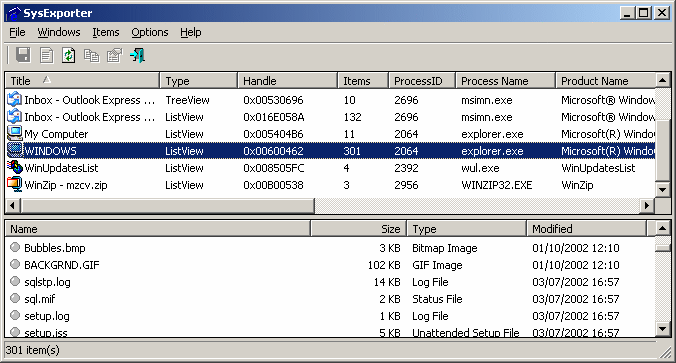
SysExporter utility allows you to grab the data stored in standard list-views, tree-views, list boxes, combo boxes, text-boxes, and WebBrowser/HTML controls from almost any application running on your system, and export it to text, HTML or XML file.
Heres some examples for data that you can export with SysExporter:
- The files list inside archive file (.zip, .rar, and so on) as displayed by WinZip or 7-Zip File Manager.
- The files list inside a folder.
- The event log of Windows.
- The list of emails and contacts in Outlook Express.
- The Registry values displayed in the right pane of the Registry Editor.
- The data displayed by SysInternals utilities (Registry Monitor, File Monitor, Process Explorer, and others.)
- The text inside a standard message-box of Windows.
- The HTML inside any instance of Internet Explorer.
Using SysExporter
This utility is a standalone executable, so it doesnt require any installation process or additional DLLs. Just run the executable (sysexp.exe) and start using it. There is only one exception: If you want to run this utility on Windows NT, you should download the psapi.dll, and copy it into the system32 folder. The main window of SysExporter contains 2 panes:- The upper pane displays the list of current opened windows that are available for export.
- When you select a single window in the upper pane, the lower pane displays all data that you can export from the selected window. For example: If you select the My computer window in the upper pane, the lower pane will display the list of all your disks, and they are displayed in the original My Computer window.
Practical Example
Lets say that you want to export the list of all files in your C:Windows folder to Excel:- First, open the C:Windows folder (or any other folder that you want to export).
- In the top pane of SysExporter, find the window of C:Windows folder and select it. If you cannot find this window, try to refresh the list by pressing F5 key.
- After selecting the desired window in the top pane, the files list of this window will be loaded to the lower pane.
- Select the files in the lower pane that you want to export. (Press Ctrl+A in order to select all files)
- Press Ctrl+C in order to copy the selected items to the clipbaord. (The exported items are copied in tab-delimited format)
- In Excel, go the position that you want to put the exported data, and then press Ctrl+V to paste the exported data into your Excel worksheet.
Download SysExporter
Go to link download

Tuesday, March 21, 2017
PacketFence v4 3 0 Free and Open Source network access control NAC solution
PacketFence v4 3 0 Free and Open Source network access control NAC solution

PacketFence is a fully supported, trusted, Free and Open Source network access control (NAC) solution. Boasting an impressive feature set including a captive-portal for registration and remediation, centralized wired and wireless management, powerful BYOD management options, 802.1X support, layer-2 isolation of problematic devices; PacketFence can be used to effectively secure networks small to very large heterogeneous networks.
Here are the changes in 4.3.0:
New Features
- Added MAC authentication support for Edge-corE 4510
- Added support for Ruckus External Captive Portal
- Support for Huawei S2700, S3700, S5700, S6700, S7700, S9700 switches
- Added support for LinkedIn and Windows Live as authentication sources
- Support for 802.1X on Juniper EX2200 and EX4200 switches
- Added support for the Netgear M series switches
- Added support to define SNAT interface to use for passthrough
- Added Nessus scan policy based on a DHCP fingerprint
- Added support to unregister a node if the username is locked or deleted in Active Directory
- Fortinet FortiGate and PaloAlto firewalls integration
- New configuration parameters in switches.conf to use mapping by VLAN and/or mapping by role
Enhancements
- When validating an email confirmation code, use the same portal profile initially used by to register the device
- Removed old iptables code (ipset is now always used for inline enforcement)
- MariaDB support
- Updated WebAPI method
- Use Webservices parameters from PacketFence configuration
- Use WebAPI notify from pfdhcplistener (faster)
- Improved Apache SSL configuration forbids SSLv2 use and prioritzes better ciphers
- Removed CGI-based captive portal files
- For device registration use the source used to authenticate for calculating the role and unregdate (bugid:1805)
- For device registration, we set the "NOTES" field of the node with the selected type of device (if defined)
- On status page check the portal associated to the user and authenticate on the sources included in the portal profile
- Merge pf::email_activation and pf::sms_activation to pf::activation
- Removed unused table switchlocation
- Deauthentication and firewall enforcement can now be done throught the web API
- Added support to configure high-availability from within the configurator/webadmin
- Changed the way we’re handling DNS blackholing when unregistered in inline enforcement mode (using DNAT rather than REDIRECT)
- Now handling rogue DHCP servers based both on the server IP and server MAC address
Bug Fixes
- Fixed pfdetectd not starting because of stale pid file
- Fixed SQL join with iplog in advanced search of nodes
- Fixed unreg date calculation in Catalyst captive portal
- Fixed allowed_device_types array in device registration page (bugid:1809)
- Fixed VLAN format to comply with RFC 2868
- Fixed possible double submission of the form on the billing page
- Fixed db upgrade script to avoid duplicate changes to locationlog table
See the ChangeLog file for the complete list of changes.
See the UPGRADE file for notes about upgrading.
Download PacketFence v4.3.0
Go to link download
Subscribe to:
Posts (Atom)